This article has been updated and can be found at the following location: Understanding Media duration and how it affects playback
When working with Xibo layouts, it’s important to understand how media duration affects the playback of your layout.
For example, a layout setup like this:
Layout A
Region 1: Image 1 (10s), Image 2 (10s)
Region 2: Text 1 (5s), Text 2 (2s)
When that runs, region 1 will show Image 1 then Image 2 because it’s the longest running region on the layout. When that finishes, the whole layout will reload and start again. Region 2 will show Text 1, Text 2, Text 1, Text 2 over and over UNTIL Region 1 completes (after 20 seconds) and then it will stop and the whole layout will reload.
Regions which only contain one media item are an exception to this basic rule.
Layout B
Region 1: Image (10s)
Region 2: Text 1 (10s), Text 2 (10s)
In this case, Region 2 is the longest running region but since region 1 only has one media item in it, when the layout plays the image in region 1 will show once and remain on the layout until Region 2 completes (as if it had a duration of 20 seconds). That’s really a powerful feature as it offers great flexibility.
Consider this layout:
Layout C
Region 1: Clock (10s)
Region 2: Weather (10s)
Region 3: Video (0s)
When this layout runs, the clock and the weather will come up on the layout and remain there until the video finishes, with no ugly flashing or refreshing. The 0 duration on the video means that the Player will just play the video until it finishes, so we don’t know at this point how long that duration will be. Without this behaviour, you would have to manually edit the Clock and Weather items each time you changed that video such that they had the same duration as the video, otherwise they would refresh (and flash) every 10 seconds.
Take for example then a layout with a ticker that has a duration per item - so an RSS feed that gets shorter and longer could have a duration of 3s per item. Assuming the RSS feed is the longest running item then you only need to worry about the duration per item of your RSS feed, as the other regions will take care of themselves 
Region Loop
In some cases it might be desirable to have a region with 1 item reload when that item is finished.
Consider this layout
Layout D
Region 1: Video (0s), Video (0s), Video (0s)
Region 2: Ticker (3600s) with loop
Assume that the Widgets in Region 1 are long and will play for an hour each, and that the ticker in region 2 is expected to have content that will changed every hour. With region loop ticked, the ticker will reload each time it expires.
If you are using ‘loop?’ checkbox on your regions, please be aware that in some circumstances it may cause the layout playback to be incorrect.
The below diagram illustrates when region loop is considered and it will effect the playback of that region.
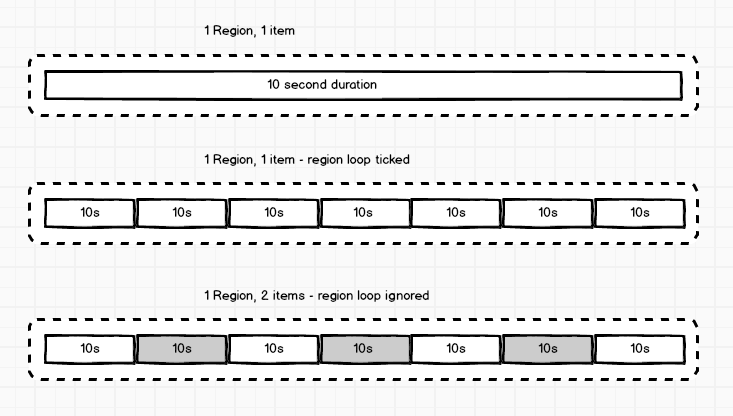
Things to watch out for when using region loop
When using region loop, you should avoid using items that expire within a very short time of each other.
Consider this layout
Layout E
Region 1: Text (10s) with loop
Region 2: Text (10s) with loop
Region 3: Image (11s)
When this layout is scheduled, after 11s it should reload whole layout and move on to another layout or show this one again, depending on your schedule. With the loop checkboxes checked and similar/same duration of your regions, they will reload and begin to loop and nearly the same time as whole layout should reload. Which will cause additional ‘flickering’ of your display, where 2 regions will flicker then after about 1s whole layout will flicker and reload, which obviously doesn’t look good and is not recommended.