Other symptoms include an error when uploading files:
SyntaxError: JSON.parse: unexpected character at line 1 column 1 of the JSON data
or simply the message
true
Xibo does not limit file upload size - but PHP does. You need to edit your php.ini file for your system to support large file uploads.
By default, the php.ini file is in the following locations:
Ubuntu (with Apache): /etc/php5/apache2/php.ini
Ubuntu (with php-fpm - for example with nginx or lighttpd): /etc/php5/fpm/php.ini
Windows (with XAMPP): install_path\xampp\php\php.ini - eg c:\xampp\php\php.ini
Please see this page for instructions on optimising PHP for >2MB uploads:
http://www.radinks.com/upload/config.php
You’ll need to change at least:
upload_max_filesize
post_max_size
memory_limit
max_execution_time
You many also need to adjust:
max_input_time
Be very careful with the units you choose. For example you might set:
upload_max_filesize=100M
post_max_size=100M
memory_limit=120M
max_execution_time=500
See also the PHP core documentation here:
Once you’ve changed the php.ini file, you must restart your webserver (ie Apache) service before the changes will be picked up. If you’re using fastcgi/php-fpm to run PHP as a separate process then you’ll need to restart that rather than your web server.
Notes for IIS users:
IIS may also limit the file sizing for upload. This can be checked/changed in the “Request Filtering” section of IIS Manager.
The following documentation may be helpful to you:
http://ajaxuploader.com/large-file-upload-iis-asp-net.htm
Notes for nginx users:
nginx also limits the maximum upload filesize in the
client_max_body_size
client_body_timeout
variables in the nginx configuration file. See the nginx manual for details,
Notes for FastCGI users:
It’s also necessary to edit the MaxRequestLen and/or fgcidmaxrequestlen parameters in your FastCGI configuration. See the follow article for more information. 1st Class Media Blog - Thoughts, Ideas & Shares: Fixing FcgidMaxRequestLen Plesk 11/12 - file upload hell
For Docker Based CMS Installations:
The PHP settings mentioned above are located in the config.env file for your installation.
Please note: you will need to stop or down your Docker CMS prior to making the below changes to your config file. You can use either of the following commands to stop or down your Docker CMS:
docker-compose down
or
docker-compose stop
To modify the file upload size limit, navigate to the directory where you have installed your Docker CMS and edit your config.env file. You will see that the last entries relate to the file upload limits:
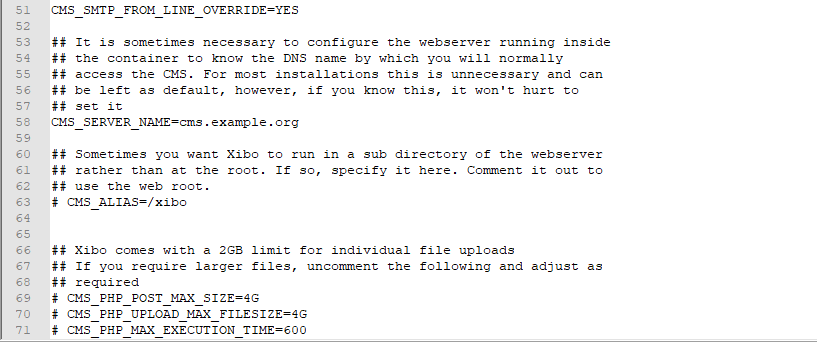
To modify the settings, simply remove the # and spaces before the entries and set the limits best suited for your installation. save the changes to confirm.
Once you have made the changes, you can restart your CMS using the up command if you previously used the down command, or the start command if you previously used the stop command:
docker-compose up -d
or
docker-compose start