@casa_user, PM sent! (+ 20chars)
I found this repository ( https://copr.fedorainfracloud.org/coprs/ligenix/enterprise-xibo ) and it seems that they have compiled arexibo for the ARM architecture of the Pi. I haven’t had time to test it yet. I think we can do it in a VM with virt-manager, for example. QEMU allows you to do this on an x86 PC. I also tried compiling it for Debian Trixie, which seems to have worked. I will continue testing as soon as I have some time. Good luck to everyone.
@Spfeifer, thanks for info.
Arexibo versions build <0.3.0 which was webkit/gstreamer based is no more maintained.
Build 0.3.0-4 on that site from ~6months ago, is compiled with QT6 and it seems it has support for FFMPEG !
@Spfeifer , I tried installing on RPi5 today from that COPR repo: Making sure you're not a bot!
It seems these images are built against X11 as main display server.
Arexibo for RPi5 download:: https://m1r0.de/rpi5/arexibo.rpi5.raspios.aarch64
It was built on/for this official RPiOS image:
RPiOS 12.2025: https://downloads.raspberrypi.com/raspios_arm64/images/raspios_arm64-2025-12-04/2025-12-04-raspios-trixie-arm64.img.xz
Tested device: RPi5 8GB
-
~2GB RAM usage on maximum workable desktop resolution up to FullHD on 4K TV
-
Video files play fluidly in fullscreen on FullHD@60FPS only in MP4 format

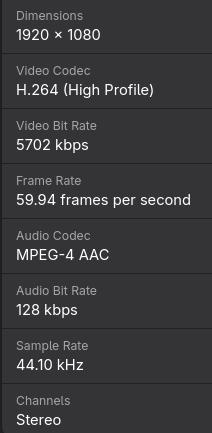
Thanks to @casa_user for RPi5 donation !
Is there an updated link for the Fedora 43 based release ISO? I can’t seem to get it to download based on the link above.
Try this one: http://m1r0.de/iso/arx.f43-03.11.2025-03:59.iso
Thank you. Not sure what my problem was, but it’s pulling down now.
Ok! Tnx.
Good luck…
Hello,
Here’s my problem:
I have an Ubuntu VM with my Xibo CMS Server and I’d like to have Xibo client displays on a Raspberry Pi 5.
I downloaded your ISO: https://downloads.raspberrypi.com/raspios_arm64/images/raspios_arm64-2025-12-04/2025-12-04-raspios-trixie-arm64.img.xz
I put the image on a Raspberry Pi and it works, but how do I install the Xibo client on it?
Thank you for your work.
Is the github repo updated? it seems that the copr buuilds relay on it, it would be great to push the latest version there 
Thank you
Pau
@smichel ,
Login to that official RPi image you installed on RPi5 and then download Arexibo from link above. Put it in .local/bin and give it execute permission.
Hi @linuxnow ,
There are no updates to Arexibo repo for RPi5, it is default build.
For COPR repo you should ask its admin. I think latest update of that repo with Arexibo was on Fedora43 release so it should be “latest”.
I mean if GitHub - birkenfeld/arexibo: A Rust Linux Xibo player is updated or is it stalled?
It would be best for you to ask/check that status with Birkenfeld, Arexibo developer.
Hello, I’m working on a NanoPi M6 from Friendly Elec, it’s pretty much the same as a Raspberry Pi. Is there an image that would work on this type of device? Thank you.
@stephane1005 ; Have no clue about that device. You could try:
Login to that official RPi image you installed on RPi5 and then download Arexibo from link above. Put it in .local/bin and give it execute permission.
After copying the files to the designated folder, what should we do?
Then register player:
arexibo --host https://my.cms/ --key $KEY $DIR
I have been packaging and making some changes to @0x0 nice scripting and a small change to arexibo player. And I have packaged it to make it easy to deploy in several ways (boot install, net install with ks, dd install, VM or rpm). I also have a non-published ansible deploy almost ready,
I have tested the x86_64 version but not yet the aarch64.
There are some goodies like key combinations to see player status or reconfiguration.
You can have a look at GitHub - linuxnow/arexibo: A Rust Linux Xibo player that is a fork from the original with all these changes and integrating changes from another repo.
Maybe it’s helpful to someone
Best
Pau