That was BETA version which is now removed, check message, new version is in there.
I edited info above to reflect release 43 version.
Thanks !
That was BETA version which is now removed, check message, new version is in there.
I edited info above to reflect release 43 version.
Thanks !
Hi Spfeifer
you can’t access via SSH using the root user, as this option is disabled for security reasons.
It’s recommended to first log in as the tv user with their password and, once logged in, use the command “sudo su” and enter the tv user’s password with root privileges.
Also note, when you press ALT+F1 to get to TTY1 with GDM login screen, default username is ADMIN, this user does not exist on F43 system, this is placeholder for user “TV” as it can login with his password. root account is disabled.
Hello,
I have installed the latest version (f43-03-11-2025). The installation is perfect, but the login ‘tv’ with the password “tv” still does not work (permission denied, please try again…). The ‘admin’ account is still present.
Thank you for your kind words !!!
Admin account is placeholder for user “TV” which is sudo user. Root is locked by deafult on F43.
If you swithc to VT1 GDM login screen and use user TV password to login on ADMIN account, you will get in.
Sent you msg with new pass details.
Thanks for testing !
BR
bonjour , je n’ai pas su me connecter , quel est le login et password . merci
pass sent to you +20 chars
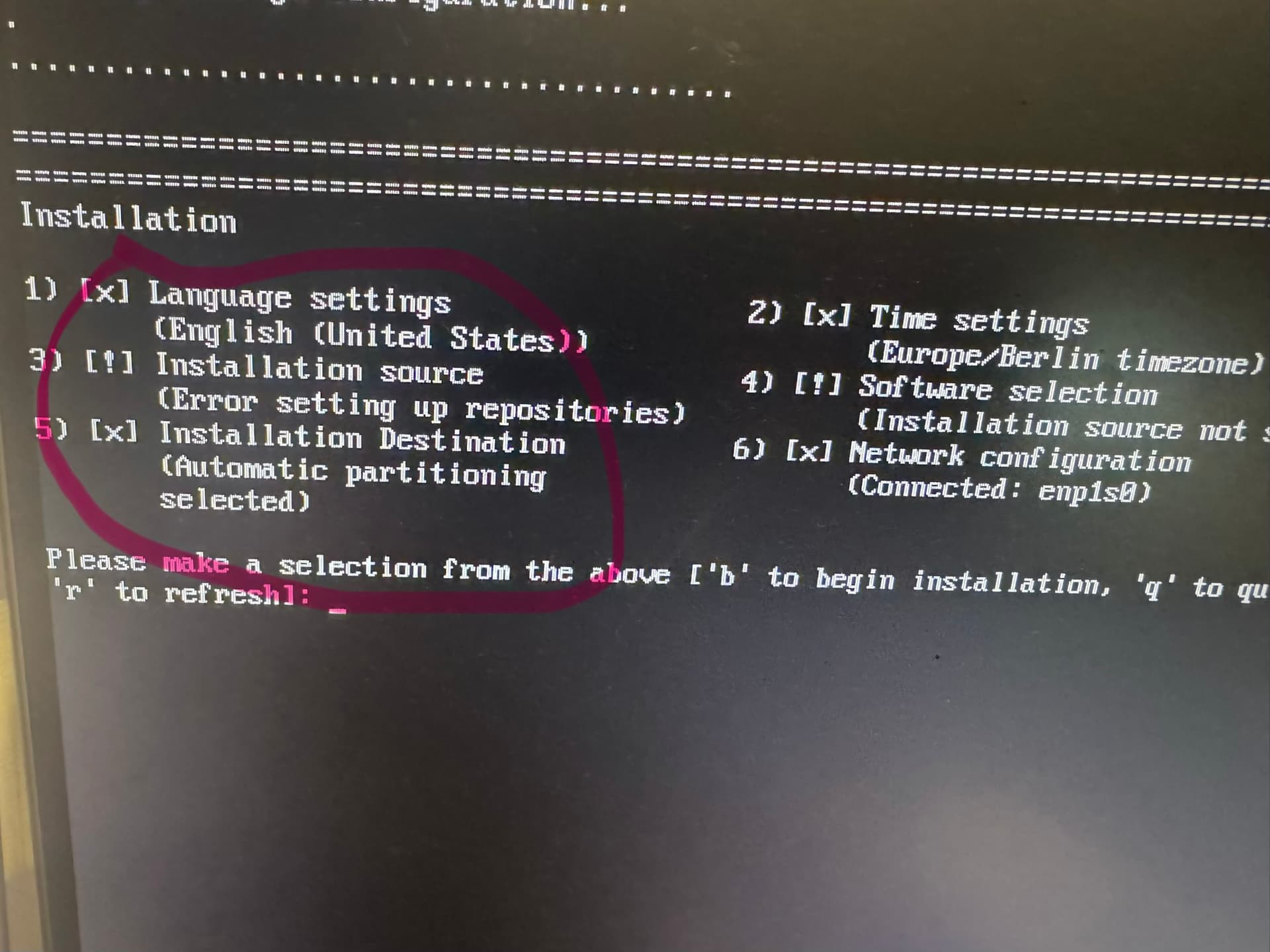
bonjour , j’ai voulu re installer la version 43 , mais il y a un probleme “ installation source error setting up repositories “ auriez vous une solution pour pouvoir continue l’install , merci
Hi @stephane1005,
I see your network is connected, internet is required for installation as image is based on Fedora 43 Netinstall ISO, could you confirm internet works on that enp1s0 port ?
Other then internet, just try restarting installation as sometimes it can happen that repository/software mirror sources does not get picked up properly if there is network/mirror problems. Drop me note how it passed.
url --mirrorlist https://mirrors.fedoraproject.org/mirrorlist?repo=fedora-43&arch=x86_64
repo --name=fedora-updates --mirrorlist=“https://mirrors.fedoraproject.org/mirrorlist?repo=updates-released-f43&arch=x86_64”
repo --name=rpmfusion-free --mirrorlist=“https://mirrors.rpmfusion.org/mirrorlist?repo=free-fedora-43&arch=x86_64” --includepkgs=rpmfusion-free-release
repo --name=rpmfusion-free-updates --mirrorlist=“https://mirrors.rpmfusion.org/mirrorlist?repo=free-fedora-updates-released-43&arch=x86_64” --includepkgs=rpmfusion-free-release
repo --name=rpmfusion-nonfree --mirrorlist=“https://mirrors.rpmfusion.org/mirrorlist?repo=nonfree-fedora-43&arch=x86_64” --includepkgs=rpmfusion-nonfree-release
repo --name=rpmfusion-nonfree-updates --mirrorlist=“https://mirrors.rpmfusion.org/mirrorlist?repo=nonfree-fedora-updates-released-43&arch=x86_64” --includepkgs=rpmfusion-nonfree-release
Hi Spfeifer
try the password: TV isn’t working. Try the word “password”, all lowercase.
bonjour , j’ai bien une connexion internet sur le pc ,mais j’ai toujours l’erreur de l’installation source .
@stephane1005, Message sent
That’s it ! Thank you very much.
Life saver this OS, all in one. Upgraded last week and lost all displays grrrrr…. Never crossed my mind that they
neglect edLinux player, terrible… Thanksyou for your good work  . Noticed the RSS feed dones’t load the images background I don’t know if you already know or not. Thanks a ain
Thank you for report and for kind words !
For RSS feed , if new generated images does not load on 1st run feed , try reboot PC/UI and see if they will get activated in 2nd run.
BR!
AreXibOS also available for raspberry pi?
because there is no client for raspberry pi
For now, only architecture I have atm to build on is x86_64.
If/when I get some RPi’s (4/5) hardware I would like to try to build on it ofc.
RPi (4/5) hardware donations are more then welcomed
Yes, we can donate to you