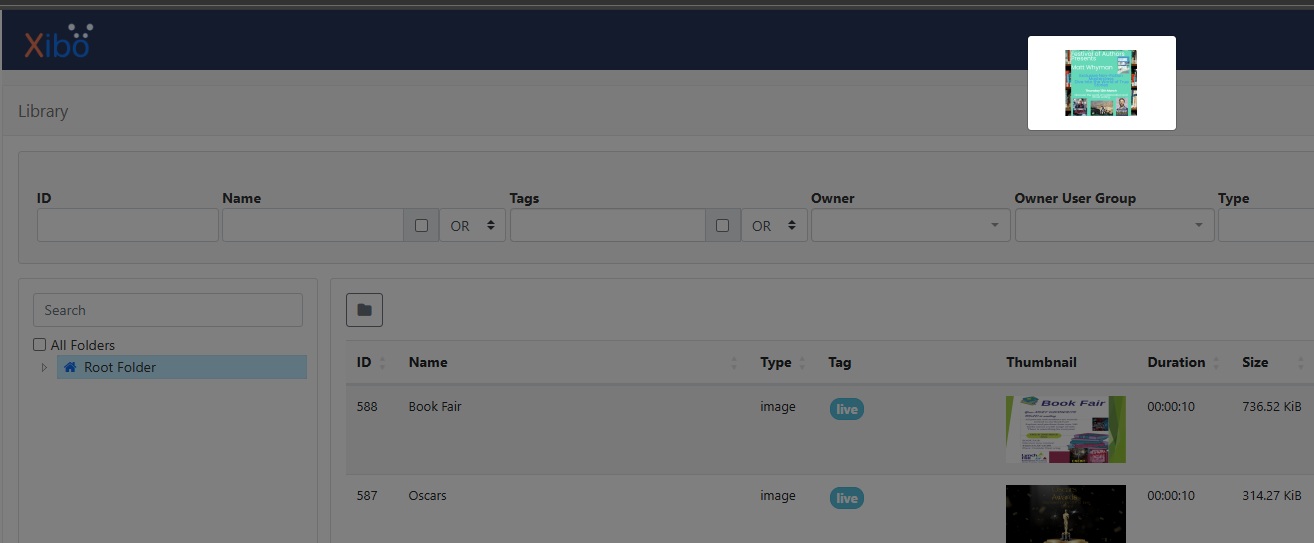
When we look at the content that is in the media library, we are not seeing a full size thumbnail of the content and just a tiny 120x67 preview (see below)
But it’s even this small when you click it to pop it out? I get it being that size on the list, and agree it should be that small for performance reasons but if I click it, it’s impossible to see what is on the media…
I was going to open a new thread but saw this one. I have the same issue and it’s been there for a while. I previously posted about it here: Media Library Small Thumbnails
We’re on the latest CMS release and it’s still not fixed. It makes navigating the library media items difficult.
I did some addition testing. For a local docker CMS install, the thumbnails are in shared/cms/library and begin with “tn_”. If I delete the thumbnail from shared/cms/library, it is then regenerated but is still small (120x68). I even tried copying the full size image to the thumbnail, but it was still regenerated as small and the full size image was overwritten. The easiest fix would be for the lightbox to just show the full size image.
Yup that works for me too. I’m wondering how to now submit a PR including a box that would allow the size to be set? The previous size is way too small when clicking on the thumbnail to work out what is going on.
I did:
docker exec -ti xibo-docker-cms-web-1 bash
apt install nano #other editors are available
nano /var/www/cms/views/library-page.twig
I then commented out the original line with {# #} and then put @Aaron_Lee_McQueen 's line in
If I could be bothered I’m sure I could do it with a sed/awk but it’s too early in the day for me.
Could anybody from Xibo dive in? I see @natasha said it’s a known issue and in the works but if we could help?
Thank you for opening this topic. Just to let you all know that we are aware that thumbnails are a little small when clicked. This will improved in a future minor release of the Xibo CMS.
Hey! This wasn’t included in the latest patch release, but will be in the next minor version (v4.5). I will make a note to update you here once that has been released in a few months time.