Before completing please check that the time, date and timezone have been correctly set on the device running the Player.
To be completed by the original poster:
Player Version
windows 4 R405.3-405 on WIndows 11 Enterprise 22H2 build 22621.1848
Issue
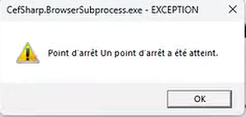
I have several XIBO Windows players, since a few weeks they crash on 4K screens. I swapped one between a full-HD and 4K screen and it only crashes when connected to the 4K screen.
CMS errors:
Unhandled Exception: Startup: Insufficient memory to continue the execution of the program.
Stack Trace: at System.Windows.Media.Imaging.WriteableBitmap..ctor(Int32 pixelWidth, Int32 pixelHeight, Double dpiX, Double dpiY, PixelFormat pixelFormat, BitmapPalette palette) at CefSharp.Wpf.Rendering.WritableBitmapRenderHandler.<>c__DisplayClass8_0.b__0() in C:\projects\cefsharp\CefSharp.Wpf\Rendering\WritableBitmapRenderHandler.cs:line 145 at System.Windows.Threading.ExceptionWrapper.InternalRealCall(Delegate callback, Object args, Int32 numArgs) at System.Windows.Threading.ExceptionWrapper.TryCatchWhen(Object source, Delegate callback, Object args, Int32 numArgs, Delegate catchHandler) at System.Windows.Threading.DispatcherOperation.InvokeImpl() at System.Windows.Threading.DispatcherOperation.InvokeInSecurityContext(Object state) at MS.Internal.CulturePreservingExecutionContext.CallbackWrapper(Object obj) at System.Threading.ExecutionContext.RunInternal(ExecutionContext executionContext, ContextCallback callback, Object state, Boolean preserveSyncCtx) at System.Threading.ExecutionContext.Run(ExecutionContext executionContext, ContextCallback callback, Object state, Boolean preserveSyncCtx) at System.Threading.ExecutionContext.Run(ExecutionContext executionContext, ContextCallback callback, Object state) at MS.Internal.CulturePreservingExecutionContext.Run(CulturePreservingExecutionContext executionContext, ContextCallback callback, Object state) at System.Windows.Threading.DispatcherOperation.Invoke() at System.Windows.Threading.Dispatcher.ProcessQueue() at System.Windows.Threading.Dispatcher.WndProcHook(IntPtr hwnd, Int32 msg, IntPtr wParam, IntPtr lParam, Boolean& handled) at MS.Win32.HwndWrapper.WndProc(IntPtr hwnd, Int32 msg, IntPtr wParam, IntPtr lParam, Boolean& handled) at MS.Win32.HwndSubclass.DispatcherCallbackOperation(Object o) at System.Windows.Threading.ExceptionWrapper.InternalRealCall(Delegate callback, Object args, Int32 numArgs) at System.Windows.Threading.ExceptionWrapper.TryCatchWhen(Object source, Delegate callback, Object args, Int32 numArgs, Delegate catchHandler) at System.Windows.Threading.Dispatcher.LegacyInvokeImpl(DispatcherPriority priority, TimeSpan timeout, Delegate method, Object args, Int32 numArgs) at MS.Win32.HwndSubclass.SubclassWndProc(IntPtr hwnd, Int32 msg, IntPtr wParam, IntPtr lParam) at MS.Win32.UnsafeNativeMethods.DispatchMessage(MSG& msg) at System.Windows.Threading.Dispatcher.PushFrameImpl(DispatcherFrame frame) at System.Windows.Threading.Dispatcher.PushFrame(DispatcherFrame frame) at System.Windows.Window.ShowHelper(Object booleanBox) at System.Windows.Window.Show() at System.Windows.Window.ShowDialog() at XiboClient.App.RunClient(Boolean screenSaver) in C:\Users\User\Documents\Source\xibo-dotnetclient\App.xaml.cs:line 119 at XiboClient.App.OnStartup(StartupEventArgs e) in C:\Users\User\Documents\Source\xibo-dotnetclient\App.xaml.cs:line 79