Server is the docker image provided by Xibo and the Linux player is installed on a fresh Ubuntu with the all updates and the current snap version and latest stable player version
Both Server and Client have internet access and are in the same subnet
Issue
Please describe in detail the issue you are experiencing, including any errors shown on the Player Status page or in the Logs section of the CMS.
Provide screenshots where possible!
Hello everyone,
I have had issues with the xibo player for Ubuntu. Anything other than a singular picture wont run. I’ll either get blackscreens or the splash screen from xibo. In the logs I get following error:
[LayoutParser - ImageGtk] Layout 24 is invalid or missing. Reason: Couldn’t recognize the image file format for file ‘/home/user/snap/xibo-player/108/2.jpg’
If I try to display the image that throws the error as singular image it works fine but any layout or similar that isn’t a singular file just won’t display.
I don’t really know what throws the error as I tried running the same Layout under a Windows 11 client and it worked instantly.
The layout is shown as working and the display also has the tick. I don’t have any experience working with Xibo. This is currently tested to replace our current sinage solution with raspberry pi’s and batch scripts.
Thanks in advance for any help! If I need to provide any more detail, pls state it.
Try playing the asset in mplayer. Sometimes the decoders are missing. Check your gstreamer install or try installing the unrestricted extras in Ubuntu?
Hi, thanks for your reply. I’ve since installed the unrestricted extras, also gstreamer and mplayer. Additionally i’ve installed the h.264 encoder from m
I could playback the .mp4 files that would display a black screen in the xibo player. I couldn’t get the mplayer to work tho.
I have also tried to get the xibo-player working under Fedora 42 where i’ve went mostly the same, with the current OS-, snap and xibo version. Installed RPM free and non-free, plus the things mentioned in your comment.
The result was also pretty similar with playback issues on the same files. Also mplayer coudln’t open (I have not investigated why, I just went the easy way to playback h.264 videos in the native video player provided by Fedora)
I’ve read somewhere in the Forum that X11 could be an issue with playback?
Hi, the player version 1.8 ist not compatible with the cms 4.2.3 afaik. Too bad it is still available on snap, that often confuses ppl.
There is no compatible linux-player atm.
Check Xibo for Linux | Xibo Open Source Digital Signage for updates on a new player.
Thanks 0x0. I’ve downloaded the ISO and it’s working well so far!
A couple of questions:
is there a way to change the volume (ie make it louder)?
how do I connect to the web console? I keep getting a ‘Refused to connect’ message in the browser. SSH works OK. Is there something I need to ‘turn on’?
For sound control from shell you can use wireplumber commands:
wpctl set-volume @DEFAULT_SINK@ 90%
wpctl set-volume @DEFAULT_SINK@ 10%+
wpctl set-mute @DEFAULT_SINK@ toggle
For Cockpit service enter following commands from shell to check status and enable it:
systemctl status cockpit
systemctl enable --now cockpit.socket
Then only thing you need to do in browser after entering “HTTPS://YOUR-IP:9090” is to accept Cockpit sels-signed SSL certificate and you should be able to get to Cockpit login page
Also you must enable firewall ports for Cockpit:
firewall-cmd --zone=public --list-all
and if you dont see cockpit in list, open firewall port for cockpit service like this:
Thanks, 0x0,
for your reply. I’ll try the drivers. I’m using a Lenovo ThinkCentre M920q. I’ll see how to install and test the drivers, and then I’ll let you know how it goes. Thanks again for your help.
Since this is Fedora server netinstall based ISO, you can not install AreXibOS without Internet.
As a workaround, you can install on internet connected PC, then fix wireless and then transfer HD.
I see that PC model does not have wifi card in spec.
What brand/model wifi adapter do you use ?
What drivers are you planning to install ?
Hi 0x0,
The Wi-Fi card in this Lenovo ThinkCentre M920Q is an Intel Wireless 8265/8275, revision 78, as I can see in the Fedora terminal; this uses the “iwlwifi” module. I’ve searched the forums for how to enable it.
I installed XioX.x86_64-41.2-1.4.iso, which I’m currently testing, and it works, but only with a wired network connection, not Wi-Fi.
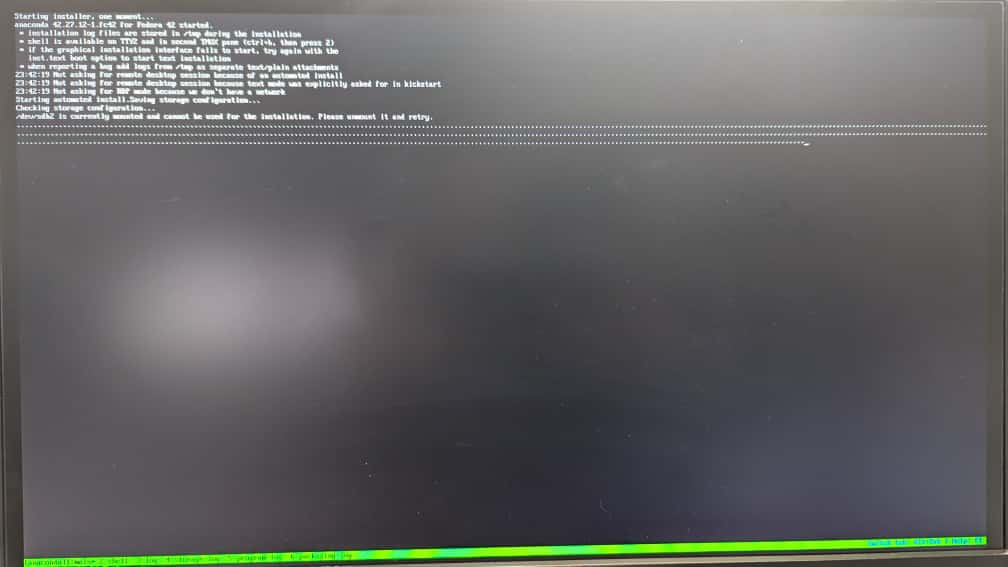
I tried installing Arexibos.x86_64-42.3-1.1.iso, but it won’t install. It gets stuck trying to mount the partitions, showing only the dots, and after more than 30 minutes, it still hasn’t installed.
For Intel Wireless 8265/8275 or infact any wifi, to be sure I would try to boot first Fedora Workstation Live edition and see if the wifi card will activate in Live session mode in nmcli or Gnome wireless settings. That way you can be sure that it “should” work on other Fedora install editions.
xiox was first demo iteration, not developed any more. Continue with AreXibOS.
For disk detection part, I have noticed on several OS that sometimes anaconda complains on same install position when detecting present disk in PC if disk has already installed OS on it…
As workaround I normally first format disk in PC (with tool such as gparted.iso or fdisk) to get rid of any OS artifacts on that disk where I want to do installation and then try to do fresh install of AreXibOS from start !
Its not fancy workaround procedure, but it worked more then several times …
Hi again, 0x0.
I managed to set up the Wi-Fi connection and install the drivers on the XioX version.
Now I’m going to try installing Arexibo to see if it works. For that, I formatted the disk, but it seems to get stuck on the loading screen (with the dots).
thanks for report and thats good news for drivers !
Could you provide screenshot where it stops just in case we are not on different dots ?
(Disk detection dots vs Plymouth splash dots?)
What type of disk do you have in that PC ? NVME , SSD , HDD ?
Could you try to install xiox-41 over again without formating and see if it will detect disk properly ?
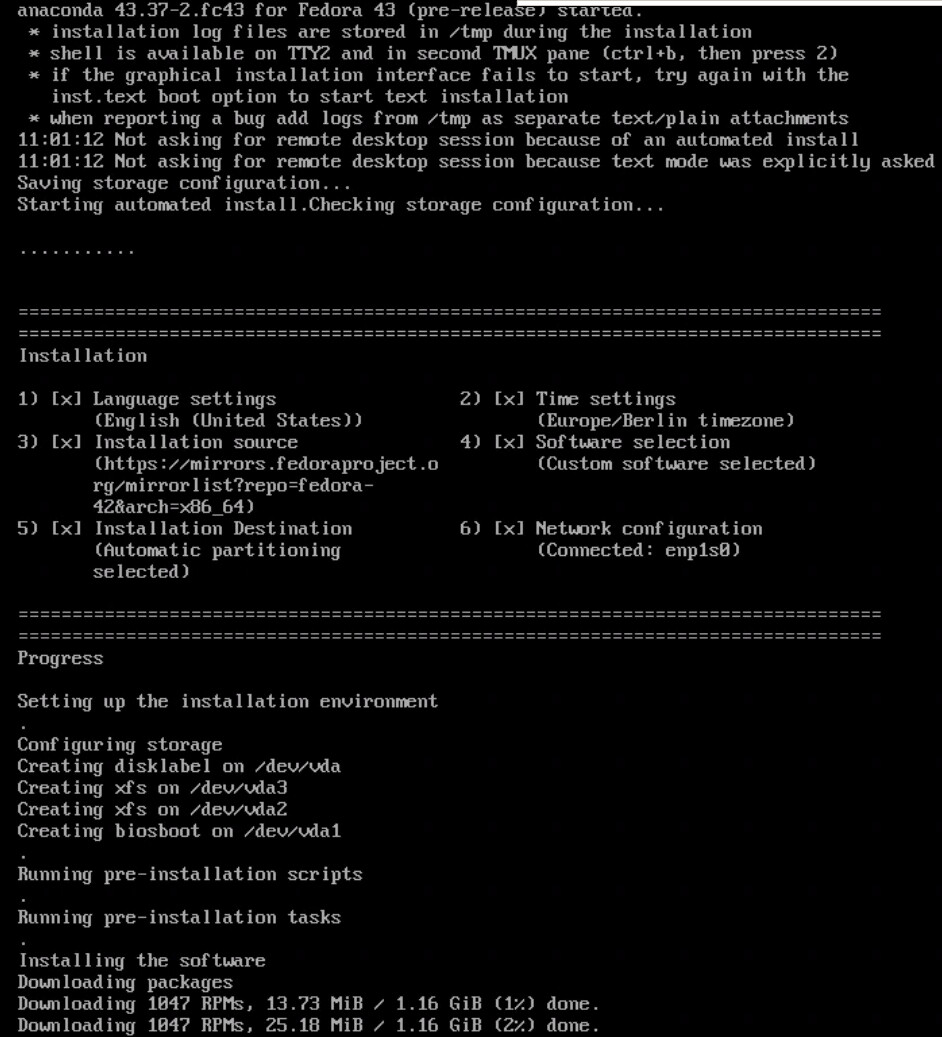
This is test i did just now now on VM (and on PC) for Arexibos 42.3 for disk detection freeze:
One installation on VM and two installation on PC detected disk and installed properly.
Do you have option to test install in VM ?
Do you maybe have extra SSD or USB stick/external SSD/HDD that you could try to put into that PC to see if disk will get detected on installation ?
Hello again, 0x0.
Thanks for continuing to help me with the testing.
I’ve continued testing on another mini PC, one with an SSD and one with NMVE. The Arexibo 42.3 installation doesn’t work on either.
Hi, 0x0.
I’ve tested it using Ventoy, but I’m also burning the site to a USB drive from Linux. I’m currently editing the script that runs the installer to see what the difference is between Arexibo and xiox-41.