I’m testing Xibo before implementing it more broadly.
When I revoke authorization from Android monitors, they keep working until the Xibo screen appears, and when I authorize them again, they return to operation on their own after a moment.
With Tizen monitors it’s not like that - they immediately go to the CMS connection configuration screen, which seems rather inelegant, and even if I authorize them, you have to physically go to them and click “Connect to CMS” or perform a restart.
Is there any way for the monitor to, first of all, be able to reconnect to the CMS automatically after authorization is revoked, and in the meantime display something more… let’s call it presentable
Thank you for posting this issue. Please can you open a support ticket on the Xibo help desk so we can discuss and troubleshoot this issue further? You can create an account on the Xibo Signage web portal, then go to the Tickets page in My Account to create a new support request.
When you open the ticket, can you put this for the attention of Daniel and also include:
The model number of your Samsung signage display.
The version of the Xibo for Tizen player you are using.
I look forward to hearing from you in the help desk and resolving this issue with you.
I have an update for all Tizen testers/users about this behaviour. It has been replicated and reported to the developers for a solution to this behaviour.
The issue has been escalated to the developers, who will further investigate the behaviour and them prepare a fix. I don’t have a release date at this time as the issue was only reported a few hours ago. The developers will provide an update when they have completed the next steps of the issue investigation.
I have made a note to share the update with you as soon as I hear from them.
Hi Jakub. I have added an additional note to the issue report that you are looking for an urgent fix for your testing. As soon as I have a fix for you to try I have a note to share that with you.
In short, it’s being resolved now and I will share the fix as soon as it is available for you to test.
I’m having a problem with versions 407 and 408.
The issue is that the screens disconnect from the CMS and can’t re-establish the connection.
Reboots don’t help — some monitors are connected via cable and others via Wi-Fi.
Currently, all of them show the status: Registered: False.
Reinstalling the app helps, but only for a few hours.
I’m using the white-label version, and I’m quite certain that when I was using the original Xibo version, there were no issues with the screens disconnecting from the CMS.
On one of the monitors, I can see 1127 failed connections to XMDS, even though the monitor has a stable internet connection all the time.
Hi Jakub. I believe we are already discussing this issue in a ticket on the help desk.
There are some overlapping issues here that as mentioned in the help desk, should be addressed in the upcoming R409 release, which I will share with you as soon as I have a copy or it is released.
I am experiencing the same issue you described with the White Label version. Even after upgrading to R409, my screens are still losing connection to the CMS, despite having a stable internet connection.
Interestingly, in the CMS dashboard, the screens appear as ‘Cloud Connected’ (Checkmark in green), but the status remains stuck on ‘Downloading’. I don’t see the new layout and the files never seem to finish syncing (displays are in the same network, but some doesn’t work) .
Did you manage to resolve this by upgrading to R409, or did you find another workaround? Like you, I’ve noticed this seems more prevalent on the White Label build than on the standard player.
Thank you for posting your issue, however this post is for an issue where the player loses connection to the CMS and does not recover when authorisation is revoked. Please can you create a new post in the future so we do not have multiple issues all in the same post?
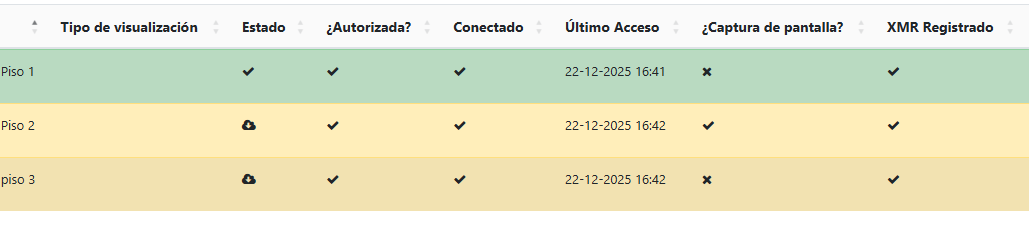
All of the displays in your screenshot are connecting to your CMS. You can see this because the Connected column has a tick. The cloud icon means that your displays have not downloaded the files they require, which is not the same as the players not connecting.
Please log into your Xibo portal account, go to the Tickets page and create a ticket on the help desk for further support with your issue.
Am having an issue installing Xibo on a QBC Samsung, how do I get about installing it on the device because when trying to install it on the 43” Samsung QBC display thru the browser it throws an error : The file format is not supported. I tried to have it on a USB stick but can’t get access to it (unless it’s one of PDF, image, video etc format).
The player neds to be installed using the Custom App settings on your QBC. If you have already uploaded the player to your CMS and set it in the default Tizen profile, you should find that entering the URL for your CMS, without the forward slash at the end, that should install the player for you.
If you find this is not working, can you follow the steps for the USB method and see if that works for you?
Thank you it worked! The only issue I have is when pairing I’m able to get it listed on the CMS but the issue is it’s not being licensed, does it require a separate Tizen license?
Please be aware that the latest Tizen player will generate a new auth code after you successfully connect the player. To resolve this, go to your CMS, locate the new display entry and make sure to authorise it. You will see a tick in the authorised column when that is done. Now enter the new auth code on the display and it should connect successfully and start downloading the files it requires.
But please confirm. This only the workaround for current release. In the next, guessing, second code will not appear and it will be working like in Android app?
You’re right that this is a workaround for the current release, which I sincerely apologise for. I’ve already reported this behaviour to the SoC developers, who will look at correcting this in the next release.
Hi all that are affected by this issue. I can confirm that the fix for this has been included in the R417 release. Please try that release and see if this fixes the issue for your affected displays.
Thank you for your patience and my sincere apologies for the time taken to resolve this issue.
 This is very important for me.