CMS: 3.1.4 (Windows server/IIS) to 3.1.4 (Ubuntu/Docker) (but it works with any other 3.* versions)
Hello everyone, I hope you’re doing well.
Well, I spent a few days trying to migrate a non-docker installation from Windows Server to a docker installation on Ubuntu 20.04.
I finally succeeded, but I want to warn you that the documentation below, for some reason, doesn’t work:
The way I managed to migrate successfully was as follows:
- Configure the config.env + docker-compose.yml files.
- Create the folder structures:
shared
     |
     - backup
     - cms
         |
         - library
- Move my library from Windows to my Linux installation over the network.
I used 7zip to compress my “library” folder to “.tar” and then recompress the “.tar” to “.gz” (gzip). (7zip link: https://www.7-zip.org/).
I moved my compressed library “library.tar.gz” to my Ubuntu server using the software “WinSCP”. (WinSCP link: WinSCP :: Official Site :: Download)
After that, I moved my library to the path of the installation container’s library (shared/cms/library) and extracted my files there.
Command to extract files on Ubuntu:
tar -xzf library.tar.gz
- Importing the database from the non-docker installation into the Docker container.
After several attempts to do what was mentioned in the documentation, with no success regarding importing the old database by putting it in the “backup” folder with the name “import.sql”. That simply dosen’t work… even the file change the name after all to “import.sql.done”, but it do nothing, it do not import the data to the Databse container.
I gave up and did it manually:
I dumped my old DB to “import.sql”.
Then i started my “cms-db” container, accessed it via MySQL Workbench (you can do it via phpmyadmin or command line as well), and imported the database “import.sql” data to it manually.
- Now it’s time to run the commands to standardize the “setting” table:
The documentation states that we should run these commands:
UPDATE `setting` SET `value`="/var/www/cms/library/", userSee=0, userChange=0 WHERE `setting`="LIBRARY_LOCATION";
UPDATE `setting` SET `value`="tcp://cms-xmr:50001", userSee=0, userChange=0 WHERE `setting`="XMR_ADDRESS";
UPDATE `setting` SET `value`="Apache" WHERE `setting`="SENDFILE_MODE";
Even after running these commands, the CMS won’t work.
What I did to work around this was:
- Run a Xibo database in Docker →
dump only the settings table from this Docker database →
truncate the settings table of my old non-docker database →
import the settings table from the Docker database to this non-docker database.
Then the CMS worked. All my library is now in perfect condition, and the CMS is completely migrated from one environment to another.
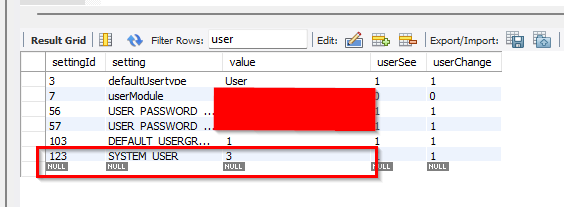
After that, I just updated the fields of this settings table to match the configurations of the old table (without touching the sendfile mode, XMR, or library path columns).
What needs to be done now, but I haven’t had time yet, is to compare field by field to validate which other changes in the settings table are necessary because I have already validated that there must be something else beyond these three changes mentioned in the documentation:
UPDATE `setting` SET `value`="/var/www/cms/library/", userSee=0, userChange=0 WHERE `setting`="LIBRARY_LOCATION";
UPDATE `setting` SET `value`="tcp://cms-xmr:50001", userSee=0, userChange=0 WHERE `setting`="XMR_ADDRESS";
UPDATE `setting` SET `value`="Apache" WHERE `setting`="SENDFILE_MODE";
Hi @natasha! how are you?
do you have any more up-to-date documentation regarding this switch from a non-docker environment to a docker environment?
I think it’s of great value… because I haven’t seen anyone successfully migrate a newer version of CMS from a custom installation to Docker.
Thanks everyone!!