I am looking at using XIBO on my Android TV but not as a dedicated content tv but instead aa a mix use on our Android TVs where we can display content + also use it as a regular tv for our guests.
The challenge we face is once the content starts displaying on the screen and if we shut the app so we can watch Netflix or other app’s , the XIBO app pops up automatically on the screen until the guest again shuts it with the remote. This is annoying for the user if they want to be able to watch their other app’s without being interrupted every 2 minutes with the XIBO content.
Is there a way to have XIBO start up ONLY when the guest powers on the tv with the remote and the app stays shut while they watch tv , it stays shut until the next time the tv is turned on? Maybe the option for the app not to auto launch after powering off with the remote.
Has anyone found a way to set this option within the app? Or anyone who has been able to customize the app for this feature?
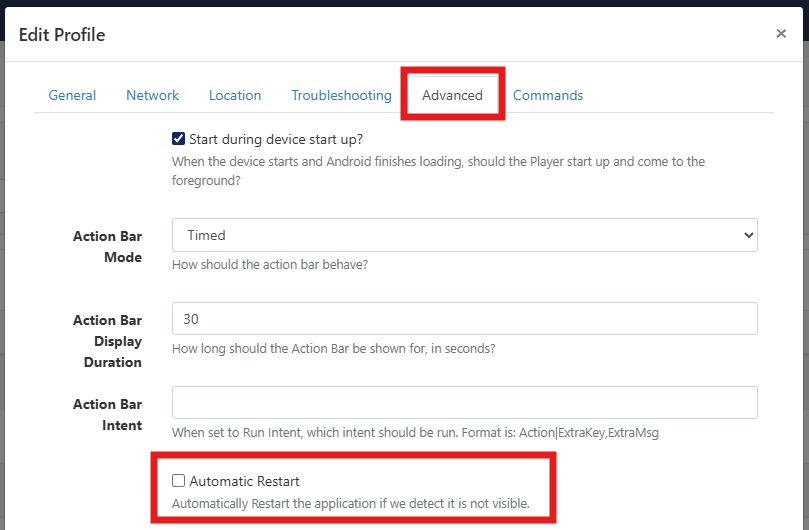
You can prevent Xibo from restarting once it has been closed by unticking the following option on the Display Settings profile for your Android displays, via the ‘Display Settings’ page in the CMS:
If you want to adjust the setting for individual Displays, you can do this via the ‘Displays’ page of the CMS by clicking on the Row Menu for the Display, then click on Edit. Navigate to the ‘Settings’ tab, then locate the ‘Automatic Restart’ option. Click on the Override Pencil, then untick the box, scroll down and click on Save.
Thanks for the response. This option to turn off available on the XIBO self hosted CMS as well or only in the cloud version?
Also To clarify ,
Once this option is turned off , would the XIBO app start again on its own once the tv is turned off and back on using the remote control? We basically need it to turn on just once after the tv is turned on by the guest.
Wanted to follow up on my previous message to check if you could please clarify my doubts. Would be great if you can confirm the points and work out a solution so we can implement a XIBO solution for our clients.
This option is available in both cloud CMS and self-hosted CMS instances.
The app will still be started automatically when the display is switched off and back on again. I’m afraid there isn’t currently an option for the app to only be automatically started once.
Let me clarify my requirement. As long as the app stays off after the guest exits the app once and doesn’t pop back on while they are watching Netflix or other on demand app’s then this is a workable solution.
Second , Once the display is turned off (using the remote) and turned back on (again with the remote) the app should turn on with the display. This is exactly what I need.
Can you point me to anyone who can give me a demo to test this feature of what you explained so I can see if it works as expected?
Also , would you be able to recommend someone who can help setup a self hosted CMS instance for me? I am looking at associating with XIBO as a reseller to sell XIBO signage solutions to my clients.
To start with , I am looking at implementing a 30 display project.
Hi @Ron_Shook , in that case disabling the Automatic Restart feature will do what you require. The app will open automatically when the display is switched on. After the user exits the app, the app will only be restarted if the display is switched off and back on again, or if it is opened manually.
I have signed up for the CMS cloud trial and tested one of our client’s TV’s using the option to disable the app from auto starting after it’s closed once. It works perfect!
However , a point that requires some attention is the time that our content takes takes to start displaying is around 60-80 seconds which is too long as by this time the guest would have already started watching their other App’s. I have set the start time under the display settings to “10 Seconds” but this doesn’t seem to be triggering in 10 seconds.
Can this be checked? Also , is there an option to set the startup duration for lesser time so our content can display IMMEDIATELY after the TV turns on?
Also , just some feedback.
The auto start of the App works ONLY if the TV is powered off from the main power switch. If the TV is powered off from the remote and turned back on using the remote , the App does not auto start. Any work around on this part?
When you say that you have the start time under display settings set to 10 seconds, is that the ‘Start delay for device start up’ setting? If so, that setting controls how long the Xibo player waits before it starts after the device is turned on (and has to be set to a minimum of 10 seconds), but it doesn’t affect how long it takes for content to start displaying after the app has started which will depend on a number of things such as the hardware specification of the device, whether there is new content for the display to download, the speed of the network connection etc.
Regarding the app only automatically starting if the display is turned off by the switch, you would need to check if the TV has a setting that allows it to be fully powered off by the remote instead of going into stand-by mode when the off button is pressed.
Yes , the “start delay for device start up” has been set at 10 seconds but the Xibo app still takes much longer to auto start once the TV has been turned on. In most instantaces , it’s taken 60-80 seconds for the app to actually auto start AFTER the TV has fully booted up.
Just to rule out an issue with the Hardware on the TV , I have tried this on two different brands , including a latest TCL 55”. I faced the same issue with both the TV’s so not sure if there is another setting that needs to be tweaked?
Also , just to understand technically , can we not have the option to reduce the start delay to maybe 0 seconds or 1 second?
This is a big concern as by the time the app auto loads , the customer would have already started watching their other App’s and would completely miss our advertised content. A solution on this would be greatly appreciated as I am literally in the final stages of positioning a Xibo solution for this client who has 30 TV’s to start with.
Unfortunately, I don’t believe there is any way currently to have content appearing immediately as soon as an Android display is turned on from a complete power off without setting Xibo as the Launcher/Home app (which in your case might not be desirable as it may prevent other apps from being used).
I would recommend that you discuss this with our sales team Contact as they may be able to work with our product team to find a solution for you.
If we do set XIBO as the launcher app , wouldn’t the user be able to close it with the remote if they want to use their other apps?
Basically what we need to achieve is the XIBO app to start running on the tv in the least amount of time. As mentioned in my previous post , it’s taking anywhere from 60 - 80 seconds (tested on two different TVs as well) for the app to start displaying content. This defeats the purpose of having a CMS on the tv , as the guest will always miss the content if XIBO takes this long to open.
Can you give me a solution on the above.
Yes , I am already in touch with your sales team and evaluating the type of channel partner program that would suit me best. However , the app needs to be able to achieve the basic checklist to be able to position it to my client / clients.
Tried it on two different TV’s and same result. The latest one being a TCL QD-Mini LED Google TV 55Q6C. Takes 60-80 seconds for the CMS to start displaying AFTER the TV has been turned on.
Not sure if it makes any difference but just to add , I am trying to do this through my trial cloud hosted Xibo account.
If Xibo is set as the Launcher it cannot be closed via the Home, or Back buttons. If the display remote has dedicated buttons for Netflix / the other apps that you wish to use, it might be possible to use those to navigate out of the Xibo app however, but this is something that you would need to test, and it would rely on the displays supporting the ability to choose the app that should be used as the Launcher, or the use of a 3rd party app that enables this ability.
I’ll discuss your use case with the team here to see if there are any other potential solutions and let you know as soon as I have news.
After checking with the team here I can confirm that the length of time the app takes to open at start up is indeed limited by the hardware / firmware of the display device.
You would need to use a media player that supports Kiosk mode and takes responsibility for launching Xibo.
One such example of media players that can do this would be the H200 / H200W which is listed in the first column of our recommended media player comparison chart
Please note however that whilst the app opens immediately at start up on these devices, it may still take a few seconds for content to begin displaying.
Will give the media player a try and let you know the result if the loading times are reduced.
Another thing , I have been in touch with Izzy from your sales team to get going on the commercials and also on the partner program. However , there has been no response from her for the past 10 days to my emails , which is quite unlike her usual prompt responses.
Just wondering if you can pass on a message to your sales team to be kind enough to respond to my last couple of emails so we can close things. Trying to figure out what the issue is and if they have been receiving my emails.
Apologies for this, Izzy attended ISE last week and is now in the process of catching up on emails. She advises me that she’ll send you a response as soon as possible.