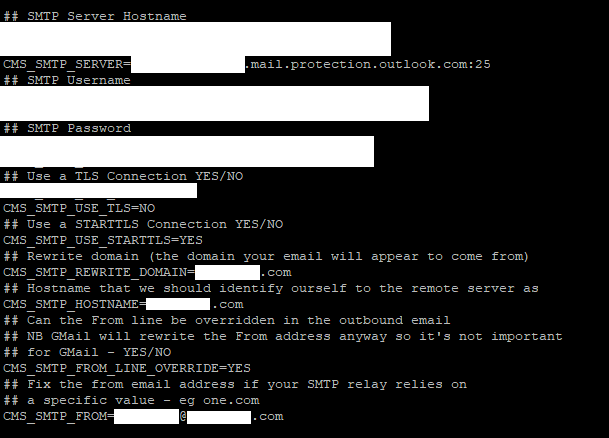
I’m having the same issue on 4.4.2. I upgraded to 4.4.2 on May 5th and it was working until May 13th. Now it’s not working. Maybe some Ubuntu update caused the issue?
sudo docker compose down && sudo docker compose -f cms_custom-ports.yml up -d
at around 08:45 a.m.
Editing config.env is not necessary, but this command only work after this time. Doing it earlier does not help. It still breaks. Do you also use a SMTP Relay (Connector)?
Nice, I hope it works until tomorrow afternoon. Unfortunately my exim4 directory in the docker container is empty, so I can’t agree with the same error.
Please let me know if it works for more than 24 or 48 hours, because I also thought that a change in config.env worked, but next day it was always broken.
I tried a few changes of settings and every change that did not matter worked just until next day 08:45 a.m. CET
No it did not fix the issue. After some amount of time after restarting the container, it stops working. I think the service might be crashing in the container. I need to do some more digging.
It would help if we heard from one of the developers on this issue.
The only information I have, is that mail sending via SMTP Relay without credentials is not supported by XIBO.
In my case I need a cron job that does a container down and up after 08:40 am every day. Then the TFA and mail delivery works.
The strange thing on my side is the time. Whenever I restart docker it always stops working at nearly exact this time (08:40 am).
On two different servers (one in my office for testing and the other is an Azure VM) the same behaviour. And why did it run for more than half a year?
The next try from my side is to move XIBO out of the docker container to see if that changes something and maybe I can debug it better.
Actually I have a open ticket at microsoft regarding this problem. Hopefully they find the reason.
We expect you to be sending email via SMTP on port 587 (ie authenticated). You need a user in your Microsoft domain to authenticate as to send email. You can’t relay unauthenticated via port 25 as your message won’t pass SPF/DMARC etc.