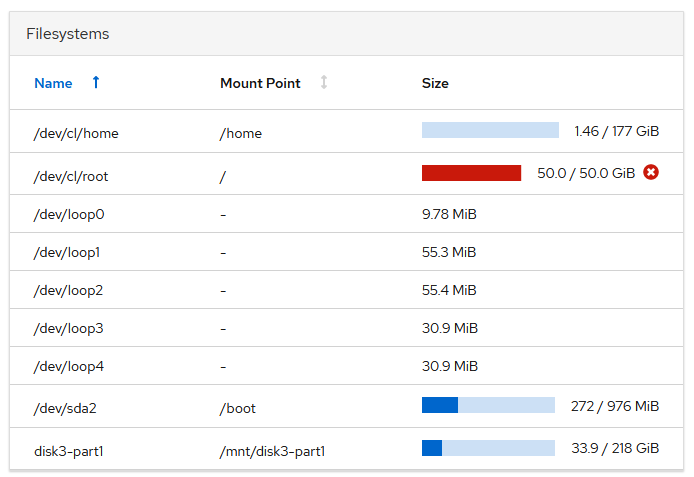
So as it turns out it was disk space after all.
CentOS 8 when loading on the drive apportioned about 47G by default. That is also where amoung all the various linux directories, Xibo gets placed. Funny thing about those non-virtualized root directories, they’re the one directory that cannot be resized. I even entered rescue mode and tried to resize it but without joy. Of coarse I didn’t discover that until after I discovered that the Linux tool, Cockpit, allows you to extremely easily add additional volumes to your LVM structure. Which means you can add a tremendous amount of space to your drive, but when combined with the previous note about immutable root directory size, is practically meaningless…at least for me.
So as I now realize adding volumes wasn’t gonna make any difference to the Library Size, I decided to rescue all my content, and Layouts, settings, and yml files, and dockers…So I backed all that up on /dev/sda in a directory called /Xibo. Then I unplugged the External USB housing that was /dev/sdc, left it behind, and took the PC home to work on it. (It was getting late, I wanted a beer while I worked on it.)
Remember that part where the Linux tool Cockpit made it really easy to add drives to the LVM directory structure? As it turns out it doesn’t make it just as easy to remove it. Not to mention that I had left the External USB Drive, part three of the LVM at work. So the system now wouldn’t boot, and the directory structure was borked because 1 of the three drives needed to be now whole, was not available.
So I did the unthinkable, I removed the reference to the third drive, and a whole lotta stuff disappeared. /Xibo on /dev/sda1 ceased to exist. So much for my feeble backup attempt.
I went to Bed.
The next morning, after a good nights sleep, I felt like I could make better decisions. I formatted the Hard drive, and now understanding some of what I hadn’t understood before drew some intelligent conclusions.
-
One of the most important decisions you can make about Xibo installation needs to be done before you install the OS… especially if your not going to virtualize. How big does your root directory need to be?
-
We had loaded 12 hours of mp4 @ 1920 x1080p, 4:2:2, 30 fps, video, a few graphics, but mostly video. That had taken about 47 of 50 Gigs. For us that was for Christmas…which was peak video season. Which means we needed enough for this month(30 days) and next month(30 days). Given that some material you’ll want to leave in place, while you work on next months content, I determined I was being generous with 6 times my monthly needs.
This time, I added another on board drive, created an LVM, and allocated 300 Gigs to the root directory. I set everything else up the same as before. I then spent four hours reloading content and rebuilding the twelve hours of layouts I had lost. Another two hours of scheduling, and re-adding users, and all was good.
The families that watch the channel never knew what was happening as the TV content continued to be fed by the player that was no longer associated with the CMS. Tying the player to the new CMS was the last step.
I’m not a PC Tech and certianly not an engineer. Short of fooling around with hackintoshes a few years ago, I had never done anything but install applications on my PC. This was certainly an education. Maybe my hard lessons will assist someone to adopt Xibo and make it a sucess on the first try.
Finally, The CEO got to post her Christmas message and no one but me knew what an effed-up weekend it was.