Hi,
We can’t display https web page on WebOS Xibo client. We can only display http web page.
Xibo Server Version : 1.8.11
WebOS Xibo client Version : 1.8R16
WebOS Version : 3.2
Can you help us ?
Thanks a lot.
Best regards
Vincent
Hi,
We can’t display https web page on WebOS Xibo client. We can only display http web page.
Xibo Server Version : 1.8.11
WebOS Xibo client Version : 1.8R16
WebOS Version : 3.2
Can you help us ?
Thanks a lot.
Best regards
Vincent
Thank you for the information regarding your Xibo setup. Can you confirm the model number of your webOS Display please?
If you can send me the https URL that you are trying to display on your Player, I would be happy to test it for you. If you would prefer to keep the link private, feel free to send it to me in a Private Message.
Can you confirm whether other https URLs are displaying on your webOS Player?
Many Thanks.
My WebOS display is LG 32SM5KE
For example : https://www.google.fr or https://blog.xibo.org.uk/ or https://trello.com we have a blank screen.
We tried another internal https website and it doesn’t work too.
It works very good with the windows player.
Thank you.
Thank you for letting me know. I have tested Displaying https on a webOS Display running 1.8 R16 (specifically https://blog.xibo.org.uk/) and did not experience any issue.
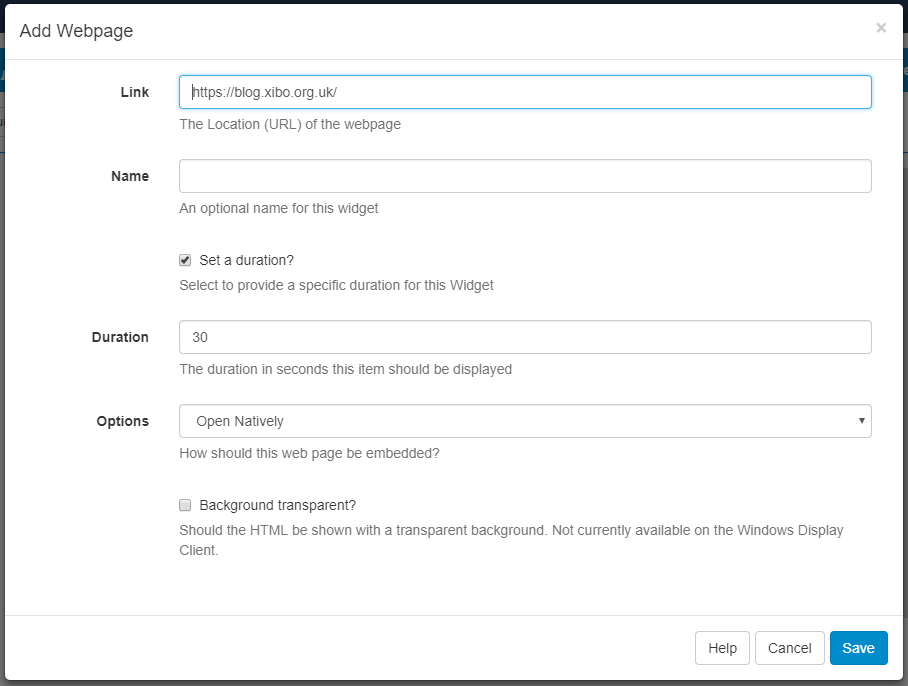
To test the https page, I created a Webpage Widget with the below settings:
Can you confirm if you have set up your Webpage Widget in the same way? Could you also let me know what is shown on the Display instead of the https webpage? Are you receiving any errors?
Many Thanks.
Further to my previous message, I have information that will help to understand the issue you are experiencing.
Whether a website will Display on the Xibo for webOS Player is also affected by the header settings for the website. If the X-Frame-Options header is set, then the website will not be able to Display.
I’ve since discovered that the Xibo Blog webpage is the only https webpage you mentioned that does not set the X-Frame-Options header, which is why it displayed correctly on Xibo for webOS. The other 2 websites you mentioned unfortunately will not display correctly on Xibo for webOS because the X-Frame-Options header has been set.
My apologies for any inconvenience caused.
Many Thanks.
Thanks for you answer.
Now I can display xibo website because the date/time on TV was wrong. Very important to connect to https web site with certificates.
What can we do to pass X-Frame-Options ? Is there any chance to have new version to correct this ?
Many Thanks
Glad to hear you have resolved the issue.
I have spoken to the Development team about the X-Frame-Options, who will look further into whether this can be changed for future releases. The issue is not how Xibo handles the webpages, but instead how the webpages are displayed by webOS.
Many Thanks.
The issue is not resolved because the website we want to display must use X-Frame-Options. Like https://trello.com
I think is not a WebOS problem because we can display this website with the WebOS Browser.
Thank you for your feedback.
Thank you for your feedback, I will pass this information on. The Development team will continue to look into this and whether the Xibo for webOS can display websites with X-Frame-Options set.
Many Thanks.