Scenario: Windows Installation, R405 (last available to download).
I have a web page that contains an embedded YouTube live stream.
I would like to display it in Xibo, full screen, on a Windows machine, but I am having a problem with the YouTube part, which returns a playback error (An error occurred. Please try again later. (Playback ID: xxxxxxx)). From what I can understand, this is because the page is displayed using the CEF browser and not Edge (the PC’s default browser).
I cannot create a region above the displayed page because the page changes its content dynamically and sometimes the stream should NOT be displayed.
For this reason, I need to find a way to force Xibo to use Edge and not CEF when loading the web page.
I have already tried adding the URL to the whitelist in the display settings, but without success.
Does anyone have any other suggestions I could try?
And as often happens, when asking questions, an idea for solving problems comes to mind!
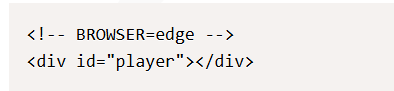
I noticed that by using the embedding tool instead of the web page, I could force Edge to be used.
At that point, all I did was use this tool, inserting an iframe into the HTML code that contained the page I needed, forcing the embedding size to 1920x1080…
Apparently, everything works fine!
I’ll insert the code here, in case anyone else encounters the same problem.
Thank you for your reply.
I checked the link you described, but it seems there are problems with embedding a specific channel live streaming, whose ID changes every time it is restarted.
Do you know if this problem has been resolved in recent weeks/months, and if it is possible to specify the YouTube channel ID as a parameter to embed related live streaming directly?
I’m sorry to hear this is the case. The script requires the specific ID for the live stream video, so that would need to be updated each time you wish to use a live stream. My apologies for any inconvenience that causes.