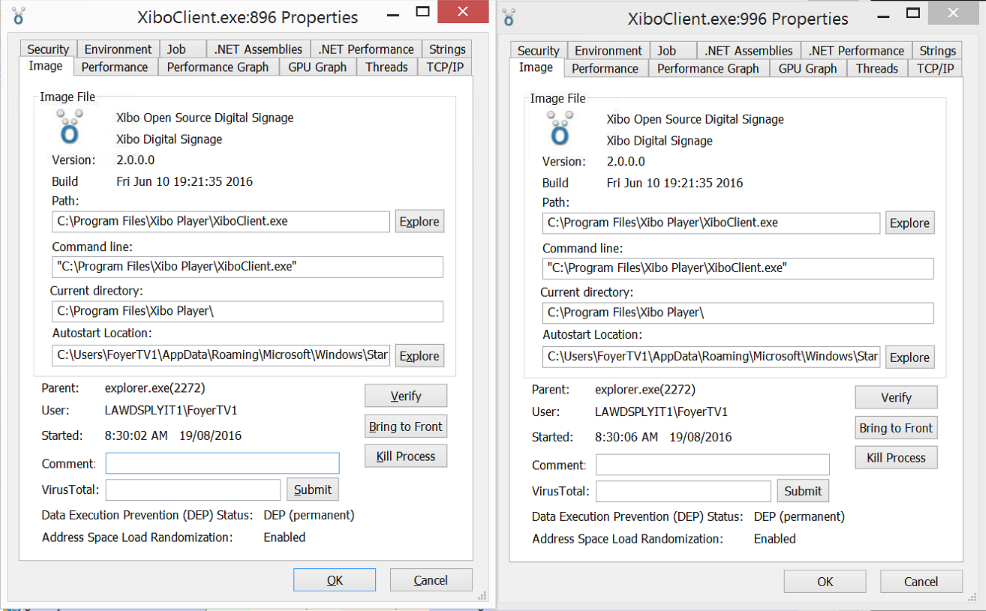
We’re having a problem where extra instances of the client are being started automatically and only displaying the default layout, presumably because the additional instance of the client is trying to use the same display identifier as the original instance. These extra instances are being started over the top of the original instance and thus blocking it from display.
The server is running version 1.7.8 on OpenSUSE. The client was running version 1.7.5 on “Windows 8.1 with Bing”, but the problem is still happening after updating to version 1.7.8. We have several displays connecting to the same server but only one of them is exhibiting this behaviour.
We are not using CEF for the browser so that shouldn’t be the issue here.
Does anyone have any suggestions on what would be causing this?
Perhaps you have Xibo being started by some means other than via the Startup Items start menu group? Perhaps it’s in your default profile or has been added to the registry startup items or similar?
Are both instances running as the currently logged in user? I suspect not, as Xibo specifically checks to ensure only one copy is run concurrently.
I don't actually know when the new client instance is being
started. I tend to be the first person to get into the office of a
morning and I'll sometimes find the display in the state
described. However, it doesn't appear to happen consistently every
night or even after a set number of days. I'll look into it some
more next week, I'll set up some monitoring on the device so I can
hopefully get a better idea of when the extra instance is being
spawned and maybe what is launching it. I'll report my findings
here when I have more information for you.
After over a week of waiting for this problem to manifest again I just decided to remote into the relevant display. I found that there were two instances of the client running again but this time they were both displaying content which was why I hadn’t noticed anything wrong.
I tried out the program discussed in a another posting (Minimise Xibo Client) to forcefully minimise Xibo, which worked well by the way. I was then able to use Sysinternals Process Explorer to examine the client instances. I found that they were started within seconds of each other and around the time I would have last rebooted the device.
Using Sysinternals Autoruns I discovered that there were shortcuts to Xibo in the All Users startup folder and in the start up folder for the user account. I’ve removed one of the shortcuts and rebooted the device again, so now I’ll wait and see but it appears that it could be a PEBKAC error.
@alex That screenshot above shows that both instances of the client are running as the current user, so there may be an issue with the one copy check that you mentioned. Let me know if there is anything I can do to help with that.
I suspect they’re launched then at exactly the same moment and so it’s basically a race condition when they check for another player instance running.
You’ll need to remove one of the shortcuts and see if you can find out what caused it to be added there. By default, we only install a shortcut in the current user startup items I believe.