OK, thanks for the feedback. I have reopened the issue.
I am starting to run out of ideas, but please can someone try this PHAR file: PsiTransfer
Replyied on Github
A new PHAR file to try can be found here: https://github.com/xibosignage/xibo-xmr/releases/download/1.0/xmr.phar
Update on status in the issue:
I can confirm that it is working under Windows Server 2022/IIS. Thanks @dan and all!
Hi @dan and @alex
What is this error in the new XMR?

enable-fd-setsize=2048 is recommended, but you may want to set it to equal the maximum number of open files supported by your system, in order to avoid seeing this error again at a later date. [] []
cms-xmr_1  | [2025-03-18 23:19:04] xmr.ERROR: #0 /opt/xmr/vendor/react/event-loop/src/StreamSelectLoop.php(300): {closure}(2, 'stream_select()...', '/opt/xmr/vendor...', 304) #1 [internal function]: React\EventLoop\StreamSelectLoop->React\EventLoop\{closure}(2, 'stream_select()...', '/opt/xmr/vendor...', 304) #2 /opt/xmr/vendor/react/event-loop/src/StreamSelectLoop.php(304): stream_select(Array, Array, NULL, 0, 4693178) #3 /opt/xmr/vendor/react/event-loop/src/StreamSelectLoop.php(232): React\EventLoop\StreamSelectLoop->streamSelect(Array, Array, 4693178) #4 /opt/xmr/vendor/react/event-loop/src/StreamSelectLoop.php(213): React\EventLoop\StreamSelectLoop->waitForStreamActivity(4693178) #5 /opt/xmr/index.php(233): React\EventLoop\StreamSelectLoop->run() #6 {main} [] []
It runs well for like, 4 minutes,
Commands are running fine, screenshots etc.
And then it crash with this error;
obs: I’ts a machine (ubuntu) running only XMR for more than one CMS:
Here is my docker-compose.yml:
version: "3"


services:

  cms-xmr:

    image: ghcr.io/xibosignage/xibo-xmr:1.0

    ports:
      - "8080:8080"
      - "8081:8081"
      - "9505:9505"

    restart: always


    environment:

      XMR_DEBUG: "true"
And my CMS:

As you can see, all well setted.
Update:
Apparently, even with the error, XMR continues to work normally.
Strange.
The debugger shows the error, then an “exited”
However, the commands continue to work normally.
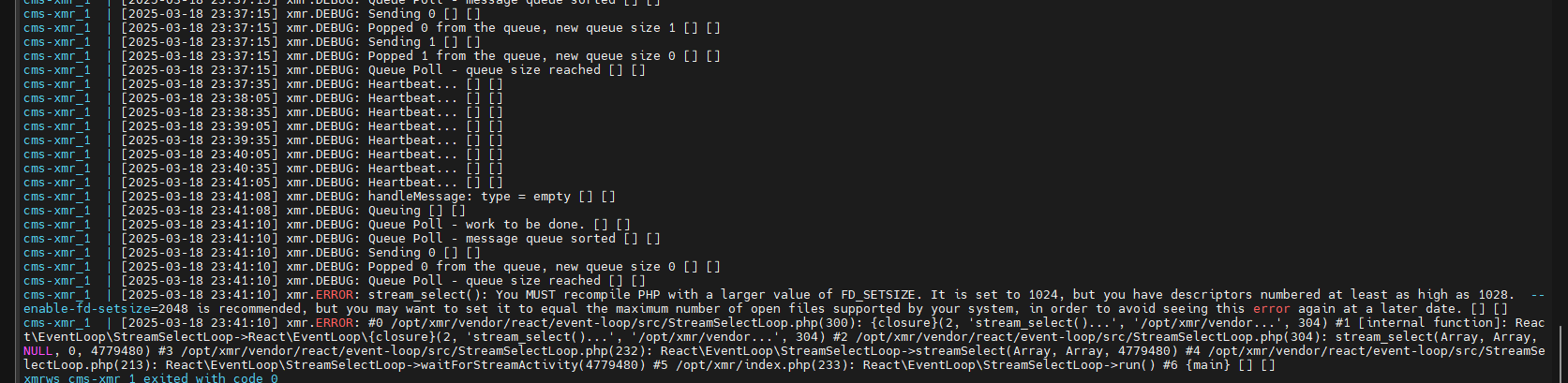
cms-xmr_1  | [2025-03-18 23:41:10] xmr.DEBUG: Queue Poll - queue size reached [] []
cms-xmr_1  | [2025-03-18 23:41:10] xmr.ERROR: stream_select(): You MUST recompile PHP with a larger value of FD_SETSIZE. It is set to 1024, but you have descriptors numbered at least as high as 1028.  --enable-fd-setsize=2048 is recommended, but you may want to set it to equal the maximum number of open files supported by your system, in order to avoid seeing this error again at a later date. [] []
cms-xmr_1  | [2025-03-18 23:41:10] xmr.ERROR: #0 /opt/xmr/vendor/react/event-loop/src/StreamSelectLoop.php(300): {closure}(2, 'stream_select()...', '/opt/xmr/vendor...', 304) #1 [internal function]: React\EventLoop\StreamSelectLoop->React\EventLoop\{closure}(2, 'stream_select()...', '/opt/xmr/vendor...', 304) #2 /opt/xmr/vendor/react/event-loop/src/StreamSelectLoop.php(304): stream_select(Array, Array, NULL, 0, 4779480) #3 /opt/xmr/vendor/react/event-loop/src/StreamSelectLoop.php(232): React\EventLoop\StreamSelectLoop->streamSelect(Array, Array, 4779480) #4 /opt/xmr/vendor/react/event-loop/src/StreamSelectLoop.php(213): React\EventLoop\StreamSelectLoop->waitForStreamActivity(4779480) #5 /opt/xmr/index.php(233): React\EventLoop\StreamSelectLoop->run() #6 {main} [] []
xmrws_cms-xmr_1 exited with code 0
Screenshot/NotifyStatus Running:

That’s interesting; I presume its because of the number of displays you have connecting. When the service exits it will restart, so I guess that is why you see it still working. It’s probably exiting and restarting over and over?
Hi @dan How are you?
It doesn’t seem to be the case, because for the test with XMR 1.0 I only used two CMSs with 5 displays on each one (10 displays in total). It doesn’t seem like a large amount to me.
In XMR 0.11, there were about 1K displays sending requests to the XMR server, and it was relatively rare for me to have to do anything. It automatically restarted the XMR server once a day, and this mitigated the issues quite a bit.
Yes, it is
Anyways,
Can this FD_SETSIZE be increased in any way?
Since XMR is also designed to serve more than one CMS instance, there shouldn’t be any errors of this type with so few devices connected, even if it restarts itself.
It would be more to have greater confidence in the XMR service, because from the looks of it, it is restarting on its own despite the error (but errors are not good) lol
I confess that the test lasted about two hours, so I am wary and tend to think that this could cause a bigger problem when used for longer.
Thanks!
Yeah, I agree having it error is not good.
We don’t see this on our main test instance running the standard XMR container, which is really odd! Its been running for 10 days with 30 or so displays connecting.
I don’t know whether this could be on the host machine perhaps? If I run ulimit on both the container and the host I get unlimited out; what do you get?
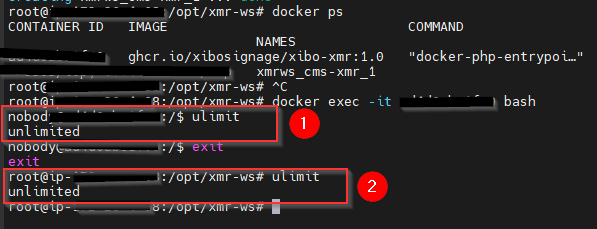
And it seems to be an error related to the container’s PHP.
I don’t even have PHP installed on the host… everything is inside the container itself.
With no intent of steering this conversation away from important troubleshooting, I do have a somewhat relevant question. It would appear that WebSockets was introduced in v4.2.0, which was released in January-- and the latest player revisions were released sometime at the end of December. Are the latest releases equipped to handle the switch from the legacy TCP/9505 port to using WebSockets? It would appear that the provided Xibo-CMS docker-compose.yml file does not account for the exposure of any additional ports than what traditionally has been needed in the past, i.e 80/443, 9505. To that end, manually exposing these ports in the containers and setting a custom WebSocket address on the player config does not seem to actually trigger any attempts for the player and CMS to communicate over 8080/8081 
We are in a transitional period; the web socket enabled XMR has been released, with support for legacy ZMQ connections. The docker file we’ve distributed hasn’t changed in that regard: xibo-docker/docker-compose.yml at master · xibosignage/xibo-docker · GitHub. We didn’t see any point in mapping the 8080 port yet, but perhaps we should have to be clearer (i’ll make a note of this).
Player applications will be updated over the coming months as those releases are ready. By the time we get to v5 all players should support web sockets and we will build an option to “turn off” the legacy mode in XMR.
The breakthrough for 4.2 is that ZMQ is no longer a required dependency for installing the CMS, because the CMS → XMR communication is now over HTTP (port 8081). Port 8081 isn’t needed to be exposed in the docker files we ship, because the CMS → XMR communication is internal to the docker network.
I see why you say that, but it doesn’t make sense in my mind! You are running the same container as me, but my container does not log that message, even though they should be identical. I think it must be something related to the host, but I really don’t know what it could be yet.
ight 
What matters now is that it is working fine despite the error.
I will continue investigating here, to find something that will let you know.
So which xmr.phar file is the right one to use now with xibo 4.2.1?
And in which location is it supposed to be replaced? Does it have to be “/vendor/bin/xmr.phar or” “/vendor/xibosignage/xibo-xmr/bin/xmr.phar” ?
The one added as an asset to the release.
If you’re using the phar file instead of Docker you can put the file wherever you want, depending on how you’re going to run it.
I don’t recommend running it from the same installation folder as your CMS, but you certainly could do that if you wanted.
Sorry to go back on what I said here, but we didn’t map the port because in standard trim the cms-web container already acts as a reverse proxy for the cms-xmr container on that port. I.e. ws://cms-web/xmr passes through the cms-xmr, no port mapping required.
If you don’t want to use that, you can map the port you need manually and configure the CMS setting accordingly, just like you would for ZMQ.
Thank you for clearing this up. I spent some time trying to troubleshoot why none of my players were connecting via websocket and what were, what I incorrectly perceived, failing back to legacy ZMQ to communicate.
I wish this has been documented or noted somewhere (if it was, I missed it).
Sorry if we’ve caused any confusion - what could we have done that would have made it clearer for you in the first place? Perhaps a KB article on here which describes updating a manual/custom installation?
We will of course announce XMR web socket support in the relevant player release notes as they become available.