Hi everyone,
I’m facing an issue with the Weather Widget and I’m hoping someone can help or has experienced something similar.
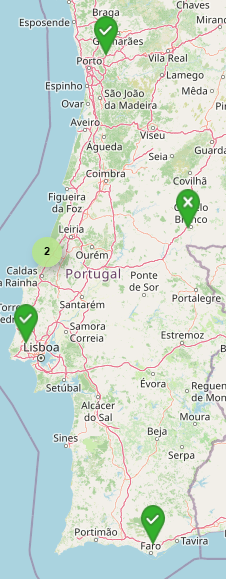
I have multiple displays deployed across different locations in the country. For each display, the geographic coordinates (latitude and longitude) are correctly configured in the display settings.
Each of these displays runs a layout that includes the Weather Widget. My expectation is that the widget should automatically use the configured coordinates of each display to show the local weather forecast.
However, what is happening is:
-
The Weather Widget does not reflect the display’s configured location
-
Instead, it consistently shows the default location forecast (as defined by the widget/application)
-
This behavior is the same across all displays, regardless of their individual coordinates
So effectively, even though the displays have different locations configured, the Weather Widget ignores them and falls back to a default location.
What I’ve checked so far:
-
Display coordinates are correctly set in Xibo CMS
-
Displays are online and syncing properly
-
Layout and widget configuration are identical across devices
Questions:
-
Is there any setting I might be missing to force the widget to use the display location?
-
Has anyone encountered similar behavior or found a workaround?
Any help or suggestions would be greatly appreciated.
Thanks!
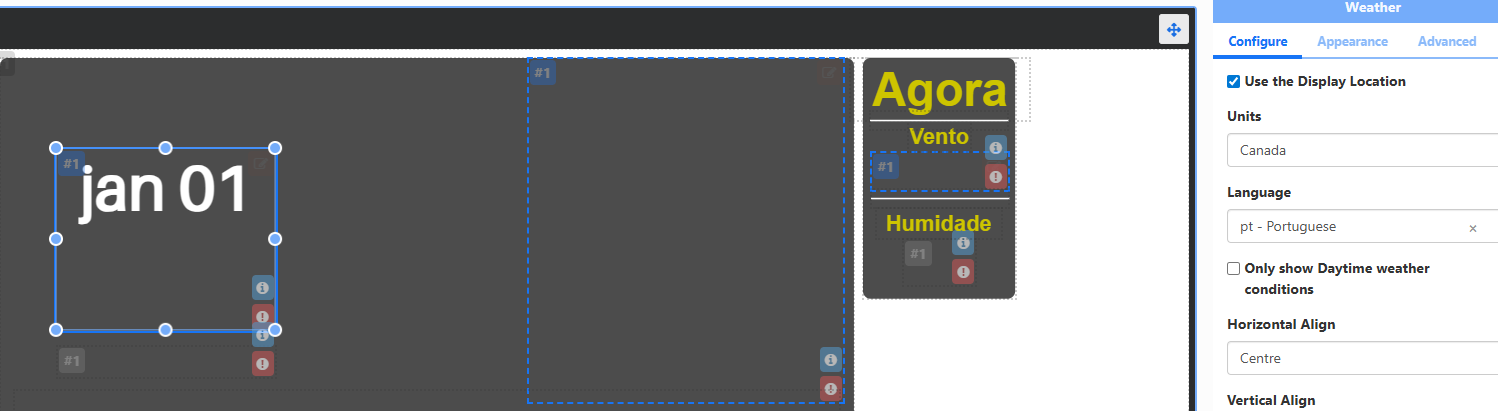
Hi Ruben, The configuration to select which geolocation you want the weather widget to use is located in the layout designer; click on the weather widget itself. There are a couple of things to keep in mind:
-
If any of the location settings are incorrect, the widget will display the default location’s weather.
-
If you plan to use the device’s location, ensure the device has an active GPS. If not, as long as you select the widget to work based on the stipulated latitude and longitude, and those coordinates are correct, it should function properly.
If all these prerequisites are covered, please validate the WidgetSync task on your CMS. You can also clear the cache for the weather modules by navigating to CMS → Modules → Weather. Once you have completed these steps, you should have everything necessary to get your module working.
Hi Erik,
Thanks for your reply.
The widget and the coordinates for each display were configured correctly, and the task is running.
I have cleared the module cache, but the issue persists.
I’m using the latest CMS version (Docker installation) and the latest player version (licensed Samsung Tizen).

Hi Ruben
Would it be possible, that you can set up a xibo CMS trial to troubleshoot it on our end
Hi Erik,
Just to clarify this point: on 06-02-2026 I had already set up a test license to debug another issue. For that reason I’m no allowed to create an additional test license.
Thanks.
Hi Ruben,
Please submit a ticket through your account on the Xibo website. Once submitted, I will be able to assist you further with setting up a CMS trial.
Best regards,
Erik Romo
Hi Erik,
Sorry for the delay
I was out of the office until yesterday.
I will request support for a new trial key and keep you updated
Best regards,
Ruben