### Author:  [@scrandall](https://community.xibo.org.uk/u/scrandall)
#### Post date: [July 18, 2017, 3:01pm UTC](https://community.xibo.org.uk/t/xibo-step-by-step-installation-iis-8-5-on-windows-server-2012/9878/21 "2017-07-18T15:01:14Z")
Thanks for the information. I discovered the reason was that my “environment path” setting was set to a different version of PHP (iisExpress v7.1). I set the correct path and got the correct php\_zmq.dll files and all is well. Thanks again for the help.
---
### Author:  [@Jarzet](https://community.xibo.org.uk/u/Jarzet)
#### Post date: [July 21, 2017, 1:32pm UTC](https://community.xibo.org.uk/t/xibo-step-by-step-installation-iis-8-5-on-windows-server-2012/9878/22 "2017-07-21T13:32:04Z")
Hi Michael,
I’m looking for an explanation like yours to configure everything for a long time. And I’m glad to find yours.
But I have a problem when I write “php xmr.phar”, can you help me ?
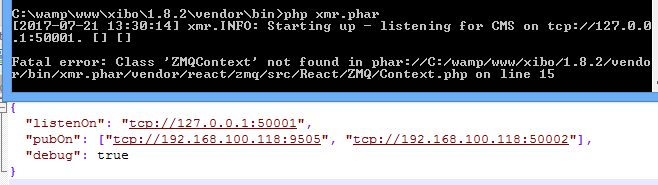
Thanks
---
### Author:  [@michael](https://community.xibo.org.uk/u/michael)
#### Post date: [July 21, 2017, 3:05pm UTC](https://community.xibo.org.uk/t/xibo-step-by-step-installation-iis-8-5-on-windows-server-2012/9878/23 "2017-07-21T15:05:28Z")
Hello Jarzet,
I am very glad if my guide help anybody.
I think its releated to zeromq settings. Did you complete zeromq steps also?
---
### Author:  [@Jarzet](https://community.xibo.org.uk/u/Jarzet)
#### Post date: [July 25, 2017, 7:31am UTC](https://community.xibo.org.uk/t/xibo-step-by-step-installation-iis-8-5-on-windows-server-2012/9878/24 "2017-07-25T07:31:00Z")
Yes, I did, the only difference is that i downloaded the TS version and not the NTS version like you because xibo say i have not zeromq when i put the files of the NTS version.
---
### Author:  [@Jesse\_Allen\_Mendoya](https://community.xibo.org.uk/u/Jesse_Allen_Mendoya)
#### Post date: [July 29, 2017, 2:46pm UTC](https://community.xibo.org.uk/t/xibo-step-by-step-installation-iis-8-5-on-windows-server-2012/9878/26 "2017-07-29T14:46:42Z")
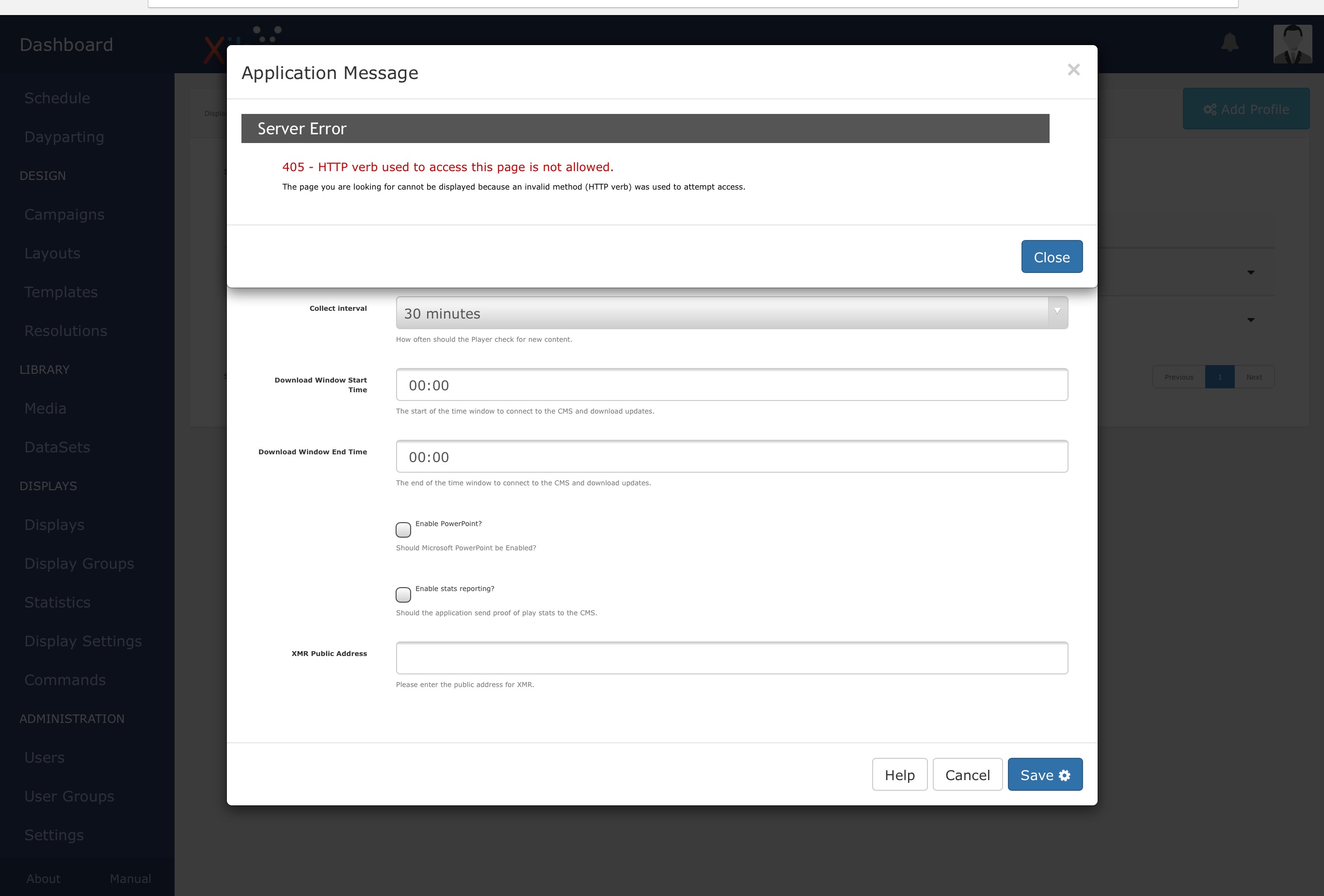
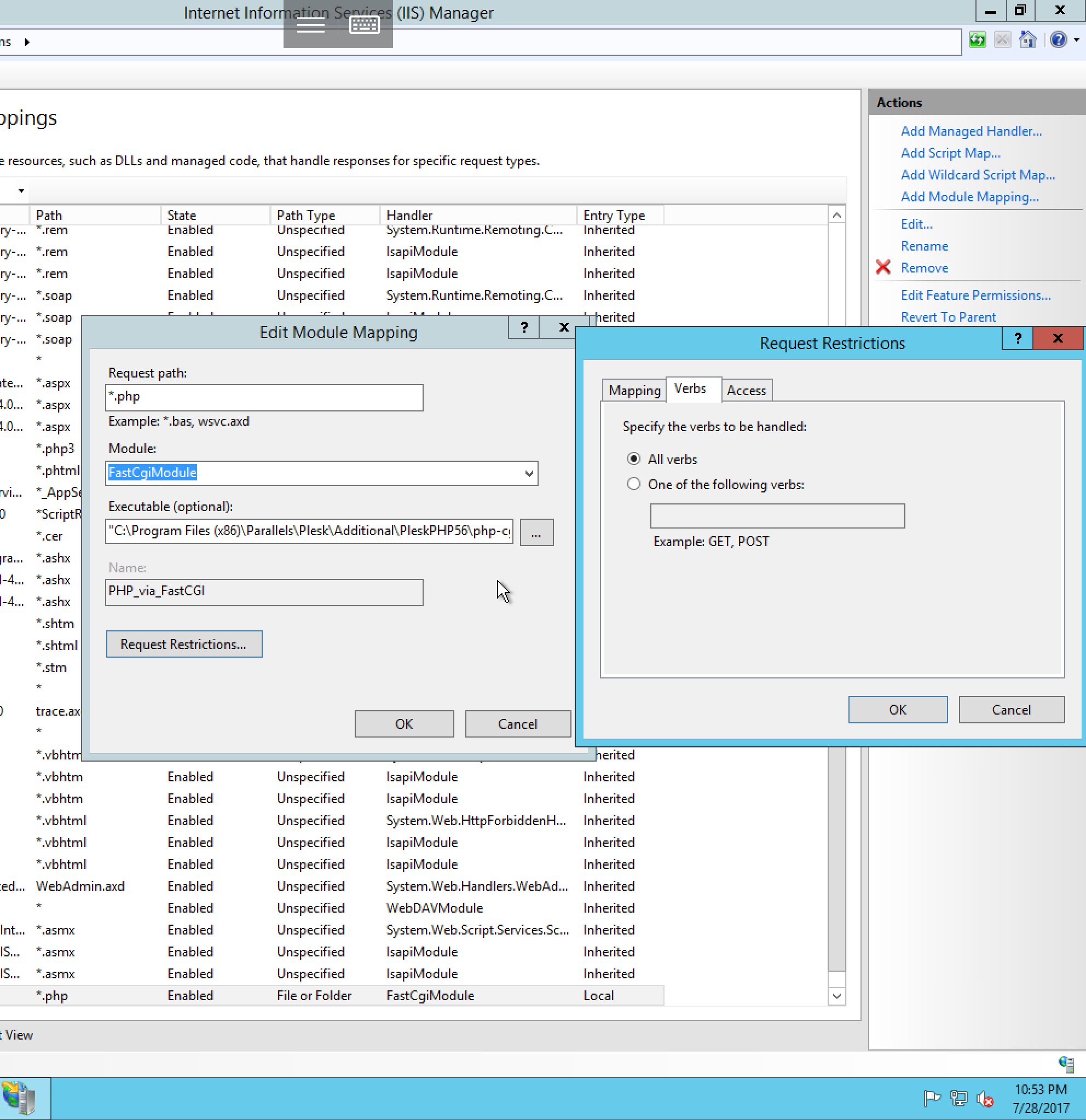
Thank you Michael but I’m still having the same issue of receiving a 405 error. I’m not sure if it’s something between plesk and iis? Any suggestions? Any ideas would be helpful:) thank you!
---
### Author:  [@Mrinfec](https://community.xibo.org.uk/u/Mrinfec)
#### Post date: [August 9, 2017, 2:54pm UTC](https://community.xibo.org.uk/t/xibo-step-by-step-installation-iis-8-5-on-windows-server-2012/9878/27 "2017-08-09T14:54:21Z")
Hi jesse, I have the same problem, but I have fixed it.
Fix the problem by configuring the web.config file by adding this:
> \< modules\>
> \< remove name=“WebDAVModule” /\>
> \< / modules\>
> ```
>
>
>
>
> ```
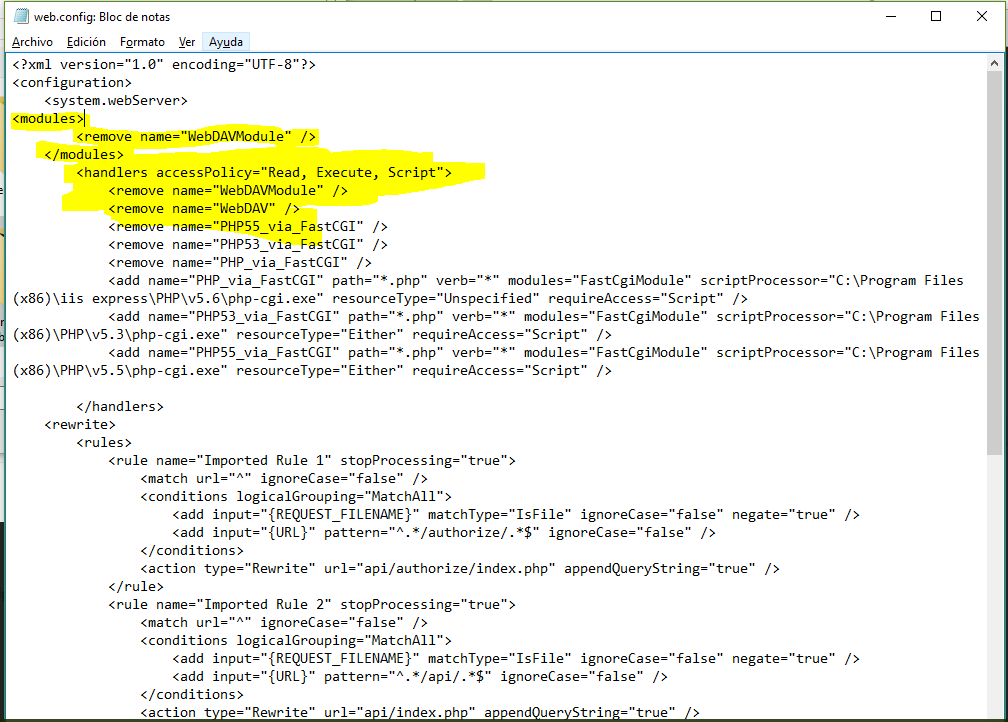
I hope I’ve helped,
---
### Author:  [@Jesse\_Allen\_Mendoya](https://community.xibo.org.uk/u/Jesse_Allen_Mendoya)
#### Post date: [August 10, 2017, 2:08am UTC](https://community.xibo.org.uk/t/xibo-step-by-step-installation-iis-8-5-on-windows-server-2012/9878/28 "2017-08-10T02:08:33Z")
THANK YOU SO MUCH \<3 That worked for me!!!
---
### Author:  [@admin1](https://community.xibo.org.uk/u/admin1)
#### Post date: [August 24, 2017, 8:31pm UTC](https://community.xibo.org.uk/t/xibo-step-by-step-installation-iis-8-5-on-windows-server-2012/9878/29 "2017-08-24T20:31:03Z")
Hello guys,
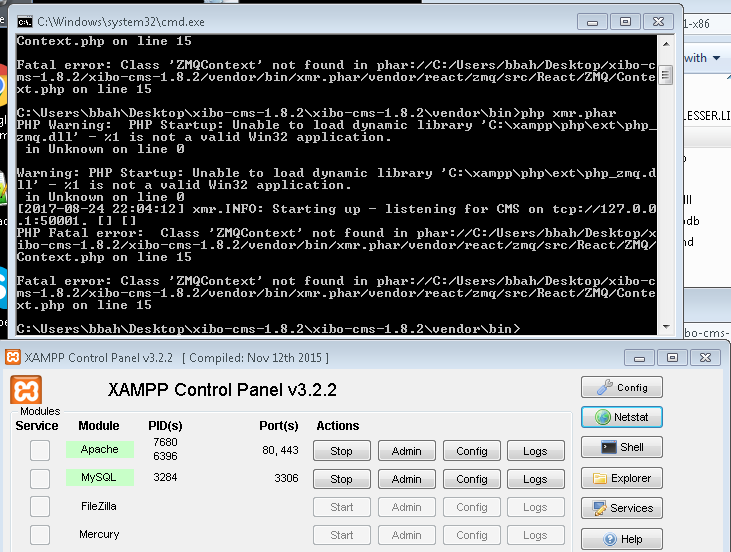
I am having the same issue as Jarzet. I followed the steps but still can’t get the XMR work. Having hard time installing ZeroMQ. I have a windows 7 machine 64bit. The CMS is working fine and the player but not updating changes since its missing XMR.
Can you please assist me.
Thanks,
---
### Author:  [@rediaz20](https://community.xibo.org.uk/u/rediaz20)
#### Post date: [August 25, 2017, 2:15pm UTC](https://community.xibo.org.uk/t/xibo-step-by-step-installation-iis-8-5-on-windows-server-2012/9878/30 "2017-08-25T14:15:19Z")
Hello Alex, first thank for the step by step installation guide, I did followed it really carefully and I am not an expert on the matter I didn’t receive any type of error but when I open the Xibo installation welcome page there are no ticks, exclamation or cross in front of any of the prerequisites. I already followed your guide twice but same thing in both cases. Thanks
---
### Author:  [@NeilJones](https://community.xibo.org.uk/u/NeilJones)
#### Post date: [October 24, 2017, 2:04pm UTC](https://community.xibo.org.uk/t/xibo-step-by-step-installation-iis-8-5-on-windows-server-2012/9878/31 "2017-10-24T14:04:29Z")
Hi Michael
thanks for the guide
---
### Author:  [@JoshR](https://community.xibo.org.uk/u/JoshR)
#### Post date: [January 24, 2018, 4:45pm UTC](https://community.xibo.org.uk/t/xibo-step-by-step-installation-iis-8-5-on-windows-server-2012/9878/32 "2018-01-24T16:45:01Z")
I just wanted to say thank you, followed your instructions to the letter about 3 months ago and everything worked great.
I also wanted to post that i upgraded my original 1.8.2 install successfully to 1.8.4 following the same installation instructions as above. hopefully to try to give a little back. So in order that i remember it:
i followed the steps listed here: [https://xibo.org.uk/manual/en/upgrade\_custom.html](https://xibo.org.uk/manual/en/upgrade_custom.html) for a custom upgrade
I did a database backup following these instructions on youtube since ive never messed with mysql.
I ended up not needing the backup but just thought i’d mention it.
made a copy of settings.php from the php\_files folder found in web/settings.php
I downloaded the latest .zip of the windows xibo CMS install, and extracted it.
I stopped the php xmr.phar heartbeat thing that runs on the server, stopped the iis server
Renamed my old PHP\_FILES folder to old\_php\_files
created a new folder called php\_files
made a copy of settings.php from the php\_files folder found in web/settings.php
also made a copy of my cacert.pem file that i had on the root of my php\_files folder (this was needed to use the weather plugin, to make ssl communication work i believe)
I moved all of the extracted files from the new xibo zip into the new PHP\_FILES folder, and put the cacert.pem, settings.php files back in their locations.
you also need to copy the json file and the xmr.phar files listed in michaels steps above
I then added IUSR and IIS\_IUSRS to the new PHP\_FILES folder securities.
At this point i thought i was good to go and started up IIS again, got a 404 error.
I then went back step by step through Michael’s install guide and found i had to make all of the adjustments over again step by step. (these settings may be stored in files in the old php\_files folder but i dont know which, so i just re-made the changes)
After doing this i was able to start IIS successfully, once i logged in as admin the page was awaiting me to click start on the upgrade.
Upgrade went through the steps and didnt have any issues.
All of my layouts and everything seem to be there. and my test TV is updating properly.
A word of warning, prior to attempting this i did shut down the VM and take a snapshot as a failsafe incase i broke it beyond repair.
Hope this may help anyone looking to attempt and upgrade after doing Michael’s custom install.
---
### Author:  [@xMonty](https://community.xibo.org.uk/u/xMonty)
#### Post date: [February 22, 2018, 3:15pm UTC](https://community.xibo.org.uk/t/xibo-step-by-step-installation-iis-8-5-on-windows-server-2012/9878/33 "2018-02-22T15:15:59Z")
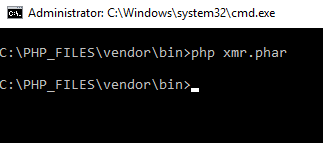
thanks for the guide but that is happning when i run the php command ☹
---
### Author:  [@dan](https://community.xibo.org.uk/u/dan)
#### Post date: [February 23, 2018, 2:08pm UTC](https://community.xibo.org.uk/t/xibo-step-by-step-installation-iis-8-5-on-windows-server-2012/9878/34 "2018-02-23T14:08:25Z")
This was due to invalid formatting in `config.json` - i have corrected the original article with code formatting for that block for future copy/pasters.
---
### Author:  [@ziegler](https://community.xibo.org.uk/u/ziegler)
#### Post date: [April 20, 2018, 4:11pm UTC](https://community.xibo.org.uk/t/xibo-step-by-step-installation-iis-8-5-on-windows-server-2012/9878/35 "2018-04-20T16:11:19Z")
500 internal server error?
- Windows Server 2012 R2 Datacenter, IIS, PHP 5.6.35, Xibo 1.8.9, MySQL
- http://{server}/release-1.8.9 correctly redirects to http://{Server}/release-1.8.9/install/ but I get a 500 error? PHP should be logging to C:\Windows\Temp but NO log. Event Log is clean.
- “c:\inetpub\wwwroot\release-1.8.9\venter\bin\>php xmr.phar” works
- IIS /release-1.8.9 is mapped to c:\inetpub\wwwroot\release-1.8.9\web
How can I debug this or get the error?
I have another server using docker & it works but security wants me to use IIS.
---
### Author:  [@michael](https://community.xibo.org.uk/u/michael)
#### Post date: [April 21, 2018, 3:52am UTC](https://community.xibo.org.uk/t/xibo-step-by-step-installation-iis-8-5-on-windows-server-2012/9878/36 "2018-04-21T03:52:49Z")
Dear Jeff, 500 Error is general error. But you can check file permissions
of IIS (over the folder of xibo files) Not read only, can write exc…
Please check my guide for 500 errors, it could be a solution.
Why you map /release-1.8.9 to c:\inetpub\wwwroot\release-1.8.9\web. Put
xibo files to a c:\xibo189 file and add site from IIS, physical folder is
c:\xibo189. And dont forget to to check permissions (connect as, Test
Settings)
As I remember in you could see IIS log in windows event log. Please check
application log, windows log both.
Best
Michael
---
### Author:  [@lparetti9](https://community.xibo.org.uk/u/lparetti9)
#### Post date: [July 17, 2018, 8:34pm UTC](https://community.xibo.org.uk/t/xibo-step-by-step-installation-iis-8-5-on-windows-server-2012/9878/38 "2018-07-17T20:34:20Z")
When I navigate to localhost it redirects to localhost/install, but the page is mostly blank. All I see is a black bar at the top with Xibo Digital Signage on the tab.
---
### Author:  [@bkc](https://community.xibo.org.uk/u/bkc)
#### Post date: [July 24, 2018, 3:52pm UTC](https://community.xibo.org.uk/t/xibo-step-by-step-installation-iis-8-5-on-windows-server-2012/9878/39 "2018-07-24T15:52:07Z")
Dear michael!
Thank you for the very informative and professional guide!
I have the same problem as lparetti9.
I also tried to install on xampp server and had the same result…
could you sugget what is the problem?
thank you very much!
---
### Author:  [@lparetti9](https://community.xibo.org.uk/u/lparetti9)
#### Post date: [July 25, 2018, 1:25pm UTC](https://community.xibo.org.uk/t/xibo-step-by-step-installation-iis-8-5-on-windows-server-2012/9878/40 "2018-07-25T13:25:50Z")
This fixed my issue. Altering line 49 in the lib/Helper/Translate.php file:
>
---
### Author:  [@bkc](https://community.xibo.org.uk/u/bkc)
#### Post date: [July 25, 2018, 1:57pm UTC](https://community.xibo.org.uk/t/xibo-step-by-step-installation-iis-8-5-on-windows-server-2012/9878/41 "2018-07-25T13:57:28Z")
Fixed mine too.
Thank you!
---
### Author:  [@golabs](https://community.xibo.org.uk/u/golabs)
#### Post date: [October 9, 2018, 11:47pm UTC](https://community.xibo.org.uk/t/xibo-step-by-step-installation-iis-8-5-on-windows-server-2012/9878/42 "2018-10-09T23:47:00Z")
With the help of this manual installation guide and a little hint here ([Can find mcrypt in PHP 7](https://community.xibo.org.uk/t/can-find-mcrypt-in-php-7/15495/9?u=golabs)) I managed to get Xibo CMS 1.8.11 running on Windows Server 2012 R2 with IIS 8.5.
The mcrypt is going to be dropped in 1.8.12 what I understood and have been reading on the Xibo CMS Github:
>
So far it seems to be working, in the coming days I’ll see if everything works fully fine and it all works well towards the screens as well. (Will post an update later on on this.)
[Previous page](https://community.xibo.org.uk/t/xibo-step-by-step-installation-iis-8-5-on-windows-server-2012/9878.md?page=1)
[Next page](https://community.xibo.org.uk/t/xibo-step-by-step-installation-iis-8-5-on-windows-server-2012/9878.md?page=3)