# Xibo On Premise Licensing For Non Docker version
**URL:** https://community.xibo.org.uk/t/xibo-on-premise-licensing-for-non-docker-version/38408
**Category:** Uncategorised Topics
**Created:** [September 5, 2026, 11:03pm UTC](https://community.xibo.org.uk/t/xibo-on-premise-licensing-for-non-docker-version/38408 "2026-09-05T23:03:52Z")
**Posts on this page:** 8
**Page:** 1
### Author:  [@GG-gggg](https://community.xibo.org.uk/u/GG-gggg)
#### Post date: [September 5, 2026, 11:03pm UTC](https://community.xibo.org.uk/t/xibo-on-premise-licensing-for-non-docker-version/38408/1 "2026-09-05T23:03:53Z")
Hi
I purshased recently Xibo On Premise Licensing Module and one Xibo Android licence to validate the process and after that I will purshase more Android player licence. But , I am currently facing major difficulties getting the offline activation module to work in our environment. Please note that our CMS setup is a standard/custom web server installation running **Xibo CMS version 2.0.3** (downloaded [2.0.3 Released](https://xibosignage.com/blog/2-0-3-released) ), and is **not** running on Docker.
Upon reviewing the existing documentation and support guides for the offline license activation module, I noticed that all recommended file paths and directory structures seem to apply strictly to Docker-based environments. Consequently, I cannot locate these paths on our non-Docker setup to properly place and configure the module ang get the offline activation for my android player work proprely.
It will be great if someone could assit-help
Thank you very much for your time and assistance.
---
### Author:  [@GG-gggg](https://community.xibo.org.uk/u/GG-gggg)
#### Post date: [September 6, 2026, 1:58pm UTC](https://community.xibo.org.uk/t/xibo-on-premise-licensing-for-non-docker-version/38408/2 "2026-09-06T13:58:36Z")
@alex @Peter Please , Any help ? Thanks
---
### Author:  [@alex](https://community.xibo.org.uk/u/alex)
#### Post date: [September 6, 2026, 3:06pm UTC](https://community.xibo.org.uk/t/xibo-on-premise-licensing-for-non-docker-version/38408/3 "2026-09-06T15:06:38Z")
Broadly, the module file for the type of Player you want to licence goes in the `custom` folder in your Xibo install folder. As it’s a custom install, we don’t know where that is. It’ll be in the same folder as the `web` folder.
The code snippet goes in `web/settings.php` instead of `settings-custom.php`.
If you’ve purchased the on-premise module already and the above doesn’t get you up and running, please open a ticket via My Account and the team will assist you with installing it.
That being said, Xibo 2.0.3 is from 2019. It’s more than 7 years old, and has multiple serious security vulnerabilities. You should get upgraded to a current version as a matter of urgency.
The project no longer offers documentation for custom installations. Docker has been the recommended install method for many years now. Again, you should aim to get to the recommended method moving forward.
It’s a Sunday here in the UK. The helpdesk isn’t open today, but if you get a ticket logged someone will be in touch tomorrow.
---
### Author:  [@GG-gggg](https://community.xibo.org.uk/u/GG-gggg)
#### Post date: [September 6, 2026, 3:33pm UTC](https://community.xibo.org.uk/t/xibo-on-premise-licensing-for-non-docker-version/38408/4 "2026-09-06T15:33:39Z")
Hi and thanks for your prompt response.
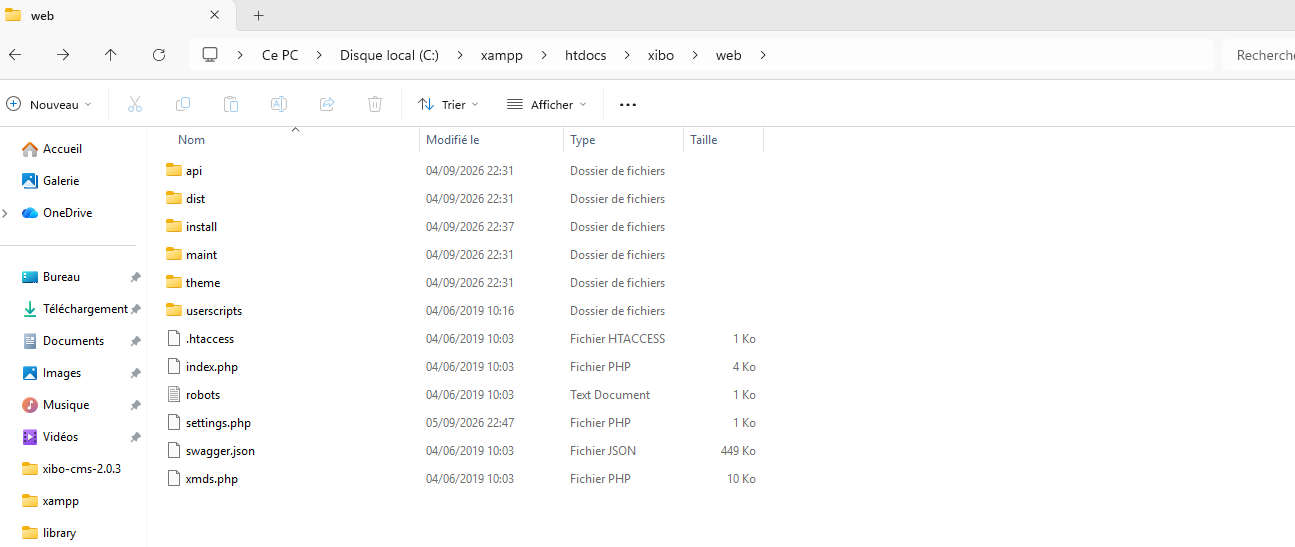
We are running Xibo 2.0.3 on Windows OS + Xampp (Apache-Mysql), in a restricted Corporate LAN (Dark site without Internet Connectivity). U can find attached the folders structure.
Right now, We aren’t planning to update Xibo installation.
Yes, I already purchased the on-premise module and also purchased one Xibo android license to test before we purchase again more Xibo android licenses. But , i wasn’t able to get it run , and the support told me that they can only assist when Xibo is Docker installation. Knowing that , the official documentation [On-Premise Licensing Module | Xibo Digital Signage](https://account.xibosignage.com/docs/setup/on-premise-licensing) , specify a guide for **CMS Custom Install 1.8 / 2.x / 3.x / 4.x and later - Xibo for Android** but it seems that the mentionned Folders PATHs and steps are also for Docker installation. Yesterday, I reopned a new ticket .
So, I would be grateful if you could help.
Thanks

---
### Author:  [@alex](https://community.xibo.org.uk/u/alex)
#### Post date: [September 6, 2026, 3:49pm UTC](https://community.xibo.org.uk/t/xibo-on-premise-licensing-for-non-docker-version/38408/5 "2026-09-06T15:49:52Z")
The settings.php file you need is in the first screenshot.
The custom folder is in the second.
The instructions are otherwise the same as documented.
Dark site or not, you should be planning to upgrade. The version you have is not supported and gets no more updates.
---
### Author:  [@GG-gggg](https://community.xibo.org.uk/u/GG-gggg)
#### Post date: [September 6, 2026, 3:59pm UTC](https://community.xibo.org.uk/t/xibo-on-premise-licensing-for-non-docker-version/38408/6 "2026-09-06T15:59:23Z")
Hi Alex,
The documentation are also talking about " Finally, run a manual licence check from the Player. It won’t licence the Player initially but a file - request.txt should be created on in the `/library/android` folder." , and , i didn’t find any android folder.
About the update , yes i agree with u . We will plan to upgrade later by the end of 2026. But , rightnow, we must get the on-prem module and android player to work . I really appriciate your help and assistance on these matter.
Thanks again for your help.
---
### Author:  [@JerryW](https://community.xibo.org.uk/u/JerryW)
#### Post date: [September 7, 2026, 6:35am UTC](https://community.xibo.org.uk/t/xibo-on-premise-licensing-for-non-docker-version/38408/8 "2026-09-07T06:35:12Z")
Hi GG,
Thank you for reaching out to Xibo Community!
I have responded to your ticket raised on our helpdesk. Please let me continue assisting you via the ticket you’ve raised. Thanks!
Kind regards,
Jerry
---
### Author:  [@GG-gggg](https://community.xibo.org.uk/u/GG-gggg)
#### Post date: [September 7, 2026, 9:38am UTC](https://community.xibo.org.uk/t/xibo-on-premise-licensing-for-non-docker-version/38408/9 "2026-09-07T09:38:46Z")
Hi,
OK , I will check your response and feedback
Thanks