# Xibo isn't responding / Stuck on home launcher selection after updating
**URL:** https://community.xibo.org.uk/t/xibo-isnt-responding-stuck-on-home-launcher-selection-after-updating/37585
**Category:** Xibo Player for Android
**Created:** [April 8, 2026, 12:09pm UTC](https://community.xibo.org.uk/t/xibo-isnt-responding-stuck-on-home-launcher-selection-after-updating/37585 "2026-04-08T12:09:34Z")
**Posts on this page:** 5
**Page:** 1
### Author:  [@MrStefan](https://community.xibo.org.uk/u/MrStefan)
#### Post date: [April 8, 2026, 12:09pm UTC](https://community.xibo.org.uk/t/xibo-isnt-responding-stuck-on-home-launcher-selection-after-updating/37585/1 "2026-04-08T12:09:34Z")
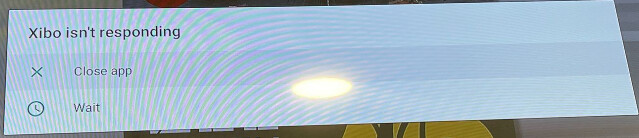
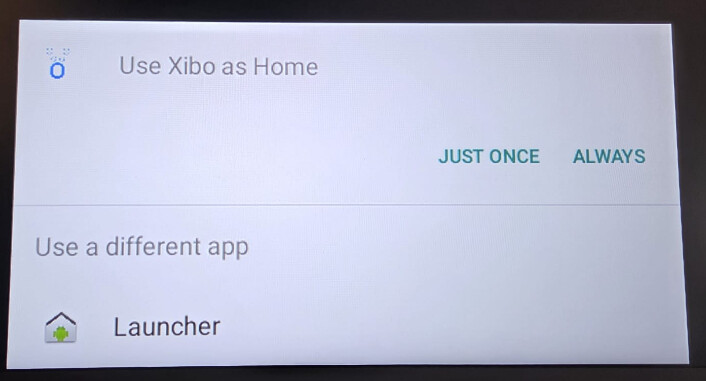
After putting a new Android version in the CMS, some of the DSCS9X players display one of the following problems right after the update, or at random some time later. I’ve had this issue with upgrading to R406, R407, R408, and now R409.
1. Xibo isn’t responding
2. Stuck on home launcher selector (usually resolves after a minute, but not all the time)
Is there a solution that can automatically detect if the player is in such a state, and resolve it automatically without having to use TeamViewer, SSHelper, or any other remote software?
My own thought is to create a script that would run on the device itself, once it detects one of the two scenarios, it would simply stop the Xibo app and start it again. If someone had already made something like this, I’d love to hear about it!
---
### Author:  [@MrStefan](https://community.xibo.org.uk/u/MrStefan)
#### Post date: [April 14, 2026, 8:02am UTC](https://community.xibo.org.uk/t/xibo-isnt-responding-stuck-on-home-launcher-selection-after-updating/37585/2 "2026-04-14T08:02:10Z")
I’ve created a potential solution, but I haven’t been able to fully test it yet.
- The “Xibo is not responding” pop‑up couldn’t be reproduced during testing. To test the script, the search function in the settings app was used instead, which eventually triggers a crash pop‑up for the Settings app.
- For the home launcher, I simulated the behavior by long‑pressing the home button, (closing Xibo), and switching to different apps.
The script I’ve written is as follows:
```auto
#!/system/bin/sh
# Startup delay
# Sleep 600
PACKAGE="uk.org.xibo.client"
ACTIVITY="uk.org.xibo.player.Player"
COMPONENT="$PACKAGE/$ACTIVITY"
while true; do
echo "Monitor loop running"
# Detect crash in system window manager
if dumpsys window windows | grep -Ei "Error"; then
echo "Crash detected — rebooting"
reboot
fi
# Check if Xibo process is running
if ! pgrep -f "$PACKAGE" >/dev/null; then
echo "Xibo not running — starting"
am start -n "$COMPONENT"
else
echo "Xibo running - bringing to foreground"
am start -a android.intent.action.MAIN \
-c android.intent.category.LAUNCHER \
-n "$COMPONENT"
fi
sleep 300
done
```
As of now I haven’t yet found a way to run this script at boot, and if I do, I want the solution to be something that can be set up using commands sent directly from the CMS.
---
### Author:  [@MrStefan](https://community.xibo.org.uk/u/MrStefan)
#### Post date: [May 7, 2026, 11:39pm UTC](https://community.xibo.org.uk/t/xibo-isnt-responding-stuck-on-home-launcher-selection-after-updating/37585/4 "2026-05-07T23:39:23Z")
I finally figured it out, there’s a way to push the solution straight from the Xibo CMS and have the script run right when the device starts up!
> ### Important
>
> My solution has only been tested on exclusively the DSDevices DSCS9X. This player runs on Android 9 with the firmware provided by DSDevices. This solution may or may not work on other devices or Android versions.
# Create the required files on your machine
Use your own device and any code editor of choice; Visual Studio Code was used in this instance. Then proceed to create the following two files.
As Xibo does not accept all file types, we will be temporary working with a .html file.
* * *
`XiboHelperRC.html`
```c
service xibohelper /system/bin/sh /system/bin/xibohelper.sh
class late_start
user root
group root
oneshot
seclabel u:r:su:s0
```
* * *
`XiboHelperSH.html`
```sh
#!/system/bin/sh
PACKAGE="uk.org.xibo.client"
ACTIVITY="uk.org.xibo.player.Player"
COMPONENT="$PACKAGE/$ACTIVITY"
while true; do
echo "Monitor loop running"
# Detect crash in system window manager
if dumpsys window windows | grep -Ei "Error"; then
echo "Crash detected — rebooting"
reboot
fi
# Check if Xibo process is running
if ! pgrep -f "$PACKAGE" >/dev/null; then
echo "Xibo not running — starting"
am start -n "$COMPONENT"
else
echo "Xibo running - bringing to foreground"
am start -a android.intent.action.MAIN \
-c android.intent.category.LAUNCHER \
-n "$COMPONENT"
fi
sleep 300
done
```
* * *
# Upload the files to the CMS
Upload both files to your CMS, and note down the ID given to them.
1. Head to the **Media** page
2. Top right select **Add Media**
3. Click on **Add files**
4. Select both `XiboHelperSH.html` and `XiboHelperRC.html`
5. Click on **Start upload**
6. Note down the ID’s
# Assign the files to each display
If you have a lot of displays, there’s no bulk action. You’ll have to do it display by display.
1. Click on the **[v]** at the right of the display, select **Assign Files**
2. Search for **XiboHelper**
3. Click on the **+** icon for both `XiboHelperRC.html` and `XiboHelperSH.html`
Wait for these files to be downloaded on the displays.
# Create the command
You will only need to replace `ID_SH` and `ID_RC` to the ID of the correct file.
```auto
su -c "mount -o remount,rw / && cp /data/data/uk.org.xibo.client/files/ID_SH.html /system/bin/xibohelper.sh && cp /data/data/uk.org.xibo.client/files/ID_RC.html /system/etc/init/xibohelper.rc && sed -i 's/\r//' /system/bin/xibohelper.sh && sed -i 's/\r//' /system/etc/init/xibohelper.rc && chmod 755 /system/bin/xibohelper.sh && chown root:root /system/bin/xibohelper.sh && chmod 644 /system/etc/init/xibohelper.rc && chown root:root /system/etc/init/xibohelper.rc && mount -o remount,ro /"
```
1. Head to the **Commands** page
2. Click on **\>\_Add Command**
3. Give it a name, such as **Install Xibo Helper**
4. Code is **XiboHelper**
5. Command type should be **Free text**
6. Paste in the code from the box above with the IDs added
# Execute the command
There are multiple ways to execute the command.
For the commands to execute on the displays page, XMR must be working!
Otherwise use the calendar to schedule the command.
## A: Displays page
1. Open the **Displays** page
2. Click on the **[v]** at the right of the display, select **Send Command**
3. Search for **Install Xibo Helper** and select it
4. Hit **Save**
## B: Calendar
1. Open the **Schedule** page
2. On the top right, click **+Add Event**
3. Set the type to **Command**
4. Search for **Install Xibo Helper** and select it
5. Click **Next**
6. Select the desired displays
7. Click **Next**
8. Set the start time around 5 minutes in the future
9. Click **Finish**
# Conclusion
That’s it. With these steps you have now configured your device to resolve the following:
- When the script detects any crash, it will give the system a reboot.
- The script will ensure Xibo is always on the foreground.
This script will run once every 5 minutes.
---
### Author:  [@MrStefan](https://community.xibo.org.uk/u/MrStefan)
#### Post date: [May 8, 2026, 12:17am UTC](https://community.xibo.org.uk/t/xibo-isnt-responding-stuck-on-home-launcher-selection-after-updating/37585/5 "2026-05-08T00:17:29Z")
One thing I forgot to mention is that the device needs to be rebooted after running the command. The script only starts when the device boots up.
Unfortunately, I don’t have permission to edit my post above. So there is a chance people may miss this crucial step.
---
### Author:  [@system](https://community.xibo.org.uk/u/system)
#### Post date: [August 7, 2026, 6:18am UTC](https://community.xibo.org.uk/t/xibo-isnt-responding-stuck-on-home-launcher-selection-after-updating/37585/6 "2026-08-07T06:18:17Z")
This topic was automatically closed 91 days after the last reply. New replies are no longer allowed.