# Xibo for Android loses connection
**URL:** https://community.xibo.org.uk/t/xibo-for-android-loses-connection/18905
**Category:** Xibo Player for Android
**Created:** [May 20, 2019, 10:54am UTC](https://community.xibo.org.uk/t/xibo-for-android-loses-connection/18905 "2019-05-20T10:54:45Z")
**Posts on this page:** 19
**Page:** 1
### Author:  [@halonso](https://community.xibo.org.uk/u/halonso)
#### Post date: [May 20, 2019, 10:54am UTC](https://community.xibo.org.uk/t/xibo-for-android-loses-connection/18905/1 "2019-05-20T10:54:45Z")
Hi guys, we have a problem with Xibo for Android.
We are using Xibo Android 1.8 R104 and CMS 1.8.13 with no special problems at all, but we want to update Android devices with latest version. One reason is that sometimes we have blocking problems at random time and display. The content randomly stops playing and hold one layout continoulsy.
The problem is when we update release to 1.8 R108 (hoping bug resolved) the display lost connection and never again connects to CMS. Also tested with v2 R201.
Neither updated via CMS nor manual installation.
Only appears connected when manually clicks “Connect to CMS” after installation, never again.
Any idea? Thanks in advance!
---
### Author:  [@halonso](https://community.xibo.org.uk/u/halonso)
#### Post date: [May 21, 2019, 8:14am UTC](https://community.xibo.org.uk/t/xibo-for-android-loses-connection/18905/2 "2019-05-21T08:14:35Z")
We are using Android 4.4.2 devices.
Tested in Bluestacks emulator, seems to work properly.
---
### Author:  [@nell](https://community.xibo.org.uk/u/nell)
#### Post date: [May 23, 2019, 10:38am UTC](https://community.xibo.org.uk/t/xibo-for-android-loses-connection/18905/3 "2019-05-23T10:38:19Z")
I suggest you bring up the player’s status screen by clicking anywhere on the screen, then at the top.\> `Status` and scroll down to check `Licence` and `Registered`
If it says `false` on `Registered`, please scroll down to the end to check the last 5 logged messages.
Alternatively you can send us screenshots of the whole Status Screen and send it to our support email.
---
### Author:  [@halonso](https://community.xibo.org.uk/u/halonso)
#### Post date: [May 24, 2019, 10:18am UTC](https://community.xibo.org.uk/t/xibo-for-android-loses-connection/18905/4 "2019-05-24T10:18:53Z")
Thanks Nell.
Display shows: Registered = false, Licence = true.
There is not log messages:
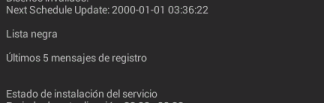
Anyway, we are investigating if error are related to a bad network configuration of device not affected by R104.
Thanks, will keep you updated.
---
### Author:  [@DanBW](https://community.xibo.org.uk/u/DanBW)
#### Post date: [May 24, 2019, 12:51pm UTC](https://community.xibo.org.uk/t/xibo-for-android-loses-connection/18905/5 "2019-05-24T12:51:25Z")
I can see in your screenshot that the `Next Scheduled Update` is in 2000. Can you confirm that the time and date are set correctly in the Android system settings?
Many Thanks.
---
### Author:  [@halonso](https://community.xibo.org.uk/u/halonso)
#### Post date: [June 12, 2019, 5:29pm UTC](https://community.xibo.org.uk/t/xibo-for-android-loses-connection/18905/6 "2019-06-12T17:29:37Z")
Look at this new log:

I’ve just updated Xibo from R104 to R108 and it begins to fail. I can connect to the CMS by clicking “Connect to CMS” and player appears connected. After 5 minutes (the configured refresh interval), player returned to appear offline and never again reconnects.
Player has Internet access and network is correctly up…
---
### Author:  [@DanBW](https://community.xibo.org.uk/u/DanBW)
#### Post date: [June 13, 2019, 10:28am UTC](https://community.xibo.org.uk/t/xibo-for-android-loses-connection/18905/7 "2019-06-13T10:28:14Z")
Thank you for the screenshots. According to the error logs you have provided, the Player is confirming that it does not have a network connection and so is unable to connect to your CMS. Your screenshots are quite limited and do not provide any time stamps so I have no idea how old these logs are.
You mentioned that the Player appears connected to your CMS when you enter the CMS credentials in `Connect to CMS`, can you confirm what you are seeing that makes you think they are connected? What does the Display entry look like in your CMS, is it showing as up to date?
You didn’t respond to my question about making sure that the time and date are set correctly on the device running your Player. Can you confirm they are set properly?
Can you provide a full status screenshot? You can always edit the photo so that any info you want to keep private is hidden or send it to me in a private message. Without being able to see more than you are providing, it is hard to tell when you are getting these errors and if there are any other logs that could explain your issue.
Please also let me know if this is a Wifi or wired network connection.
Many Thanks.
---
### Author:  [@halonso](https://community.xibo.org.uk/u/halonso)
#### Post date: [August 2, 2019, 9:05am UTC](https://community.xibo.org.uk/t/xibo-for-android-loses-connection/18905/8 "2019-08-02T09:05:30Z")
Hi Dan, sorry for delay.
I attach a recent capture of status screen:
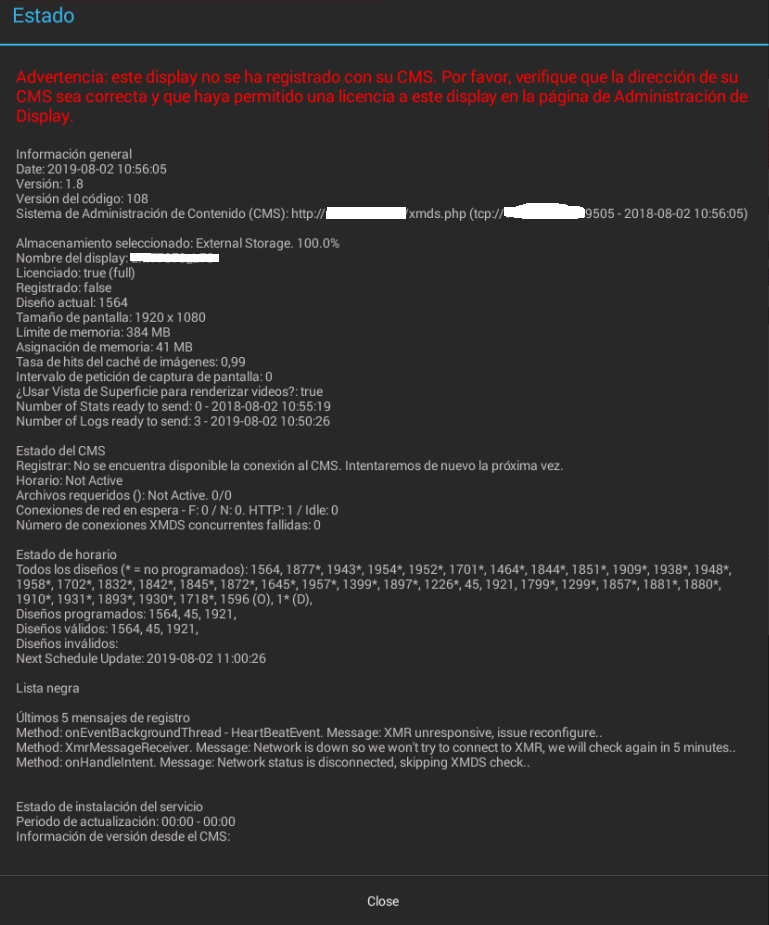
We use an android player with wired connection (RJ45) and static IP.
Time and date seems ok. Internet navigation it’s ok. If I click “Connect to CMS” it connects to CMS and appears online (cms connected tick) for 5 minutes, after that becomes offline again.
Seems like only Connect to CMS method uses network connection okay, but not the periodic update check.
That problem not exists in release R104, so… what is the difference between the two releases?
Many thanks!
---
### Author:  [@DanBW](https://community.xibo.org.uk/u/DanBW)
#### Post date: [August 6, 2019, 7:50am UTC](https://community.xibo.org.uk/t/xibo-for-android-loses-connection/18905/9 "2019-08-06T07:50:25Z")
Thank you for your reply, no need to apologise for the delay.
I can see 2 things in the Status screenshot you provided that will need to be addressed. The first is that the Player has not been registered in your CMS. This is quite unusual as you appear to have a large number of Events scheduled to this Player, yet it is not Authorised. Did you de-authorise the Player after you scheduled Events for it?
The second issue you have appears to be related to your network. You have errors stating that the Network connection is down/disconnected, so the Player is unable to connect to your CMS.
There are no differences between the R104 and R108 that would explain why your Player fails to connect to your CMS, nothing has changed about the APK that would affect that. Are there any security devices on your network that may be stopping the Player from connecting to your CMS?
Many Thanks.
---
### Author:  [@halonso](https://community.xibo.org.uk/u/halonso)
#### Post date: [August 6, 2019, 11:12am UTC](https://community.xibo.org.uk/t/xibo-for-android-loses-connection/18905/10 "2019-08-06T11:12:55Z")
Hi Dan!
_Did you de-authorise the Player after you scheduled Events for it?_
Of course not, player was authorised months ago, so it have content downloaded.
I have the displays automatic authorization setted on CMS too.
This message dissapears when I click “Connect to CMS” and returns after 5 minutes (configured updating time). Display seems always authorised on CMS. (tick icon)
_Are there any security devices on your network that may be stopping the Player from connecting to your CMS?_
Negative. We have more a more players connected identically and they work perfectly, all with version R104…
Thanks to you
---
### Author:  [@DanBW](https://community.xibo.org.uk/u/DanBW)
#### Post date: [August 6, 2019, 12:04pm UTC](https://community.xibo.org.uk/t/xibo-for-android-loses-connection/18905/11 "2019-08-06T12:04:54Z")
Thank you for answering my questions about this issue. Can you also confirm if your other players are on the same network as the Player you are having an issue with?
Many Thanks.
---
### Author:  [@halonso](https://community.xibo.org.uk/u/halonso)
#### Post date: [August 6, 2019, 12:19pm UTC](https://community.xibo.org.uk/t/xibo-for-android-loses-connection/18905/12 "2019-08-06T12:19:07Z")
Yes. All players are on the same network. No firewalls or traffic policies between players and CMS.
Thanks!
---
### Author:  [@DanBW](https://community.xibo.org.uk/u/DanBW)
#### Post date: [August 6, 2019, 12:24pm UTC](https://community.xibo.org.uk/t/xibo-for-android-loses-connection/18905/13 "2019-08-06T12:24:02Z")
Thanks for confirming. At this point I would be interested to see what happens when you uninstall the R108 Player on that device and reinstall R104. Could you do this and report if the issue is indeed not occurring on this device once you return to using the R104 Player please? I can then discuss this difference with my colleagues.
Many Thanks.
---
### Author:  [@halonso](https://community.xibo.org.uk/u/halonso)
#### Post date: [August 6, 2019, 12:42pm UTC](https://community.xibo.org.uk/t/xibo-for-android-loses-connection/18905/14 "2019-08-06T12:42:20Z")
Yes, we have already tried.
When we returned to R104 player works perfectly. No connectivity issues!
It’s strange, seems like a functionality or mod of R108 causes the issue.
Thanks!
---
### Author:  [@DanBW](https://community.xibo.org.uk/u/DanBW)
#### Post date: [August 6, 2019, 1:59pm UTC](https://community.xibo.org.uk/t/xibo-for-android-loses-connection/18905/15 "2019-08-06T13:59:03Z")
Could you also confirm if the Player is set to run as Launcher? If it is, could you change the setting so that it does not?
To do this, go to the System settings for Android and select the Home option. Make sure that you do not have Xibo set as Home. After you have done this, can you try the Player again please to see if there is any change?
Many Thanks.
---
### Author:  [@halonso](https://community.xibo.org.uk/u/halonso)
#### Post date: [August 7, 2019, 11:16am UTC](https://community.xibo.org.uk/t/xibo-for-android-loses-connection/18905/16 "2019-08-07T11:16:54Z")
Hi Dan, I’ve changed Home app to Android Launcher… but no good news, same problem…network issues but Internet works perfectly on the player ☹
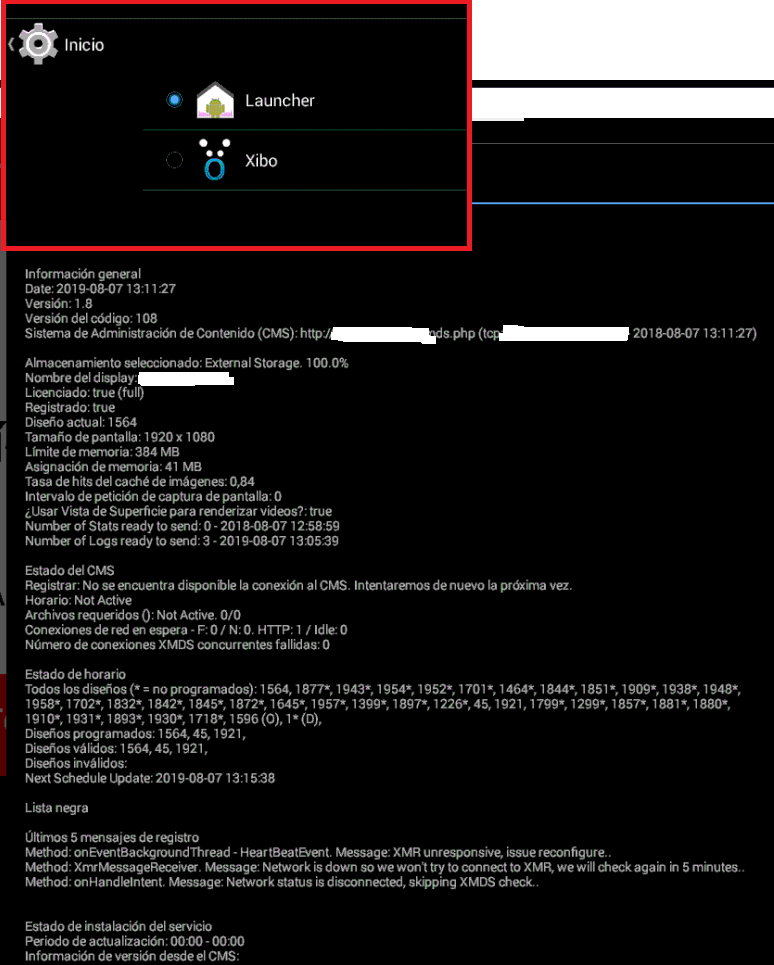
Thanks
---
### Author:  [@DanBW](https://community.xibo.org.uk/u/DanBW)
#### Post date: [August 8, 2019, 12:06pm UTC](https://community.xibo.org.uk/t/xibo-for-android-loses-connection/18905/17 "2019-08-08T12:06:00Z")
Thank you for changing the setting and sorry to hear that it has not resolved the issue. Are all of your devices running the Xibo Player the same make and model, as well as running the same version of Android and with the same Firmware version?
Many Thanks.
---
### Author:  [@halonso](https://community.xibo.org.uk/u/halonso)
#### Post date: [August 9, 2019, 7:46am UTC](https://community.xibo.org.uk/t/xibo-for-android-loses-connection/18905/18 "2019-08-09T07:46:14Z")
Hi Dan, yes, of course. All devices are the same.
I think is not a device problem, because the R108 does not work on any device, but if I install R104 works on all devices, this is the version we have in production now.
Thanks
---
### Author:  [@system](https://community.xibo.org.uk/u/system)
#### Post date: [March 4, 2020, 5:16pm UTC](https://community.xibo.org.uk/t/xibo-for-android-loses-connection/18905/19 "2020-03-04T17:16:15Z")