# Taskbar displays over Xibo
**URL:** https://community.xibo.org.uk/t/taskbar-displays-over-xibo/36298
**Category:** Xibo Player for Windows
**Created:** [September 3, 2025, 2:51pm UTC](https://community.xibo.org.uk/t/taskbar-displays-over-xibo/36298 "2025-09-03T14:51:23Z")
**Posts on this page:** 11
**Page:** 1
### Author:  [@jrodlivewire06](https://community.xibo.org.uk/u/jrodlivewire06)
#### Post date: [September 3, 2025, 2:51pm UTC](https://community.xibo.org.uk/t/taskbar-displays-over-xibo/36298/1 "2025-09-03T14:51:23Z")
### Before completing please check that the time, date and timezone have been correctly set on the device running the Player.
To be completed by the original poster:
# Player Version
4.404.1
# Issue
After the PC’s restart the taskbar displays over the Xibo software even though the taskbar is set to auto hide. This issue seemed to start after installing Windows 24H2 or at least the August cumulative.
---
### Author:  [@frederic\_Horcholle](https://community.xibo.org.uk/u/frederic_Horcholle)
#### Post date: [September 3, 2025, 3:38pm UTC](https://community.xibo.org.uk/t/taskbar-displays-over-xibo/36298/2 "2025-09-03T15:38:24Z")
> [@jrodlivewire06](#):
>
> After the PC’s restart the taskbar displays over the Xibo software even though the taskbar is set to auto hide. This issue seemed to start after installing Windows 24H2 or at least the Augu
Hi same to me with W11PRO last version 4.05.
---
### Author:  [@frederic\_Horcholle](https://community.xibo.org.uk/u/frederic_Horcholle)
#### Post date: [September 3, 2025, 3:55pm UTC](https://community.xibo.org.uk/t/taskbar-displays-over-xibo/36298/3 "2025-09-03T15:55:39Z")
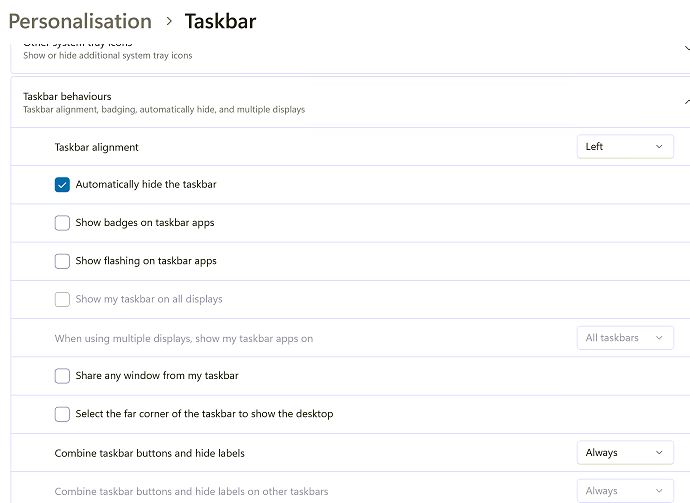
Here is my new config for today, I will check tomorrow, if it lasts
---
### Author:  [@frederic\_Horcholle](https://community.xibo.org.uk/u/frederic_Horcholle)
#### Post date: [September 4, 2025, 7:27am UTC](https://community.xibo.org.uk/t/taskbar-displays-over-xibo/36298/4 "2025-09-04T07:27:13Z")
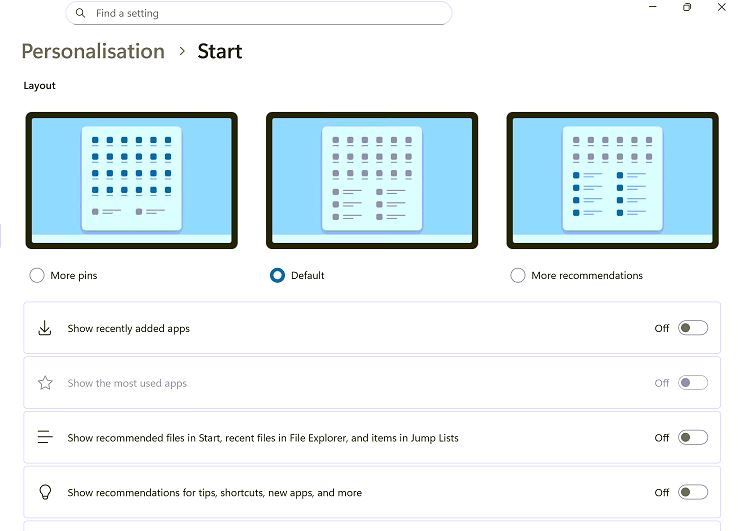
Still the same this morning, I saw that the Start Button was waiting for a click, I try this config for the start menu, next tomorrow !
---
### Author:  [@jschoenstein](https://community.xibo.org.uk/u/jschoenstein)
#### Post date: [September 8, 2025, 9:31pm UTC](https://community.xibo.org.uk/t/taskbar-displays-over-xibo/36298/5 "2025-09-08T21:31:37Z")
Hi, We used to see this with Win7 too. The mouse pointer (even if there’s no mouse) highlights the task bar and it shows on top of everything. I plugged a mouse into the PC so that it wouldn’t highlight the task bar.
---
### Author:  [@CraftedInSteel](https://community.xibo.org.uk/u/CraftedInSteel)
#### Post date: [November 14, 2025, 12:02pm UTC](https://community.xibo.org.uk/t/taskbar-displays-over-xibo/36298/6 "2025-11-14T12:02:45Z")
Hello,
since switching from Windows 10 to Windows 11, we have also had the problem that the taskbar remains visible.
Unfortunately, the Windows setting “Hide taskbar” does not change the behavior.
---
### Author:  [@CraftedInSteel](https://community.xibo.org.uk/u/CraftedInSteel)
#### Post date: [December 11, 2025, 8:24am UTC](https://community.xibo.org.uk/t/taskbar-displays-over-xibo/36298/7 "2025-12-11T08:24:01Z")
Hello,
There is a new version of the Windows client, which, according to the changelog, should fix the problem: [Xibo for Windows v4 R406 - Announcements - Xibo Community](https://community.xibo.org.uk/t/xibo-for-windows-v4-r406/36800)
I have installed the version on a trial basis and will report back.
---
### Author:  [@DanBW](https://community.xibo.org.uk/u/DanBW)
#### Post date: [December 12, 2025, 3:08pm UTC](https://community.xibo.org.uk/t/taskbar-displays-over-xibo/36298/8 "2025-12-12T15:08:56Z")
CraftedInSteel (cool name btw) is correct, the fix for the issue should be in the R406 Windows player.
---
### Author:  [@CraftedInSteel](https://community.xibo.org.uk/u/CraftedInSteel)
#### Post date: [December 15, 2025, 1:53pm UTC](https://community.xibo.org.uk/t/taskbar-displays-over-xibo/36298/9 "2025-12-15T13:53:42Z")
Hello,
I haven’t seen the taskbar since installing R406.
---
### Author:  [@LMorier](https://community.xibo.org.uk/u/LMorier)
#### Post date: [December 17, 2025, 3:50pm UTC](https://community.xibo.org.uk/t/taskbar-displays-over-xibo/36298/10 "2025-12-17T15:50:20Z")
Hello!
We’ve had the same issue and I’ve been pulling my hairs for weeks to find the cause. Maybe your situation will be different but I’ll share our discovery.
My epiphany was when I took the computer down from the TV and plugged it to my test station (That has a standard computer display). I then couldn’t reproduce the issue.
Turns out the thin client we use for Xibo Windows automatically put it’s resolution to 4K to match the TV. Xibo was then crashing and the taskbar retained focus.
By changing the resolution to 1080P Xibo stopped crashing so we didnt have the issue again.
---
### Author:  [@system](https://community.xibo.org.uk/u/system)
#### Post date: [March 18, 2026, 9:51pm UTC](https://community.xibo.org.uk/t/taskbar-displays-over-xibo/36298/11 "2026-03-18T21:51:02Z")
This topic was automatically closed 91 days after the last reply. New replies are no longer allowed.