# \[SOLVED\] V4.0.0 - Some Bugs + ZMQ Problems | ZMQ for PHP 8.2.10 NTS | OpenSSL 3 Legacy Setting to Windows Server IIS
**URL:** https://community.xibo.org.uk/t/solved-v4-0-0-some-bugs-zmq-problems-zmq-for-php-8-2-10-nts-openssl-3-legacy-setting-to-windows-server-iis/29954
**Category:** Get Help
**Created:** [September 5, 2023, 9:12pm UTC](https://community.xibo.org.uk/t/solved-v4-0-0-some-bugs-zmq-problems-zmq-for-php-8-2-10-nts-openssl-3-legacy-setting-to-windows-server-iis/29954 "2023-09-05T21:12:36Z")
**Posts on this page:** 11
**Page:** 2
### Author:  [@wer83](https://community.xibo.org.uk/u/wer83)
#### Post date: [September 14, 2023, 5:34pm UTC](https://community.xibo.org.uk/t/solved-v4-0-0-some-bugs-zmq-problems-zmq-for-php-8-2-10-nts-openssl-3-legacy-setting-to-windows-server-iis/29954/21 "2023-09-14T17:34:48Z")
Can you run XMR manually? Open a command prompt and navigate to where ever your Xibo directory is (for instance on mine, C:\Xibo-CMS) and then the Vendor\Bin directory and run “php XMR.phar” and see if it starts up and gives heartbeats?
---
### Author:  [@pitoco02](https://community.xibo.org.uk/u/pitoco02)
#### Post date: [September 14, 2023, 5:59pm UTC](https://community.xibo.org.uk/t/solved-v4-0-0-some-bugs-zmq-problems-zmq-for-php-8-2-10-nts-openssl-3-legacy-setting-to-windows-server-iis/29954/22 "2023-09-14T17:59:28Z")
Great, since your XMR is working well, I’ll focus on troubleshooting my environment’s settings in this case. I use an external XMR server hosted on AWS, so I’ll see if there’s anything I can do there.
---
### Author:  [@wer83](https://community.xibo.org.uk/u/wer83)
#### Post date: [September 14, 2023, 6:38pm UTC](https://community.xibo.org.uk/t/solved-v4-0-0-some-bugs-zmq-problems-zmq-for-php-8-2-10-nts-openssl-3-legacy-setting-to-windows-server-iis/29954/23 "2023-09-14T18:38:35Z")
I asked because I was getting an error that revealed itself to me when I ran it manually; it was looking for/wanted the config.json file to be in C:\XiboInstallDir\vendor\xibosignage\xibo-xmr\bin instead of C:\XiboInstallDir\Vendor\Bin directory.
---
### Author:  [@pitoco02](https://community.xibo.org.uk/u/pitoco02)
#### Post date: [September 14, 2023, 6:48pm UTC](https://community.xibo.org.uk/t/solved-v4-0-0-some-bugs-zmq-problems-zmq-for-php-8-2-10-nts-openssl-3-legacy-setting-to-windows-server-iis/29954/24 "2023-09-14T18:48:15Z")
My requests are coming to my XMR server normally, and still work with my V3 CMS’s:
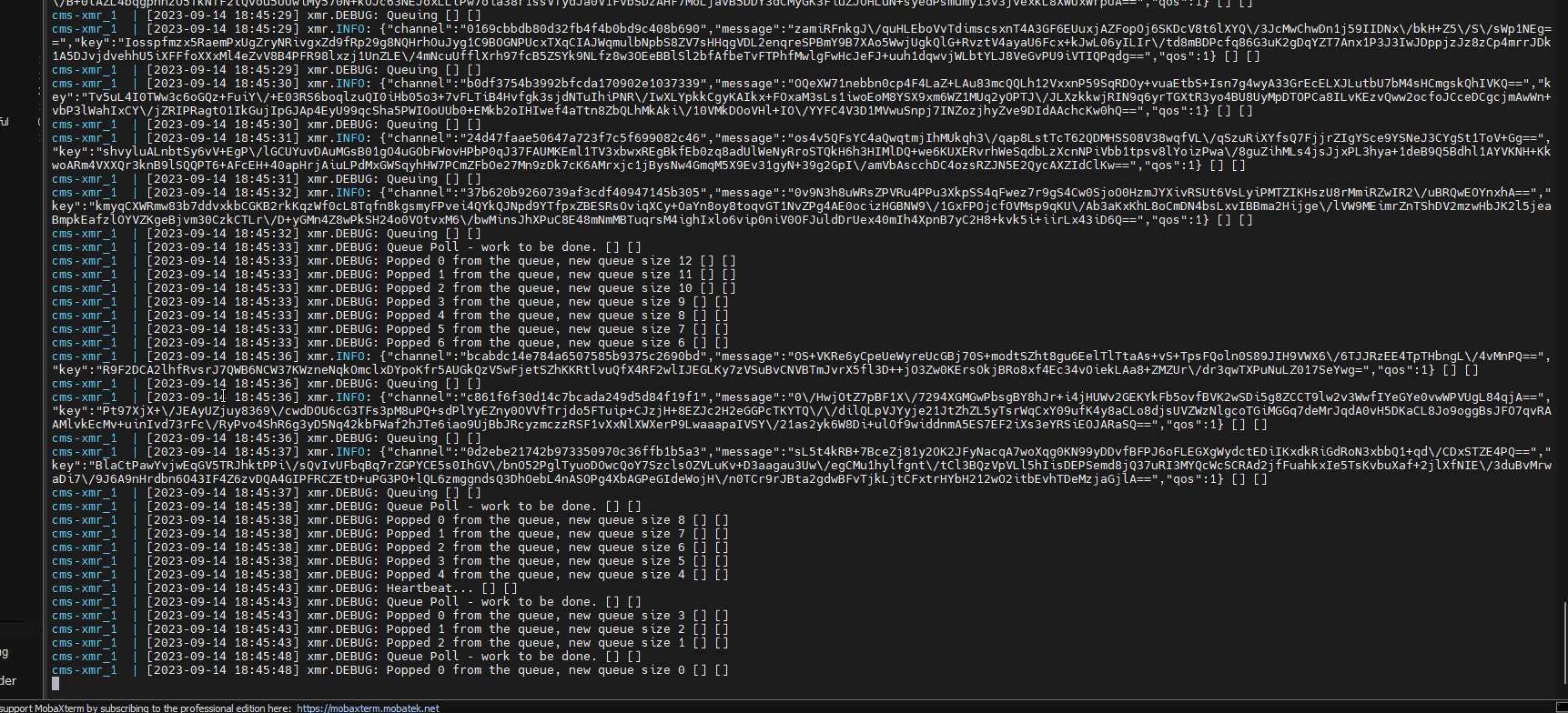
I’m using the latest version of XMR (0.11) on that server.
But… in my V4 CMS, it dosen’t complete te command:

```auto
Player action connection failed. E = Cannot seal message
```
---
### Author:  [@pitoco02](https://community.xibo.org.uk/u/pitoco02)
#### Post date: [September 14, 2023, 8:04pm UTC](https://community.xibo.org.uk/t/solved-v4-0-0-some-bugs-zmq-problems-zmq-for-php-8-2-10-nts-openssl-3-legacy-setting-to-windows-server-iis/29954/25 "2023-09-14T20:04:13Z")
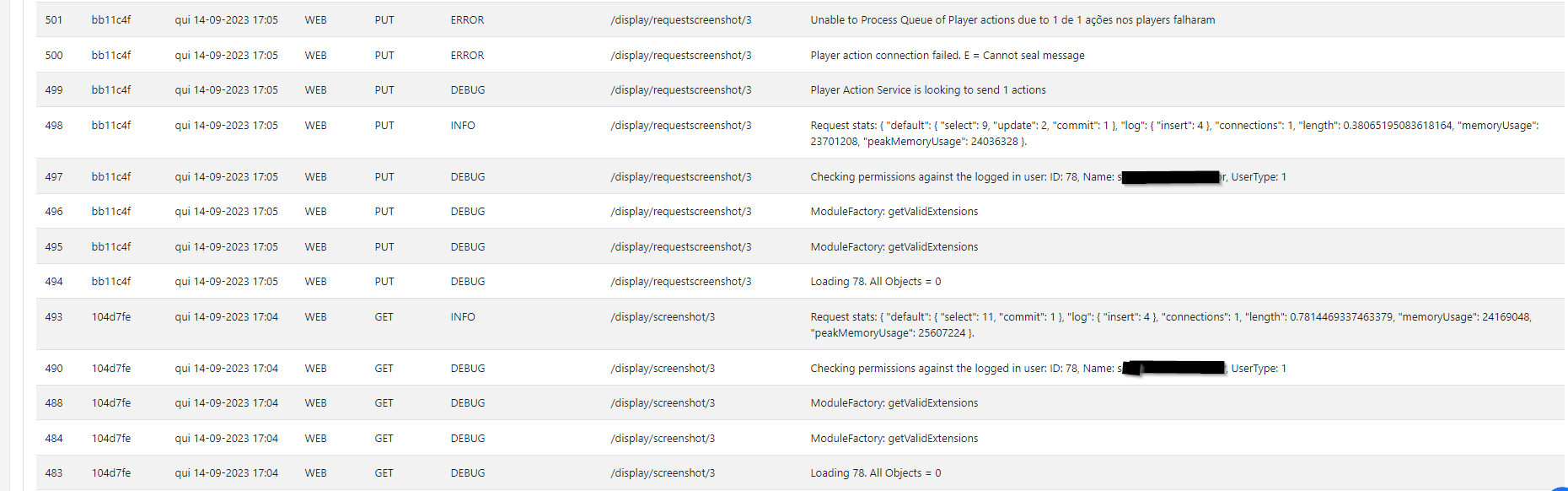
This is what is shown in the debugger
---
### Author:  [@dan](https://community.xibo.org.uk/u/dan)
#### Post date: [September 15, 2023, 7:38am UTC](https://community.xibo.org.uk/t/solved-v4-0-0-some-bugs-zmq-problems-zmq-for-php-8-2-10-nts-openssl-3-legacy-setting-to-windows-server-iis/29954/26 "2023-09-15T07:38:10Z")
> [@pitoco02](#):
>
> Good news guys!
> I was able to solve that!
This is fantastic news! Are these files you produced yourself, or ones you have found?
> Cannot seal message
This comes from `openssl_seal` and is not related to ZMQ. I think you’ll need to allow openssl to use legacy cyphers in `php.ini` to fix this issue.
I’ve had a quick look and I think this link explains it: [Apache/PHP Installing cypher for openssl() - missed in openssl\_get\_cipher\_methods - Stack Overflow](https://stackoverflow.com/a/74608852/6416145)
---
### Author:  [@pitoco02](https://community.xibo.org.uk/u/pitoco02)
#### Post date: [September 15, 2023, 12:37pm UTC](https://community.xibo.org.uk/t/solved-v4-0-0-some-bugs-zmq-problems-zmq-for-php-8-2-10-nts-openssl-3-legacy-setting-to-windows-server-iis/29954/27 "2023-09-15T12:37:37Z")
> [@dan](#):
>
> This is fantastic news! Are these files you produced yourself, or ones you have found?
Yes, i produced based on some researches and the documentation of that thread on github (
I spent the night trying to understand how to do this) :
>
> **[How to compile a PHP extension (DLL file) in Windows with Visual Studio](https://ourcodeworld.com/articles/read/804/how-to-compile-a-php-extension-dll-file-in-windows-with-visual-studio#disqus_thread)**
>
> Learn how to compile PHP extensions from its source code using Visual Studio in a Windows environment.
> **[\[PHP\] Compile an extension on Windows](https://blog.benoitblanchon.fr/build-php-extension-on-windows/)**
>
> I recently wrote a PHP extension and while the documentation is very clear on how to build it on Linux, there is not so much information on how to compile an extension on Windows.
When i have some time, i’ll write a clearer documentation about how to build/compile it.
> [@dan](#):
>
> This comes from `openssl_seal` and is not related to ZMQ. I think you’ll need to allow openssl to use legacy cyphers in `php.ini` to fix this issue.
Great! I’ll test it
---
### Author:  [@dan](https://community.xibo.org.uk/u/dan)
#### Post date: [September 15, 2023, 4:22pm UTC](https://community.xibo.org.uk/t/solved-v4-0-0-some-bugs-zmq-problems-zmq-for-php-8-2-10-nts-openssl-3-legacy-setting-to-windows-server-iis/29954/28 "2023-09-15T16:22:19Z")
> [@pitoco02](#):
>
> When i have some time, i’ll write a clearer documentation about how to build/compile it.
Having some documentation for building it would be super useful as a record.
I was actually thinking whether I could add the link `https://github.com/zeromq/php-zmq/files/12610669/ZMQ-4.3.4_x64_PHP8.2.10-NTS.zip` to the CMS install documentation in a note for windows.
I wasn’t sure how you got them to be uploaded into the zeromq repository and whether there was a release page or issue or something that you’d worked on with them.
---
### Author:  [@pitoco02](https://community.xibo.org.uk/u/pitoco02)
#### Post date: [September 15, 2023, 7:28pm UTC](https://community.xibo.org.uk/t/solved-v4-0-0-some-bugs-zmq-problems-zmq-for-php-8-2-10-nts-openssl-3-legacy-setting-to-windows-server-iis/29954/29 "2023-09-15T19:28:48Z")
> [@dan](#):
>
> I was actually thinking whether I could add the link `https://github.com/zeromq/php-zmq/files/12610669/ZMQ-4.3.4_x64_PHP8.2.10-NTS.zip` to the CMS install documentation in a note for windows.
Feel free to make it available to IIS/Windows Server users
> [@dan](#):
>
> This comes from `openssl_seal` and is not related to ZMQ. I think you’ll need to allow openssl to use legacy cyphers in `php.ini` to fix this issue.
Still trying… but its not working
---
### Author:  [@pitoco02](https://community.xibo.org.uk/u/pitoco02)
#### Post date: [September 15, 2023, 11:48pm UTC](https://community.xibo.org.uk/t/solved-v4-0-0-some-bugs-zmq-problems-zmq-for-php-8-2-10-nts-openssl-3-legacy-setting-to-windows-server-iis/29954/30 "2023-09-15T23:48:10Z")
> [@pitoco02](#):
>
> Still trying… but its not working
Finally it’s working… man 🫠
That’s how i did:
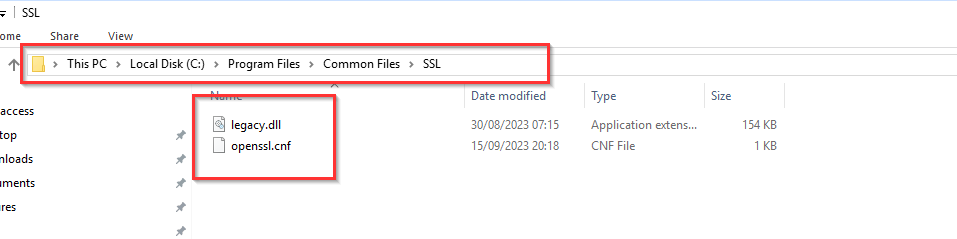
I ran the phpinfo() command and found where the openssl configuration files should be.
Both the folder and the files did not exist, and it’s not possible to change the directory via PHP.ini. In this case, I created the SSL folder as it should be.
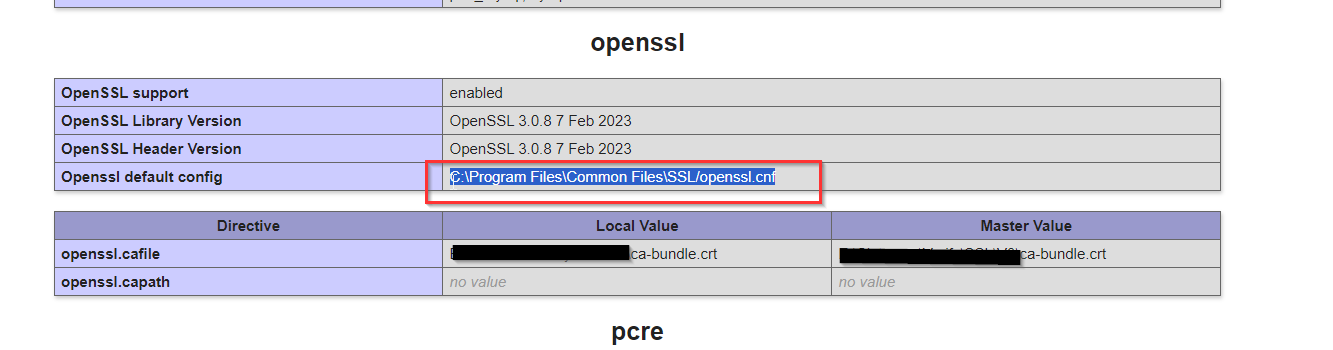
```auto
C:\Program Files\Common Files\SSL/openssl.cnf
```
In PHP version 8.2.10 (which I’m using) in the `extras\ssl\` folder, they provided the legacy.dll to be used on Windows :
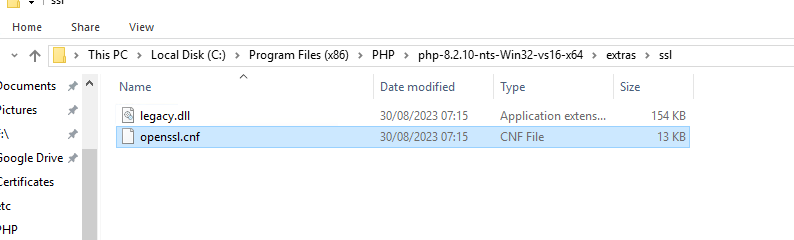
I copied the files and made the changes mentioned in this link to the openssl.cnf file.
> [@dan](#):
>
> I’ve had a quick look and I think this link explains it: [Apache/PHP Installing cypher for openssl() - missed in openssl\_get\_cipher\_methods - Stack Overflow](https://stackoverflow.com/a/74608852/6416145)
```auto
[openssl_init]
providers = provider_sect
ssl_conf = ssl_sect
# List of providers to load
[provider_sect]
default = default_sect
legacy = legacy_sect
[default_sect]
activate = 1
[legacy_sect]
activate = 1
```
After that, I had to set an environment variable called `OPENSSL_MODULES` and point it to the folder where the` openssl.cnf` and `legacy.dll` files were located.
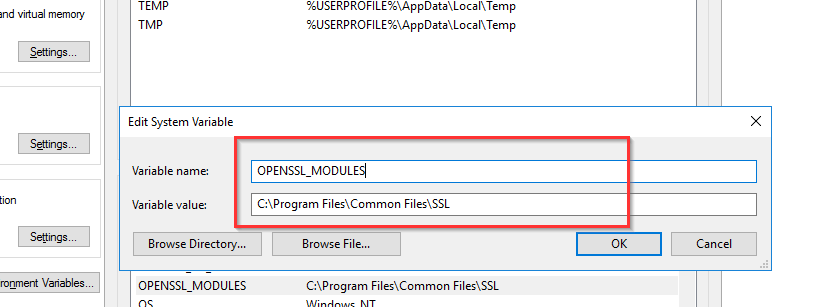
And it worked 😓
i used those links to solve that in my case:
>
>
> \### Description
>
> As OpenSSL 3 has disabled legacy algorithms by default we need …a way to reactivate them.
>
> This seems not to be possible with the current RC of PHP 8.2 on Windows:
>
> !\[grafik\](https://user-images.githubusercontent.com/12390057/199956957-7cc708f9-c3f0-43ef-b235-d1ac893e67f6.png)
> I took the configuration file from https://salsa.debian.org/php-team/pear/php-dapphp-radius/-/merge\_requests/2/diffs
>
> Maybee \`legacy.dll\` is simply missing?
>
> \### PHP Version
>
> PHP 8.2.0RC5
>
> \### Operating System
>
> Windows 10
>
> **[Enable OpenSSL legacy providers during tests (!2) · Merge requests · Debian...](https://salsa.debian.org/php-team/pear/php-dapphp-radius/-/merge_requests/2/diffs)**
>
> This allows the package to build with OpenSSL 3.
Now this topic can be closed hahaha My V4 CMS it’s running well with IIS/ Windows Server Custom Configuration.
Thank you @dan
---
### Author:  [@system](https://community.xibo.org.uk/u/system)
#### Post date: [December 16, 2023, 5:48am UTC](https://community.xibo.org.uk/t/solved-v4-0-0-some-bugs-zmq-problems-zmq-for-php-8-2-10-nts-openssl-3-legacy-setting-to-windows-server-iis/29954/31 "2023-12-16T05:48:31Z")
This topic was automatically closed 91 days after the last reply. New replies are no longer allowed.
[Previous page](https://community.xibo.org.uk/t/solved-v4-0-0-some-bugs-zmq-problems-zmq-for-php-8-2-10-nts-openssl-3-legacy-setting-to-windows-server-iis/29954.md?page=1)