# RTSP IPTV to Layout Region - Windows Client Not Woking
**URL:** https://community.xibo.org.uk/t/rtsp-iptv-to-layout-region-windows-client-not-woking/8679
**Category:** Uncategorised Topics
**Created:** [February 6, 2017, 6:06am UTC](https://community.xibo.org.uk/t/rtsp-iptv-to-layout-region-windows-client-not-woking/8679 "2017-02-06T06:06:18Z")
**Posts on this page:** 6
**Page:** 1
### Author:  [@irfan](https://community.xibo.org.uk/u/irfan)
#### Post date: [February 6, 2017, 6:06am UTC](https://community.xibo.org.uk/t/rtsp-iptv-to-layout-region-windows-client-not-woking/8679/1 "2017-02-06T06:06:19Z")
Dear Friends,
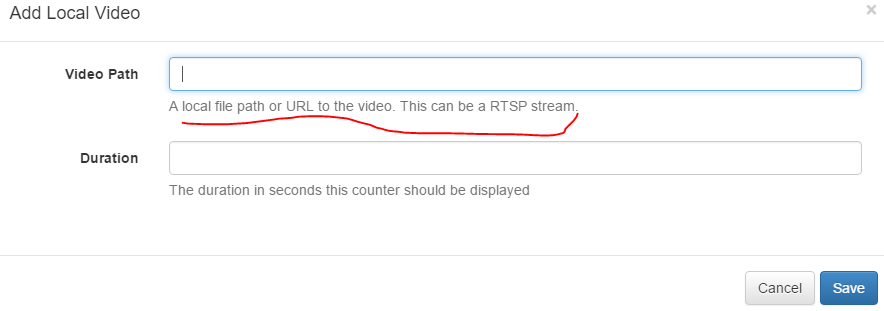
Please advise me on how to put IPTV Url with rstp to work in Layout Region. as shown below the procedure procedure is not workable unless i’m missing some configuration. kindly advise.
rtsp://172.30.14.48:8554/test
i’ve tested the same on two VLC instances and its working.
Is it possible to put a VLC instance through a command line in Layout Region
Highly appreciate your solutions.
---
### Author:  [@Peter](https://community.xibo.org.uk/u/Peter)
#### Post date: [February 6, 2017, 9:00am UTC](https://community.xibo.org.uk/t/rtsp-iptv-to-layout-region-windows-client-not-woking/8679/2 "2017-02-06T09:00:19Z")
You will need correct rtsp link to a video, for example
`rtsp://184.72.239.149/vod/mp4:BigBuckBunny_115k.mov`
Then all you need to do is to put that in the local video module and it should work on android clients.
For windows clients it’s a bit more complicated - [Streaming live video to Xibo .NET client](https://community.xibo.org.uk/t/streaming-live-video-to-xibo-net-client/3162)
Other than that you could perhaps try to use embed html module in Xibo? Assuming that IPTV provides an embed link to their streams.
---
### Author:  [@eblumberg](https://community.xibo.org.uk/u/eblumberg)
#### Post date: [April 28, 2017, 8:27pm UTC](https://community.xibo.org.uk/t/rtsp-iptv-to-layout-region-windows-client-not-woking/8679/3 "2017-04-28T20:27:52Z")
So - if I understand you correctly, Xibo is unable to play an RTSP stream in the Local Video Module - EVEN THOUGH the instructions on the Local Video module specifically state that you can use an RTSP Stream. Is that correct?’
---
### Author:  [@Guru\_Evi](https://community.xibo.org.uk/u/Guru_Evi)
#### Post date: [April 30, 2017, 10:57pm UTC](https://community.xibo.org.uk/t/rtsp-iptv-to-layout-region-windows-client-not-woking/8679/4 "2017-04-30T22:57:47Z")
No, RTSP IPTV works - I have it working on my Android players.
---
### Author:  [@eblumberg](https://community.xibo.org.uk/u/eblumberg)
#### Post date: [May 1, 2017, 3:21pm UTC](https://community.xibo.org.uk/t/rtsp-iptv-to-layout-region-windows-client-not-woking/8679/5 "2017-05-01T15:21:06Z")
But for some reason, not on Windows Players?
---
### Author:  [@Guru\_Evi](https://community.xibo.org.uk/u/Guru_Evi)
#### Post date: [May 1, 2017, 4:00pm UTC](https://community.xibo.org.uk/t/rtsp-iptv-to-layout-region-windows-client-not-woking/8679/6 "2017-05-01T16:00:40Z")
Not sure, Windows itself has no (good) native RTSP facilities, you may need to install the right codecs for it to work or use an HTML page. There is an HLS plugin which I understand is better for Windows live streaming.
Additionally, the Windows player itself is many missing features that the Android player such as overlapping regions so I do not even consider the Windows player as a viable option for production use, from what I understand it’s quite old early Windows-only technology and is slated to be replaced.