# Reboot Command Not Working
**URL:** https://community.xibo.org.uk/t/reboot-command-not-working/24705
**Category:** Xibo Player for Android
**Created:** [March 18, 2021, 8:26am UTC](https://community.xibo.org.uk/t/reboot-command-not-working/24705 "2021-03-18T08:26:55Z")
**Posts on this page:** 5
**Page:** 1
### Author:  [@LalitSharma](https://community.xibo.org.uk/u/LalitSharma)
#### Post date: [March 18, 2021, 8:26am UTC](https://community.xibo.org.uk/t/reboot-command-not-working/24705/1 "2021-03-18T08:26:55Z")
I have installed xibo CMS with Windows 10.
I have also configured XMR properly. But my reboot command is not working properly.
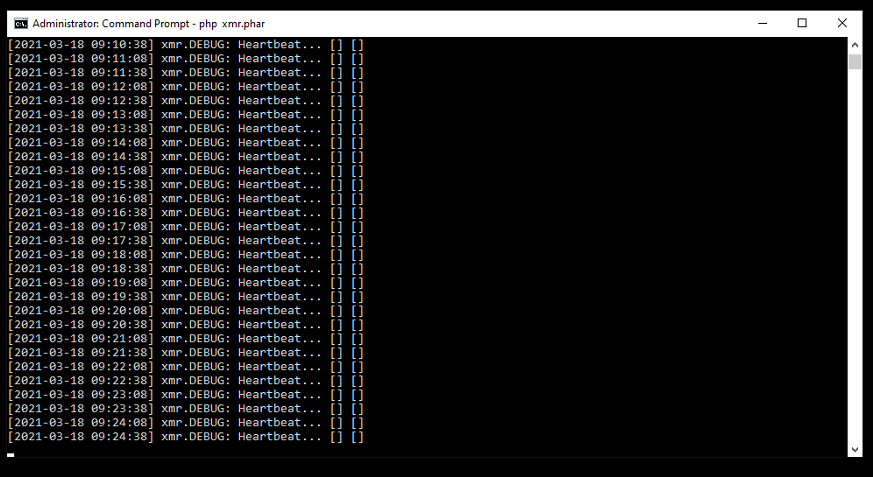
Please help…
---
### Author:  [@DanBW](https://community.xibo.org.uk/u/DanBW)
#### Post date: [March 18, 2021, 1:44pm UTC](https://community.xibo.org.uk/t/reboot-command-not-working/24705/2 "2021-03-18T13:44:28Z")
Hi LalitSharma.
I have been testing reboot commands for Windows and so far I have not encountered an issue. The command I use is:
`shutdown /f /r /t 0`
Can you also provide the following information:
- What player version are you using? For reference I am using [R256](https://blog.xibo.org.uk/xibo-for-windows-v2-r256/)
- What reboot command are you using?
- If you schedule the command using the Event schedule option, does it execute? This is a good way to test if the command works separate from XMR.
- Is your XMR service working for other commands, for example collect now?
- Is the time on your Windows 10 machine correct to within 30 seconds? If it is any longer then the XMR messages will expire and so not execute.
Many Thanks.
---
### Author:  [@LalitSharma](https://community.xibo.org.uk/u/LalitSharma)
#### Post date: [March 23, 2021, 5:30am UTC](https://community.xibo.org.uk/t/reboot-command-not-working/24705/3 "2021-03-23T05:30:47Z")
Thankyou for your support,
I am using Xibo 2 R207 on android platform not using windows platform only CMS configured on Windows 10 help with Xampp PHP version (7.2.4.0) XMR server running properly but hardware reboot command not working thru CMS for android xibo player,
Please Help for this issue…
Thanks
---
### Author:  [@DanBW](https://community.xibo.org.uk/u/DanBW)
#### Post date: [March 23, 2021, 8:46am UTC](https://community.xibo.org.uk/t/reboot-command-not-working/24705/4 "2021-03-23T08:46:12Z")
Thank you for confirming that you are actually using the Xibo for Android player. Below is a link to a guide on how to set up and send commands to your Xibo for Android player, which contains 4 reboot commands you can try. I usually use the `svc power reboot` for my players but you may wish to use one of the others. Please follow the steps and make sure you have set up your reboot command as mentioned in the guide. If the send command functionality is not working, please follow the section on how to schedule a command.
> [@How to set up a Reboot command on Xibo for Android](https://community.xibo.org.uk/t/how-to-set-up-a-reboot-command-on-xibo-for-android/23072):
>
> Creating a Reboot command for your Xibo for Android Player The Commands functionality is a powerful feature in Xibo CMS that allows predefined commands to be sent to the devices running your Xibo Players. There are two methods for sending commands, immediately via XMR or by scheduling a Command as an Event. Below is a brief overview on how to create and send a Reboot Command to an Android Device running the Xibo for Android Player. Please also note that I will be using CMS version 2.3.5 but th…
If it works when you use the schedule command functionality, then we know that the command is set up correctly and the issue is somehow XMR related. If that is the case, I would still recommend:
- Making sure that the time, date and time zone are correct on the device running your Android player to within 30 seconds.
- Testing other XMR related commands such as collect now.
- making sure that you have allowed traffic on the port you have configured your XMR service to use (9505 by default), in case the messages are being blocked by a firewall or other network configuration.
Many Thanks.
---
### Author:  [@system](https://community.xibo.org.uk/u/system)
#### Post date: [June 22, 2021, 2:46pm UTC](https://community.xibo.org.uk/t/reboot-command-not-working/24705/5 "2021-06-22T14:46:12Z")
This topic was automatically closed 91 days after the last reply. New replies are no longer allowed.