# Not more than 1 Android Client recognized by CMS
**URL:** https://community.xibo.org.uk/t/not-more-than-1-android-client-recognized-by-cms/6594
**Category:** Xibo Player for Android
**Created:** [July 14, 2016, 3:40pm UTC](https://community.xibo.org.uk/t/not-more-than-1-android-client-recognized-by-cms/6594 "2016-07-14T15:40:02Z")
**Posts on this page:** 20
**Page:** 1
### Author:  [@BrotherInMind](https://community.xibo.org.uk/u/BrotherInMind)
#### Post date: [July 14, 2016, 3:40pm UTC](https://community.xibo.org.uk/t/not-more-than-1-android-client-recognized-by-cms/6594/1 "2016-07-14T15:40:02Z")
Hello and good evening,
I have a weird issue with my CMS. I got 2 Android clients running Android version 6.0.1 on Raspberry Pis.
My CMS got the version 1.7.8 running.
When both clients are online the last client overwrites the first client. That means only one Display is showing up in the CMS.
they both got different MAC Adresses and IP Adresses. When i start the second client the second client overwrites the first one and only one display remains.
Any suggestions?
---
### Author:  [@cslaughter](https://community.xibo.org.uk/u/cslaughter)
#### Post date: [July 14, 2016, 11:38pm UTC](https://community.xibo.org.uk/t/not-more-than-1-android-client-recognized-by-cms/6594/2 "2016-07-14T23:38:46Z")
Sounds like the Android unit were cloned. When you do so, the Hardware key for Xibo will be the same on each cloned unit. I would recommend changing both Android Hardware Keys in the settings, on the units themselves. I would also then recommend leaving what will now be the outdated entry in the CMS and label it to remind you to change the hardware keys on new units. We have the exact same issue, and have done this to make sure that we don’t mess up a live unit in the field.
---
### Author:  [@BrotherInMind](https://community.xibo.org.uk/u/BrotherInMind)
#### Post date: [July 15, 2016, 6:40am UTC](https://community.xibo.org.uk/t/not-more-than-1-android-client-recognized-by-cms/6594/3 "2016-07-15T06:40:29Z")
Hello and thank you for your answer cslaughter,
How do i change this hardware key? And why the \*\*\*\*\* would the cms not take the MAC Adress which is unique to tell those clients apart?
---
### Author:  [@cslaughter](https://community.xibo.org.uk/u/cslaughter)
#### Post date: [July 15, 2016, 7:12am UTC](https://community.xibo.org.uk/t/not-more-than-1-android-client-recognized-by-cms/6594/4 "2016-07-15T07:12:32Z")
I can only tell you off the top of my head for Android, as we don’t run Windows Clients. (And even that is a bit rusty at the moment.)
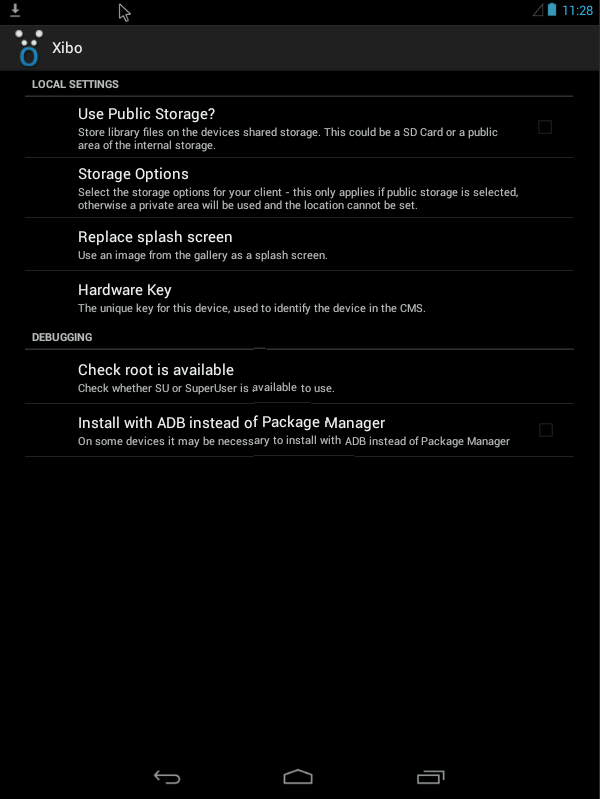
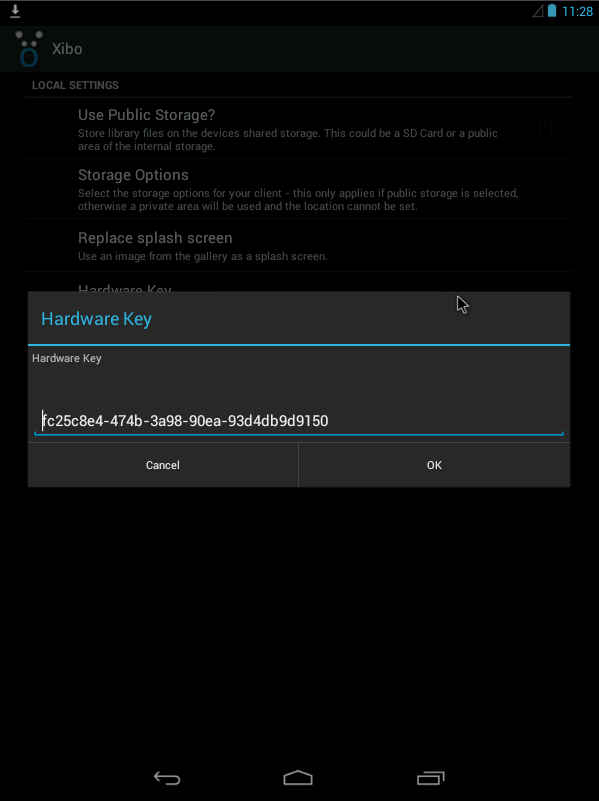
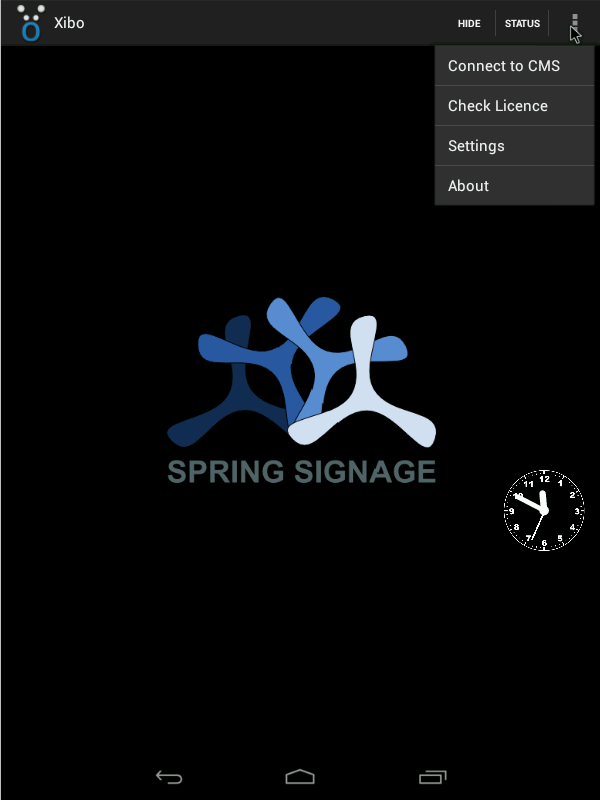
On the Android client, go to the top right, go to settings. In there is the hardware key. Be careful to replace a few characters or so and replace what you remove with characters 0-9 and a-f.
Restart the Android client for good measure and then reconnect to the CMS and configure.
I can’t speak to the MAC address part, as I did not take part in the design of the system. But I can tell you the designers are very good and have tried to adapt to changes in OSes as they have presented themselves. If you would like to make a suggest for a change, I would suggest looking in the features section. If you don’t already see it there, then please suggest the change, or maybe comment on a similar feature.
---
### Author:  [@alex](https://community.xibo.org.uk/u/alex)
#### Post date: [July 15, 2016, 7:31am UTC](https://community.xibo.org.uk/t/not-more-than-1-android-client-recognized-by-cms/6594/5 "2016-07-15T07:31:24Z")
The reason we don’t use the MAC address is there are some configurations where it’s desirable to have multiple Players appear as a single one to the CMS, or it can also be useful when replacing a failed Player to use its old hardware identifier so you don’t have to recreate any schedule assigned to the Player.
We don’t intend for you to clone or image the installed software. Had you installed the Player app on each device following the installation guide, this would not have been an issue for you.
---
### Author:  [@BrotherInMind](https://community.xibo.org.uk/u/BrotherInMind)
#### Post date: [July 15, 2016, 9:55am UTC](https://community.xibo.org.uk/t/not-more-than-1-android-client-recognized-by-cms/6594/6 "2016-07-15T09:55:00Z")
The player app was installed manually. It wasnt cloned. Just the sd card with the android image on it.
---
### Author:  [@alex](https://community.xibo.org.uk/u/alex)
#### Post date: [July 15, 2016, 10:13am UTC](https://community.xibo.org.uk/t/not-more-than-1-android-client-recognized-by-cms/6594/7 "2016-07-15T10:13:46Z")
As far as I know, the ID is generated randomly at installation time, so the chances of them being the same if manually installed are infinitesimally small. I’d go any buy a lottery ticket if I were you! 😃
---
### Author:  [@BrotherInMind](https://community.xibo.org.uk/u/BrotherInMind)
#### Post date: [July 15, 2016, 10:23am UTC](https://community.xibo.org.uk/t/not-more-than-1-android-client-recognized-by-cms/6594/8 "2016-07-15T10:23:46Z")
Where can i check this ID that is generated? I reinstalled the client 3 times by now. No changes.
I changed the build key in the android client with no success btw.
You need root to do that and change some numbers in the build. prop.
Lets see what i am able to achieve today…otherwise you are damn right i should buy a lottery ticket.
---
### Author:  [@alex](https://community.xibo.org.uk/u/alex)
#### Post date: [July 15, 2016, 10:26am UTC](https://community.xibo.org.uk/t/not-more-than-1-android-client-recognized-by-cms/6594/9 "2016-07-15T10:26:11Z")
The key is shown at the bottom of the settings page. That’s where you can edit it. You definitely don’t need to change anything in the build.prop file!
I’m not sure what you mean by you changed the build key?
Reinstalling won’t generate a new key - only on fresh installation - otherwise the value would change on upgrade.
---
### Author:  [@BrotherInMind](https://community.xibo.org.uk/u/BrotherInMind)
#### Post date: [July 15, 2016, 10:37am UTC](https://community.xibo.org.uk/t/not-more-than-1-android-client-recognized-by-cms/6594/10 "2016-07-15T10:37:25Z")
When i open up the client on my Anroid Device there is no option on the top right corner to open up any settings menu…
How does it look like when its working properly? How do you open it?
PS: And indeed they have the same hardware key
---
### Author:  [@alex](https://community.xibo.org.uk/u/alex)
#### Post date: [July 15, 2016, 10:51am UTC](https://community.xibo.org.uk/t/not-more-than-1-android-client-recognized-by-cms/6594/11 "2016-07-15T10:51:03Z")
You click on the screen to bring up the top bar. On some devices, you need to swipe up from the bottom of the screen to bring the bars back. Then the three dots menu, then settings:
---
### Author:  [@BrotherInMind](https://community.xibo.org.uk/u/BrotherInMind)
#### Post date: [July 15, 2016, 10:56am UTC](https://community.xibo.org.uk/t/not-more-than-1-android-client-recognized-by-cms/6594/12 "2016-07-15T10:56:04Z")
There is no HIDE no STATUS and no DOTS on the top right corner inside of the black bar…
I will redownload the android client and reinstall it…lets see what will happen although i dont think that will help much.
---
### Author:  [@alex](https://community.xibo.org.uk/u/alex)
#### Post date: [July 15, 2016, 11:02am UTC](https://community.xibo.org.uk/t/not-more-than-1-android-client-recognized-by-cms/6594/13 "2016-07-15T11:02:00Z")
It’s not something I’ve seen before where the menu items aren’t there.
You said you changed something in the Client itself? A build key?
What exactly did you change?
---
### Author:  [@BrotherInMind](https://community.xibo.org.uk/u/BrotherInMind)
#### Post date: [July 15, 2016, 11:11am UTC](https://community.xibo.org.uk/t/not-more-than-1-android-client-recognized-by-cms/6594/14 "2016-07-15T11:11:16Z")
No not in the client. I changed the build key of my android device. There is a file called build.prop in the system files where you can change that. I thought maybe that is the hardware key cslaughter was talking about.
PS: reinstallation of the client was not the solution btw. Still no menu on the top right corner inside the black bar …its just empty.
If i had this menu in the first place i would have never asked those questions
---
### Author:  [@alex](https://community.xibo.org.uk/u/alex)
#### Post date: [July 15, 2016, 11:21am UTC](https://community.xibo.org.uk/t/not-more-than-1-android-client-recognized-by-cms/6594/15 "2016-07-15T11:21:28Z")
Which Android image are you using for the RPi?
It’s not a device on our recommended hardware list so we won’t have specifically tested with it. Depending on which versions of the Pi your image runs on, I may have suitable hardware to try it here too.
---
### Author:  [@BrotherInMind](https://community.xibo.org.uk/u/BrotherInMind)
#### Post date: [July 15, 2016, 11:31am UTC](https://community.xibo.org.uk/t/not-more-than-1-android-client-recognized-by-cms/6594/16 "2016-07-15T11:31:02Z")
Its a modified version of the android tv running android 6.0.1 on RPi3.
[http://geektillithertz.com/wordpress/index.php/2016/06/26/androidpi3cpugpu-update/](http://geektillithertz.com/wordpress/index.php/2016/06/26/androidpi3cpugpu-update/)
You can download the image from this site. I have modified this version in order to run the display in full hd 50hz.
---
### Author:  [@alex](https://community.xibo.org.uk/u/alex)
#### Post date: [July 15, 2016, 11:33am UTC](https://community.xibo.org.uk/t/not-more-than-1-android-client-recognized-by-cms/6594/17 "2016-07-15T11:33:21Z")
I only have an RPi2 handy so I can’t run it I’m afraid. Is it possible that whatever you changed resolution wise has pushed the menu over the edge of the screen?
---
### Author:  [@BrotherInMind](https://community.xibo.org.uk/u/BrotherInMind)
#### Post date: [July 15, 2016, 11:46am UTC](https://community.xibo.org.uk/t/not-more-than-1-android-client-recognized-by-cms/6594/18 "2016-07-15T11:46:55Z")
i just changed the resolution back to 720p and nothing has changed.
Still trying to work this out…maybe i have to change anything in the cms resolutionwise?
---
### Author:  [@alex](https://community.xibo.org.uk/u/alex)
#### Post date: [July 15, 2016, 11:51am UTC](https://community.xibo.org.uk/t/not-more-than-1-android-client-recognized-by-cms/6594/19 "2016-07-15T11:51:09Z")
In the Display Settings Profile in the CMS for your Android device, have you tried to configure a resolution there at all?
Under location, the Screen Dimensions box should be empty for “full screen”.
You could try entering a resolution there, although it shouldn’t be necessary.
So something like
`0,0,1280,720` would give you 1280x720 resolution
---
### Author:  [@BrotherInMind](https://community.xibo.org.uk/u/BrotherInMind)
#### Post date: [July 15, 2016, 3:11pm UTC](https://community.xibo.org.uk/t/not-more-than-1-android-client-recognized-by-cms/6594/20 "2016-07-15T15:11:13Z")
There was nothing i could do to make it show up.
Therefore i was forced to seach for the file with the hardware key. I finally found it and changed the key.
Now i have my two displays and they are running fine.
Thx for your support and have a nice day
[Next page](https://community.xibo.org.uk/t/not-more-than-1-android-client-recognized-by-cms/6594.md?page=2)