# Non-docker Installation on Ubuntu Server 22.04
**URL:** https://community.xibo.org.uk/t/non-docker-installation-on-ubuntu-server-22-04/29008
**Category:** User Stories and Project Showcase
**Created:** [March 10, 2023, 12:25am UTC](https://community.xibo.org.uk/t/non-docker-installation-on-ubuntu-server-22-04/29008 "2023-03-10T00:25:50Z")
**Posts on this page:** 13
**Page:** 1
### Author:  [@ciphermenial](https://community.xibo.org.uk/u/ciphermenial)
#### Post date: [March 10, 2023, 12:25am UTC](https://community.xibo.org.uk/t/non-docker-installation-on-ubuntu-server-22-04/29008/1 "2023-03-10T00:25:50Z")
I have updated my install guide for version 3.3.3 on Ubuntu Server 22.04 using Apache2 as the web server.
I am always updating my guides and this one can also be found at [Install Xibo on Debian | Sifr Moja](https://ciphermenial.github.io/posts/install-xibo-on-ubuntu/)
## Notes
- The [MariaDB](https://mariadb.com) version installed here are not currently supported by Xibo.
- The library location is /var/www/Library due to the installer writing the install log file to /var/www/library. The installer requires that the library directory is empty.
- A local install of [QuickChart](https://quickchart.io) is not covered in this guide but recommended.
- Ubuntu 22.04 uses unsupported php8 by default. We will install php7.4 instead.
# Install Requirements
First we need to add the php repositories to install version 7.4 of PHP.
```bash
sudo add-apt-repository ppa:ondrej/php -y
sudo apt update
```
All of the requirements can be installed using apt.
```bash
sudo apt install mariadb-server mariadb-client apache2 libapache2-mod-xsendfile libapache2-mod-php7.4 php7.4-{cli,gd,json,dom,mysql,zip,soap,curl,xml,mbstring,zmq}
```
# Install Xibo CMS
When I am configuring server software outside of a package manager I always place it under the /srv folder. I will be installing Xibo under /srv/xibo-cms.
```bash
sudo mkdir /srv/xibo-cms
cd /srv/xibo-cms
sudo wget https://github.com/xibosignage/xibo-cms/releases/download/3.3.3/xibo-cms-3.3.3.tar.gz
```
This extracts the contents of the archive without placing it into a folder
```bash
sudo tar -xvzf xibo-cms-3.3.3.tar.gz --strip-components=1
sudo rm xibo-cms-3.3.3.tar.gz
```
The apache2 user ‘www-data’ needs to be set as owner of all the extracted items.
```bash
sudo chown -R www-data:www-data /srv/xibo-cms
```
This deletes the existing /var/www directory and creates a symlink to /srv/xibo-cms.
```bash
sudo rm -r /var/www
sudo ln -s /srv/xibo-cms /var/www
```
## Configure Apache2
This enables the necessary apache2 modules and creates a site configuration using vim.
```bash
sudo a2enmod rewrite
sudo a2enmod ssl
sudo a2enmod session
sudo vim /etc/apache2/sites-available/xibo-cms.conf
```
### xibo-cms.conf
```apache
DocumentRoot "/var/www/web"
ServerName xibo.domain.com
XSendFile on
XSendFilePath /var/www/Library
AllowOverride All
Options Indexes FollowSymLinks MultiViews
Order allow,deny
Allow from all
Require all granted
DocumentRoot "/var/www/web"
ServerName xibo.domain.com
XSendFile on
XSendFilePath /var/www/Library
SSLEngine on
SSLCertificateFile "/etc/ssl/certs/ssl-cert-snakeoil.pem"
SSLCertificateKeyFile "/etc/ssl/private/ssl-cert-snakeoil.key"
AllowOverride All
Options Indexes FollowSymLinks MultiViews
Order allow,deny
Allow from all
Require all granted
```
This disables the default site and enables the newly created xibo-cms site configuration.
```bash
sudo a2dissite 000-default.conf
sudo a2ensite xibo-cms.conf
```
## Configure MariaDB
This configures a root password for MariaDB. Make sure to change MY\_NEW\_PASSWORD to your password of choice. First enter mysql console by runinng `sudo mysql`, then run these SQL commands.
```sql
ALTER USER 'root'@'localhost' IDENTIFIED BY 'MY_NEW_PASSWORD';
FLUSH PRIVILEGES;
quit
```
## Configure PHP
PHP configuration needs to be modified to allow upload of larger files.
```bash
sudo vim /etc/php/7.4/apache2/php.ini
```
You need to modify the file to change the following settings
```auto
max_execution_time = 300
memory_limit = 256M
post_max_size = 2G
upload_max_filesize = 2G
session.cookie_secure = Off
session.cookie_httponly = On
session.cookie_samesite = Lax
```
You can do this quickly with sed.
```bash
sudo sed -i 's/max_execution_time = 30/max_execution_time = 300/g' /etc/php/7.4/apache2/php.ini
sudo sed -i 's/memory_limit = -1/memory_limit = 256M/g' /etc/php/7.4/apache2/php.ini
sudo sed -i 's/post_max_size = 8M/post_max_size = 2G/g' /etc/php/7.4/apache2/php.ini
sudo sed -i 's/upload_max_filesize = 2M/upload_max_filesize = 2G/g' /etc/php/7.4/apache2/php.ini
sudo sed -i 's/;session.cookie_secure =/session.cookie_secure = Off/g' /etc/php/7.4/apache2/php.ini
sudo sed -i 's/session.cookie_httponly =/session.cookie_httponly = On/g' /etc/php/7.4/apache2/php.ini
sudo sed -i 's/session.cookie_samesite =/session.cookie_samesite = Lax/g' /etc/php/7.4/apache2/php.ini
```
## Configure XMR
### Create XMR Configuration File
```bash
sudo vim /srv/xibo-cms/vendor/xibosignage/xibo-xmr/bin/config.json
```
Enter the following information and change the pubOn IP address to the public IP of the server. You can view this by running the command “ip address”
```json
{
"listenOn": "tcp://127.0.0.1:50001",
"pubOn": ["tcp://192.168.1.1:9505"],
"debug": false
}
```
Set www-data as the owner of the file.
```bash
sudo chown www-data:www-data /srv/xibo-cms/vendor/xibosignage/xibo-xmr/bin/config.json
```
### Create XMR service
```bash
sudo vim /etc/systemd/system/xibo-xmr.service
```
Enter the following.
```auto
[Unit]
Description=Xibo XMR
After=network.target
[Service]
User=www-data
Group=www-data
ExecStart=/usr/bin/php /srv/xibo-cms/vendor/bin/xmr.phar
Restart=always
KillMode=process
RestartSec=1
[Install]
WantedBy=multi-user.target
```
Start the service
```bash
sudo systemctl daemon-reload
sudo systemctl enable xibo-xmr.service
sudo systemctl start xibo-xmr.service
```
Check the status of the xibo-xmr service to confirm it is working.
```bash
sudo systemctl status xibo-xmr.service
```
## Configure XTR
```bash
sudo crontab -u www-data -e
```
Select the editor you prefer and then enter the following line.
```auto
* * * * * /usr/bin/php /var/www/bin/xtr.php
```
# Configure Firewall
```bash
sudo ufw allow ssh
sudo ufw allow http
sudo ufw allow https
sudo ufw allow 9505/tcp
sudo ufw enable
```
# Complete the Installation
```bash
sudo systemctl restart apache2
```
You can now browse to the server at the location you configured in the xibo-cms.conf
---
### Author:  [@Piron](https://community.xibo.org.uk/u/Piron)
#### Post date: [March 23, 2023, 4:31pm UTC](https://community.xibo.org.uk/t/non-docker-installation-on-ubuntu-server-22-04/29008/2 "2023-03-23T16:31:37Z")
Thank you very much for this tutorial: clear, complete and very useful! Functional!
---
### Author:  [@ciphermenial](https://community.xibo.org.uk/u/ciphermenial)
#### Post date: [July 21, 2023, 5:33am UTC](https://community.xibo.org.uk/t/non-docker-installation-on-ubuntu-server-22-04/29008/3 "2023-07-21T05:33:59Z")
Quick note to let you know that there was an issue with the XMR service. I have updated the guide on my site with the fix.
---
### Author:  [@albert](https://community.xibo.org.uk/u/albert)
#### Post date: [August 30, 2023, 2:26pm UTC](https://community.xibo.org.uk/t/non-docker-installation-on-ubuntu-server-22-04/29008/4 "2023-08-30T14:26:20Z")
Absolutely fantastic tutorial. Rarely have I found something so comprehensive and error-free in my 28 years on the internet. Compliment and heartfelt thanks.
---
### Author:  [@ciphermenial](https://community.xibo.org.uk/u/ciphermenial)
#### Post date: [September 8, 2023, 5:22am UTC](https://community.xibo.org.uk/t/non-docker-installation-on-ubuntu-server-22-04/29008/5 "2023-09-08T05:22:49Z")
No worries. I have updated it for 4.0.1.
---
### Author:  [@bsakizli](https://community.xibo.org.uk/u/bsakizli)
#### Post date: [November 12, 2023, 8:13am UTC](https://community.xibo.org.uk/t/non-docker-installation-on-ubuntu-server-22-04/29008/6 "2023-11-12T08:13:04Z")
Hello, today I wanted to do an updated installation, xmr does not start on the service side. I proceeded step by step according to the installation document. Could there be a change in the installation steps? I could not start the XMR service?
I installed the setup on ubuntu 22.04
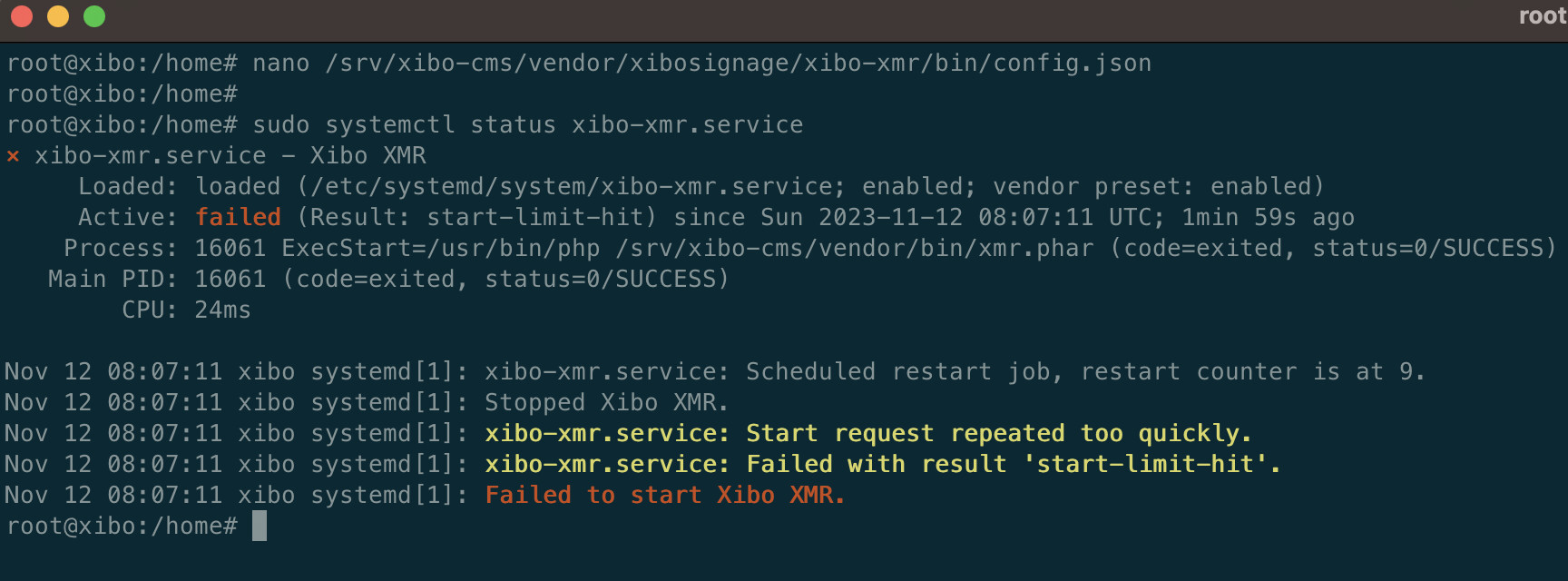
ExexStart command is written differently above, I tried with php8.2 but it didn’t start again, do you have any suggestions?
ExecStart=/usr/bin/php /srv/xibo-cms/vendor/bin/xmr.phar - not working
ExecStart=/usr/bin/php8.2 /srv/xibo-cms/vendor/bin/xmr.phar - not working
I was guided by the current document on your web page.
```auto
root@xibo:/etc/apache2/sites-available# sudo /usr/bin/php8.2 /srv/xibo-cms/vendor/bin/xmr.phar
[2023-11-12 08:52:44] xmr.ERROR: Failed to bind the ZMQ: Cannot assign requested address [] []
[2023-11-12 08:52:44] xmr.ERROR: #0 [internal function]: ZMQSocket->bind() #1 phar:///srv/xibo-cms/vendor/xibosignage/xibo-xmr/bin/xmr.phar/vendor/react/zmq/src/SocketWrapper.php(171): call_user_func_array() #2 phar:///srv/xibo-cms/vendor/xibosignage/xibo-xmr/bin/xmr.phar/index.php(98): React\ZMQ\SocketWrapper->__call() #3 /srv/xibo-cms/vendor/xibosignage/xibo-xmr/bin/xmr.phar(14): require('...') #4 /srv/xibo-cms/vendor/bin/xmr.phar(119): include('...') #5 {main} [] []
```
**SOLUTION**
```auto
{
“listenOn”: “tcp://127.0.0.1:50001”,
“pubOn”: [“tcp://*:9505”],
“debug”: false
}
```
I replaced the ip address written in this section with \*. And I started again and it is now actively working. Is there something wrong?

---
### Author:  [@ciphermenial](https://community.xibo.org.uk/u/ciphermenial)
#### Post date: [February 20, 2024, 11:42pm UTC](https://community.xibo.org.uk/t/non-docker-installation-on-ubuntu-server-22-04/29008/7 "2024-02-20T23:42:48Z")
I will do some testing and update my guide.
---
### Author:  [@ciphermenial](https://community.xibo.org.uk/u/ciphermenial)
#### Post date: [March 15, 2024, 1:24am UTC](https://community.xibo.org.uk/t/non-docker-installation-on-ubuntu-server-22-04/29008/8 "2024-03-15T01:24:03Z")
I have no updated the guide for Ubuntu Server 24.04 and Xibo CMS 4.0.8. Ubuntu 24.04 still isn’t out for over a month, but I thought I would test it out and it all works perfecty. If you are installing on an older version, you will need to add the php repositories still.
`add-apt-repository ppa:ondrej/php -y` prior to installing php.
---
### Author:  [@casa\_user](https://community.xibo.org.uk/u/casa_user)
#### Post date: [February 14, 2025, 8:39pm UTC](https://community.xibo.org.uk/t/non-docker-installation-on-ubuntu-server-22-04/29008/9 "2025-02-14T20:39:08Z")
Hello,
Is the instructions still up to date?
---
### Author:  [@illest](https://community.xibo.org.uk/u/illest)
#### Post date: [February 17, 2025, 11:27am UTC](https://community.xibo.org.uk/t/non-docker-installation-on-ubuntu-server-22-04/29008/10 "2025-02-17T11:27:31Z")
I’d suggest the Docker version if you’re asking, as there’s less that can go wrong.
---
### Author:  [@Luis\_SANTANA](https://community.xibo.org.uk/u/Luis_SANTANA)
#### Post date: [March 11, 2025, 7:37pm UTC](https://community.xibo.org.uk/t/non-docker-installation-on-ubuntu-server-22-04/29008/11 "2025-03-11T19:37:12Z")
Fiz todos os passos e no final o apache não esta carregando a pagina:
root@docker:/srv/xibo-cms# systemctl status apache2
● apache2.service - The Apache HTTP Server
Loaded: loaded (/lib/systemd/system/apache2.service; disabled; vendor preset: enabled)
Active: active (running) since Tue 2025-03-11 19:00:20 UTC; 3min 31s ago
Docs: [Apache HTTP Server Version 2.4 Documentation - Apache HTTP Server Version 2.4](https://httpd.apache.org/docs/2.4/)
Process: 29632 ExecStart=/usr/sbin/apachectl start (code=exited, status=0/SUCCESS)
Main PID: 29637 (apache2)
Tasks: 8 (limit: 14217)
Memory: 18.3M
CPU: 207ms
CGroup: /system.slice/apache2.service
├─29637 /usr/sbin/apache2 -k start
├─29638 /usr/sbin/apache2 -k start
├─29639 /usr/sbin/apache2 -k start
├─29640 /usr/sbin/apache2 -k start
├─29641 /usr/sbin/apache2 -k start
├─29642 /usr/sbin/apache2 -k start
├─29643 /usr/sbin/apache2 -k start
└─29647 /usr/sbin/apache2 -k start
Mar 11 19:00:20 docker systemd[1]: Starting The Apache HTTP Server…
Mar 11 19:00:20 docker apachectl[29635]: AH00112: Warning: DocumentRoot [/var/www/web] does not exist
Mar 11 19:00:20 docker apachectl[29635]: AH00112: Warning: DocumentRoot [/var/www/web] does not exist
Mar 11 19:00:20 docker apachectl[29635]: AH00558: apache2: Could not reliably determine the server’s fully qualified domain name, using 127.0.1.1. Set the ‘ServerName’ directive globally to suppress this message
Mar 11 19:00:20 docker systemd[1]: Started The Apache HTTP Server.
Meu xibo-cms.conf:
\
DocumentRoot “/var/www/web”
ServerName xibo.ferbasa.intranet
XSendFile on
XSendFilePath /var/www/Library
\
AllowOverride All
Options Indexes FollowSymLinks MultiViews
Order allow,deny
Allow from all
Require all granted
\
DocumentRoot “/var/www/web”
ServerName xibo.ferbasa.intranet
XSendFile on
XSendFilePath /var/www/Library
SSLEngine on
SSLCertificateFile “/etc/ssl/certs/ssl-cert-snakeoil.pem”
SSLCertificateKeyFile “/etc/ssl/private/ssl-cert-snakeoil.key”
\
AllowOverride All
Options Indexes FollowSymLinks MultiViews
Order allow,deny
Allow from all
Require all granted
Sistema retorna:
# Not Found
The requested URL was not found on this server.
* * *
Apache/2.4.52 (Ubuntu) Server at 10.106.1.140 Port 8O
---
### Author:  [@ciphermenial](https://community.xibo.org.uk/u/ciphermenial)
#### Post date: [April 25, 2025, 7:34am UTC](https://community.xibo.org.uk/t/non-docker-installation-on-ubuntu-server-22-04/29008/12 "2025-04-25T07:34:11Z")
I have updated my guide to 4.2.2 and fixed some errors.
> **[Install Xibo on Debian](https://blog.sifrmoja.xyz/posts/install-xibo-on-ubuntu/)**
>
> I have installed Xibo CMS on Debian Bullseye using Apache2 as the web server and enforcing TLS using this configuration. I have completed this using the autogenerated self-signed certificates for TLS (not trusted). You will need to follow another...
---
### Author:  [@ciphermenial](https://community.xibo.org.uk/u/ciphermenial)
#### Post date: [July 24, 2026, 5:31am UTC](https://community.xibo.org.uk/t/non-docker-installation-on-ubuntu-server-22-04/29008/13 "2026-07-24T05:31:17Z")
I have updated the guide to use [Debian Trixie and Xibo CMS 4.4.4](https://blog.sifrmoja.xyz/posts/install-xibo-on-ubuntu/).
There have been some major changes to the XMR config that I only discovered because some WebOS clients had stopped working. The XMR binary is not included in the CMS package anymore. I have included instructions on downloading it. The changes are related to websockets being the default way to access it now.