# Missing Displays after Update
**URL:** https://community.xibo.org.uk/t/missing-displays-after-update/25402
**Category:** CMS Installation
**Created:** [July 15, 2021, 6:26pm UTC](https://community.xibo.org.uk/t/missing-displays-after-update/25402 "2021-07-15T18:26:54Z")
**Posts on this page:** 4
**Page:** 1
### Author:  [@Gustel](https://community.xibo.org.uk/u/Gustel)
#### Post date: [July 15, 2021, 6:26pm UTC](https://community.xibo.org.uk/t/missing-displays-after-update/25402/1 "2021-07-15T18:26:54Z")
Hi Xibo-Team,
after upgrading from V2.3.11 to V3.0.1, 2 displays are missing from Calendar (but are present under Displays):
**V3.0.1:**

In V2.3.11 the Displays are present:
**V2.3.11:**
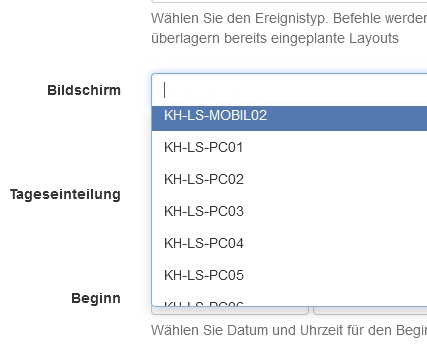
This happened after the update from V2.3.10 to V3.0.0 as well.
PS: And they are not wrongly ordered, the are simply not in the list.
Best Reagrds
---
### Author:  [@natasha](https://community.xibo.org.uk/u/natasha)
#### Post date: [July 16, 2021, 7:53am UTC](https://community.xibo.org.uk/t/missing-displays-after-update/25402/2 "2021-07-16T07:53:20Z")
Hi, try running the SQL command as in the post below:
> [@After update 3.0.0 - Calendar not showing all displays](https://community.xibo.org.uk/t/after-update-3-0-0-calendar-not-showing-all-displays/25365/11):
>
> @Peter has looked at this for you and somehow you have display groups not owned by a user. There was an old bug along those lines, so it’s potentially something historical that has slipped under the radar so to speak. We’re fairly certain you’d have seen the same in 2.3 though, and can’t explain why you didn’t right now. You can run the following SQL on your 3.0.0 database to resolve that issue: UPDATE `displaygroup` SET userId = (SELECT userId FROM `user` WHERE usertypeid = 1 LIMIT 1) WHERE…
---
### Author:  [@Gustel](https://community.xibo.org.uk/u/Gustel)
#### Post date: [July 16, 2021, 3:08pm UTC](https://community.xibo.org.uk/t/missing-displays-after-update/25402/3 "2021-07-16T15:08:30Z")
Hi Natasha,
thank you! This brought back our displays!
Just for other user having the same issue, the following command was not working:
mysql -u cms -h mysql -p cms
I needed the following:
mysql -u cms -h **localhost** -p cms
Found the solution here:
>
>
> Then I run \`./psh.phar install\` as suggested in the \[guide for local installatio…n\](https://docs.shopware.com/en/shopware-platform-dev-en/getting-started/installation-guide#setting-up-shopware), an error occurs:
>
> \`\`\`
> ERROR 2005 (HY000): Unknown MySQL server host 'mysql' (2)
> \`\`\`
>
> This is due to the \`-h 'mysql'\` option for the \`mysql\` command at step 3/28.
>
> I fixed the error by registering \`127.0.0.1 mysql\` in \`/etc/hosts\`. Maybe this information should be added to the installation guide?
Regards
---
### Author:  [@system](https://community.xibo.org.uk/u/system)
#### Post date: [October 15, 2021, 9:09pm UTC](https://community.xibo.org.uk/t/missing-displays-after-update/25402/4 "2021-10-15T21:09:05Z")
This topic was automatically closed 91 days after the last reply. New replies are no longer allowed.