# How do I enable Logging?
**URL:** https://community.xibo.org.uk/t/how-do-i-enable-logging/2325
**Category:** Help Topics
**Created:** [May 22, 2015, 1:45pm UTC](https://community.xibo.org.uk/t/how-do-i-enable-logging/2325 "2015-05-22T13:45:57Z")
**Posts on this page:** 13
**Page:** 1
### Author:  [@Terence](https://community.xibo.org.uk/u/Terence)
#### Post date: [May 22, 2015, 1:45pm UTC](https://community.xibo.org.uk/t/how-do-i-enable-logging/2325/1 "2015-05-22T13:45:57Z")
When I tried to view the last 100 logs of a display client on the Xibo Console, I get the msg indicating “Application Message: No log messages for this display”. Do I have to enable logging function? If so, how can I enable it?
---
### Author:  [@Peter](https://community.xibo.org.uk/u/Peter)
#### Post date: [May 22, 2015, 1:49pm UTC](https://community.xibo.org.uk/t/how-do-i-enable-logging/2325/2 "2015-05-22T13:49:47Z")
Hi,
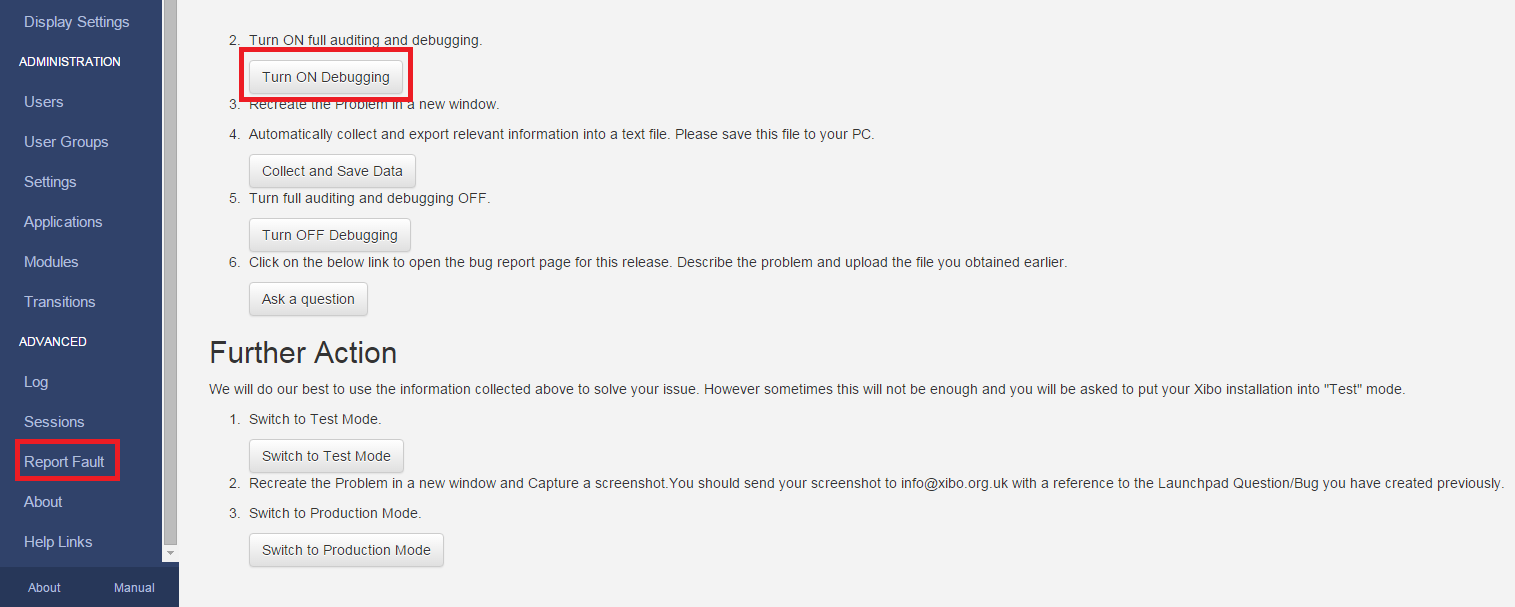
On 'report fault page ’ turn on debugging,
You can also, On ‘displays’ page -\>edit specific display, set auditing to yes (in advanced tab)
Do it only if you feel like there is something wrong with this specific display.
Later in ‘Log’ page, click ‘filter’ then you can also adjust the ‘interval’/‘duration back’ and choose only one display from the list if you want to.
Thanks,
Peter
---
### Author:  [@Terence](https://community.xibo.org.uk/u/Terence)
#### Post date: [May 22, 2015, 2:23pm UTC](https://community.xibo.org.uk/t/how-do-i-enable-logging/2325/3 "2015-05-22T14:23:03Z")
Hi Peter, we are currently running CMS Version 1.6.4. I think the instructions you provided are for version 1.7 (We do plan on moving to 1.7 this Summer). I’ve checked the displays in 1.6.4 and Auditing has been set to YES, but no logs.
---
### Author:  [@Peter](https://community.xibo.org.uk/u/Peter)
#### Post date: [May 22, 2015, 2:31pm UTC](https://community.xibo.org.uk/t/how-do-i-enable-logging/2325/4 "2015-05-22T14:31:14Z")
Oh, sorry I didn’t know that 😄
In that case, please go to advanced-\>report fault-\>Turn on debugging button
Thanks,
Peter
---
### Author:  [@Terence](https://community.xibo.org.uk/u/Terence)
#### Post date: [May 22, 2015, 2:51pm UTC](https://community.xibo.org.uk/t/how-do-i-enable-logging/2325/5 "2015-05-22T14:51:15Z")
Thanks for your help Peter!
---
### Author:  [@xibo](https://community.xibo.org.uk/u/xibo)
#### Post date: [May 25, 2015, 6:33pm UTC](https://community.xibo.org.uk/t/how-do-i-enable-logging/2325/6 "2015-05-25T18:33:34Z")
Hi there, I am having the same problem. I have the display logging turned on i think in the web page, however it doenst give me any filenames which are playing when the xibo crashes.
I am using 1.7.3, however under advanced is only proxy server information and display ID. there is nothing about “report fault” or “debugging”. where is this supposed to be set? On the server webpage, on the player options?
I just want a log of what media is playing at the time of a crash. thanks!
---
### Author:  [@Peter](https://community.xibo.org.uk/u/Peter)
#### Post date: [May 26, 2015, 9:35am UTC](https://community.xibo.org.uk/t/how-do-i-enable-logging/2325/7 "2015-05-26T09:35:49Z")
Hi, my first reply in this topic was regarding version 1.7+
> [@Peter](#):
>
> On ‘report fault’ page ’ turn on debugging’,
>
> You can also, On ‘displays’ page -\>edit specific display, set auditing to yes (in advanced tab) Do it only if you feel like there is something wrong with this specific display.
>
> Later in ‘Log’ page, click ‘filter’ then you can also adjust the ‘interval’/‘duration back’ and choose only one display from the list if you want to.
thanks,
Peter
---
### Author:  [@xibo](https://community.xibo.org.uk/u/xibo)
#### Post date: [May 29, 2015, 11:02pm UTC](https://community.xibo.org.uk/t/how-do-i-enable-logging/2325/8 "2015-05-29T23:02:34Z")
I turned logging on after i saw your message. Now someone has reported that the display has crashed. However when i look in the logs, its just a bunch of XML. Nothing says error or alert or anything. i can see that its playing its schedule, and
The last entry in the log was “display active and ready to start” which is odd. and that was from over an hour ago, however the display may have crashed and just no one reported it till now.
Can i get some help parsing these logs? what exactly am i looking for? I can see entries for “requiredfiles” “Schedule” “media inventory”. On the display itself, it is just suck at a windows error message from the program crashing. It normally plays the playlist fine, but randomly crashes every few days. So whatever content is making it crash plays fine 99% of the time. I did try the playlist on another computer and after a few days it crashes as well.
It does seem the log is not really long enough either. While i was writing this and after i restarted the player, i thought I could go back and look at what happened right when the display came back online, however it has been flushed out it looks like and i cant go to like the “second page” of logs.
it seems like its logging too much. Cant i just get just the errors logged?
---
### Author:  [@Peter](https://community.xibo.org.uk/u/Peter)
#### Post date: [June 1, 2015, 9:09am UTC](https://community.xibo.org.uk/t/how-do-i-enable-logging/2325/9 "2015-06-01T09:09:28Z")
> [@Peter](#):
>
> On ‘displays’ page -\>edit specific display, set auditing to yes (in advanced tab)

Did you do that too?
As for logs, please click on ‘filter’ then set interval and duration back to a bit higher than 120s and you will see more.
On Advanced tab of that filter you can also select only your 1 display if you want - it will make logs a bit more clear for you.

Thanks,
Peter
---
### Author:  [@xibo](https://community.xibo.org.uk/u/xibo)
#### Post date: [June 1, 2015, 6:15pm UTC](https://community.xibo.org.uk/t/how-do-i-enable-logging/2325/10 "2015-06-01T18:15:36Z")
I see the problem now. I was looking at the player logs on the player. Yes auditing was set to YES on the display. I was looking at “recent log” on the player itself.
i can see if i look at logs for the overall system that yes i can filter by “error” and time range.
However I dont see the player from friday with the problem… it does list many errors on different players so the system is working it seems, and the error messages on this page are much more readable than the “recent log”.
it would be nice if you could also filter by player, like have the column headers be a dropdown with a list of all players and you can simply select a certain player, but maybe in a future release.
Ill keep you posted, but this does solve the issue for me i think. I can view the errors now.
---
### Author:  [@Peter](https://community.xibo.org.uk/u/Peter)
#### Post date: [June 1, 2015, 7:16pm UTC](https://community.xibo.org.uk/t/how-do-i-enable-logging/2325/11 "2015-06-01T19:16:58Z")
> [@xibo](#):
>
> it would be nice if you could also filter by player
> [@Peter](#):
>
> On Advanced tab of that filter you can also select only your 1 display if you want
Basically on advanced tab you can get access to exactly what you want 😄
Thanks,
Peter
---
### Author:  [@xibo](https://community.xibo.org.uk/u/xibo)
#### Post date: [June 1, 2015, 8:28pm UTC](https://community.xibo.org.uk/t/how-do-i-enable-logging/2325/12 "2015-06-01T20:28:16Z")
Ah yes you are right. I dont know why but i can never find anything in xibo, even if its infront of my face! although its gotten a lot better in the last year.
thanks again.
---
### Author:  [@alex](https://community.xibo.org.uk/u/alex)
#### Post date: [June 5, 2015, 9:31am UTC](https://community.xibo.org.uk/t/how-do-i-enable-logging/2325/13 "2015-06-05T09:31:28Z")