# HELP! My media file has been deleted

**URL:** https://community.xibo.org.uk/t/help-my-media-file-has-been-deleted/24206
**Category:** Get Help
**Created:** [January 4, 2021, 4:44am UTC](https://community.xibo.org.uk/t/help-my-media-file-has-been-deleted/24206 "2021-01-04T04:44:42Z")
**Posts on this page:** 10
**Page:** 1

<div class="post-metadata">

### Author: ![xibo\_user\_3882](https://community.xibo.org.uk/user_avatar/community.xibo.org.uk/xibo_user_3882/32/10488_2.png) [@xibo\_user\_3882](https://community.xibo.org.uk/u/xibo_user_3882)
#### Post date: [January 4, 2021, 4:44am UTC](https://community.xibo.org.uk/t/help-my-media-file-has-been-deleted/24206/1 "2021-01-04T04:44:42Z")

</div>

![image_2021_01_04T04_32_27_077Z](https://community.xibo.org.uk/uploads/default/original/2X/0/0d31cac122747809305675ea9d848072f497720a.png)

My image files has been deleted by someone. But I dont know who did it.  
The audit trail showing empty user  
Please help

---

<div class="post-metadata">

### Author: ![DanBW](https://community.xibo.org.uk/user_avatar/community.xibo.org.uk/danbw/32/5608_2.png) [@DanBW](https://community.xibo.org.uk/u/DanBW)
#### Post date: [January 5, 2021, 1:15pm UTC](https://community.xibo.org.uk/t/help-my-media-file-has-been-deleted/24206/2 "2021-01-05T13:15:41Z")

</div>

Thank you for your message and welcome to the community! The entries you are seeing in Audit Trail are likely related to the XTR/Tasks that run automatically in your CMS as opposed to a person.

If you go to the Tasks option in your CMS you will see a list or various tasks that will run periodically. One of these tasks is named `Regular Maintenance`, which will run regularly and perform various functions, including `Tidy Library`. When a task has run and made a change in your CMS, the activity will also be logged in audit trail but will not list a user, as technically there are no users involved in the process.

It is possible that you may have had an expiry date set on the media items that have been removed. You can check if this is the case for any of your other media items by going to the `Media` option in your CMS and checking the `Expires` column to see if any of your other media items have an expiry date set.

If there is an expiry date set for an item in your library, that item will be removed the next time the regular maintenance task runs after that expiry date. As a test, I set an expiry date on an image and waited for the date to pass. The next time the regular maintenance task ran, that image was removed as expected. You can see below that the entry for that image being removed by the task does not list a user:

 ![image](https://community.xibo.org.uk/uploads/default/original/2X/8/8e30613511f8e3eb23b832757cd72915d715fd99.png)

An expiry date can be set on a media item directly in the Media menu by clicking the row menu button at the end of the item and going to the edit menu, or using the expiry dates layout tool in the layout designer. if you have used the expiry dates tool in layout designer but do not wish to delete the media on expiry, please make sure to leave the `Delete on Expiry` box unchecked:

 ![image](https://community.xibo.org.uk/uploads/default/original/2X/c/c3583a4d009e6e961e57d4327855e58cd8d94f79.png)

I hope this helps to understand what may have occurred with your images. If this happens again with a media item you know for certain did not have an expiry date set either in a layout or directly in the Media library, please update this post and we can investigate further.

Many Thanks.

---

<div class="post-metadata">

### Author: ![xibo\_user\_3882](https://community.xibo.org.uk/user_avatar/community.xibo.org.uk/xibo_user_3882/32/10488_2.png) [@xibo\_user\_3882](https://community.xibo.org.uk/u/xibo_user_3882)
#### Post date: [January 6, 2021, 3:39am UTC](https://community.xibo.org.uk/t/help-my-media-file-has-been-deleted/24206/3 "2021-01-06T03:39:33Z")

</div>

Hi Dan,

How can I know who set the expiry date?  
The audit trail didn’t show those action  
Please update the audit trail. We need to track more user’s actions.  
We also need to know which file name has been deleted, the impacted layouts, the reason why the media was deleted (user delete, expire, lib tidy,…)  
And how can we clear the invalid layout from the client. The client can not display new schedule and new layout right now. It is trying to display invalid layouts but fail. The only way is to uninstall and reinstall? We have alot of display. It take a lot of time  
Please consider

---

<div class="post-metadata">

### Author: ![DanBW](https://community.xibo.org.uk/user_avatar/community.xibo.org.uk/danbw/32/5608_2.png) [@DanBW](https://community.xibo.org.uk/u/DanBW)
#### Post date: [January 7, 2021, 11:21am UTC](https://community.xibo.org.uk/t/help-my-media-file-has-been-deleted/24206/4 "2021-01-07T11:21:40Z")

</div>

Hi xibo\_user\_3882, please excuse my delayed reply.

I have been testing with my CMS install and can see that an Audit trail log is not created when an expiry date is set on a media item, which means it will not be possible to confirm which user has set the expiry date on the images that have been deleted in your CMS. I have created an enhancement request for a log to be created when an expiry date is set on a media item, so this will be possible in a future release of Xibo CMS. Below is a link to that enhancement request so you can track its progress:

> <https://github.com/xibosignage/xibo/issues/2388>
>
> CMS:
> 2.3.8
> Enhancement:
> When an expiry date is set for a Widget within layout designer a log is created, but when an expiry date...

I have also been talking with the developers about the need for more information in these logs, so users have a clearer idea of what file was deleted and the reason for the deletion. An enhancement request has also been created for more information to be added to those logs, so you will be able to see the filename and reason for removal. A list of effected layouts will not be added to the log but the other information will certainly help to narrow what has been deleted. Here is the link for that enhancement request as well:

> <https://github.com/xibosignage/xibo/issues/2390>
>
> CMS Version:
> 2.3.8
> Enhancement:
> Currently when an item is deleted, the only information recorded is the ID of the media item and the User...

I’ve also been having a think about how a situation like this may be avoided in the future and will create a feature request on the Features channel of this forum to encourage discussion about a possible notification that would inform Users in advance that an item is due to expire in the near future, perhaps 24 hours, which would allow enough time for users to remove any expiry dates from items that should not actually be deleted. I will update this topic once I’ve created that request in case there is anything you may wish to add to this suggestion.

I’m sorry that your media items have been removed and that the logs currently will not help to determine which user set the expiry.

In response to your Xibo players not being able to display new schedules/layouts, you should find that the players will automatically skip any layouts that are invalid. Which version of the Xibo player are you using?

You should not need to uninstall and reinstall the player to clear the schedule, instead you can edit the layouts that are scheduled and either replace the media that was deleted by uploading it again to your CMS, or modify the layout so that it is once again valid, then publish the layout to update those changes, which will then be received by your player the next time it connects to your CMS, or via XMR if you are using that service.

Alternatively you can also clear scheduled events by following the below instructions:

- Go to the Schedule menu in your CMS.
- Click the `Select Displays` box above the calendar and choose the player that you wish to change the schedule for.
- This will reveal the event icons on the calendar for that player. You can remove an event by clicking on its icon and choosing delete on the Edit Event window that opens.

Many Thanks.

---

<div class="post-metadata">

### Author: ![DanBW](https://community.xibo.org.uk/user_avatar/community.xibo.org.uk/danbw/32/5608_2.png) [@DanBW](https://community.xibo.org.uk/u/DanBW)
#### Post date: [January 7, 2021, 11:45am UTC](https://community.xibo.org.uk/t/help-my-media-file-has-been-deleted/24206/5 "2021-01-07T11:45:09Z")

</div>

Hi again xibo\_user\_3882,

Here is a link to the feature request I created. If there’s anything further you would add , please feel free to add further comments to the request.

> [@An optional notification that will inform users that media items will be deleted](https://community.xibo.org.uk/t/an-optional-notification-that-will-inform-users-that-media-items-will-be-deleted/24228):
>
> Introduction A new feature that will allow users to set a notification, which will inform them in advance that media items are due to be deleted when an expiry date has been set on a media item. User Story This suggestion was inspired by the following community post: [HELP! My media file has been deleted](https://community.xibo.org.uk/t/help-my-media-file-has-been-deleted/24206) The above post made me consider the possibility that a user may set an expiration date on a media item and for various reasons may wish to change their mind at a later date. If the expiry date …

Many Thanks.

---

<div class="post-metadata">

### Author: ![xibo\_user\_3882](https://community.xibo.org.uk/user_avatar/community.xibo.org.uk/xibo_user_3882/32/10488_2.png) [@xibo\_user\_3882](https://community.xibo.org.uk/u/xibo_user_3882)
#### Post date: [January 8, 2021, 4:38am UTC](https://community.xibo.org.uk/t/help-my-media-file-has-been-deleted/24206/6 "2021-01-08T04:38:48Z")

</div>

Hi,

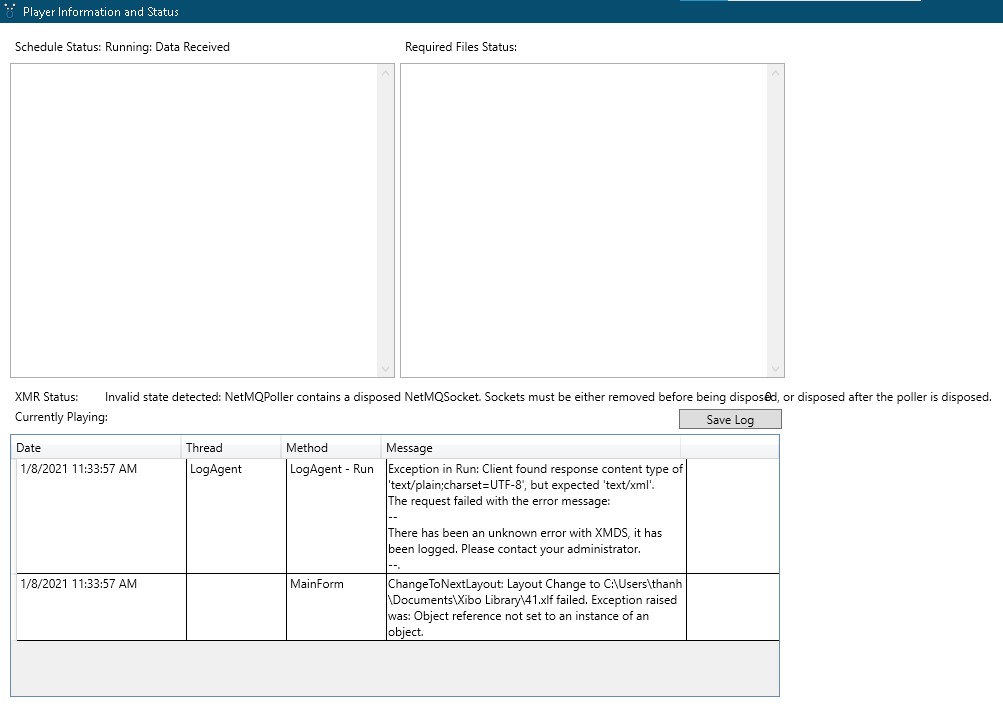
The xibo windows client version: 2.255.3.0  
After the user deleted the event and created the new one with new layout, the client couldn’t download new content. It show default layout and turn into black screen. So I have to delete everything and reinstall their client.
 ![Screenshot](https://community.xibo.org.uk/uploads/default/original/2X/9/9cde612f6c287ada78736e7cfdcd39070b4ffcde.jpeg)

---

<div class="post-metadata">

### Author: ![DanBW](https://community.xibo.org.uk/user_avatar/community.xibo.org.uk/danbw/32/5608_2.png) [@DanBW](https://community.xibo.org.uk/u/DanBW)
#### Post date: [January 11, 2021, 12:26pm UTC](https://community.xibo.org.uk/t/help-my-media-file-has-been-deleted/24206/7 "2021-01-11T12:26:19Z")

</div>

Thank you for your message. When an event is deleted from the schedule for a player you should not need to reinstall the player to resolve the issue.

It appears that in your screenshot that you are receiving errors suggesting that your XMR service is not configured correctly. My first recommendation would be to resolve the issue with your XMR service and restart the player. Below are links you can use to the documentation that will help configure your XMR service:

For Docker based installations:

> **[Xibo CMS Post-Installation Setup Guide | Xibo Open Source Digital Signage](https://xibo.org.uk/docs/setup/xibo-cms-post-installation-setup-guide#xmr)**

For custom:

> **[XMR - Push Messaging | Xibo Open Source Digital Signage](https://xibo.org.uk/docs/setup/xmr-push-messaging)**

Please also make sure that you have the time, date and time zone set correctly on your Windows machine.

I also noticed that there is no information in the required files section of the status page in your screenshot, which is very unusual. I would also recommend making sure that the local library location you have set for the player is still accessible to the player. You could also double check the settings in the Xibo Player options application to make sure it has been configured correctly/

Many Thanks.

---

<div class="post-metadata">

### Author: ![xibo\_user\_3882](https://community.xibo.org.uk/user_avatar/community.xibo.org.uk/xibo_user_3882/32/10488_2.png) [@xibo\_user\_3882](https://community.xibo.org.uk/u/xibo_user_3882)
#### Post date: [January 12, 2021, 11:02am UTC](https://community.xibo.org.uk/t/help-my-media-file-has-been-deleted/24206/8 "2021-01-12T11:02:18Z")

</div>

I dont know why did it happen  
But everything is fine now  
Thank you for your support

---

<div class="post-metadata">

### Author: ![DanBW](https://community.xibo.org.uk/user_avatar/community.xibo.org.uk/danbw/32/5608_2.png) [@DanBW](https://community.xibo.org.uk/u/DanBW)
#### Post date: [January 12, 2021, 11:24am UTC](https://community.xibo.org.uk/t/help-my-media-file-has-been-deleted/24206/9 "2021-01-12T11:24:09Z")

</div>

Thank you for the update, I’m glad to hear the player is now downloading the files it requires. It may be that because your XMR service is returning an error that the player is unable to contact your CMS immediately and is instead waiting for the collect interval you have set, which could explain the delay in files being downloaded to the player.

I would still recommend investigating and resolving the issue you have with your XMR setup and keeping an eye on the player in case the issue should return, which I hope it does not.

Many Thanks.

---

<div class="post-metadata">

### Author: ![system](https://community.xibo.org.uk/uploads/default/original/2X/a/a8759c2d8cc561474733895ac75beeb830f5d8ca.png) [@system](https://community.xibo.org.uk/u/system)
#### Post date: [April 13, 2021, 5:24pm UTC](https://community.xibo.org.uk/t/help-my-media-file-has-been-deleted/24206/10 "2021-04-13T17:24:12Z")

</div>

This topic was automatically closed 91 days after the last reply. New replies are no longer allowed.
