### Author:  [@Peterspie](https://community.xibo.org.uk/u/Peterspie)
#### Post date: [August 29, 2018, 8:41am UTC](https://community.xibo.org.uk/t/forgot-password/15572/1 "2018-08-29T08:41:31Z")
Hello, I know this has been done before, but I just don’t get it to work.
I have lost the password for the CMS running on Docker for Windows.
In this [topic](https://community.xibo.org.uk/t/forgot-password-1-8-1-docker/10492) it is made clear to run a sql-command on the web-container.
But I really don’t understand how to do that.
Do I use a powershell to do this?
I have tried the first line, and it comes back with the name of the web container. So far so good.
Then, the second line `docker exec -it bash` doesn’t do anything.
So, for now I am stuck.
Can someone explain me how to continue?
Regards, Peter
---
### Author:  [@alex](https://community.xibo.org.uk/u/alex)
#### Post date: [August 29, 2018, 10:16am UTC](https://community.xibo.org.uk/t/forgot-password/15572/2 "2018-08-29T10:16:34Z")
The second line must do something. Can you send a screenshot when you get to that step?
If it’s Docker for Windows (as opposed to Docker Toolbox) then you’re right to run it in PowerShell.
You might find it easier to follow:
> [@How do I reset the xibo\_admin account password?](https://community.xibo.org.uk/t/how-do-i-reset-the-xibo-admin-account-password/29):
>
> If you’ve forgotten your xibo\_admin account password and don’t have any way to recover access to your Xibo system, you can reset the xibo\_admin account password as follows: Connect to the Xibo database and run the following SQL. You could do that from the mysql command line application, or via a web interface such as PHPMyAdmin: UPDATE `user` set `UserPassword` = MD5('password'), CSPRNG = 0 WHERE `UserID` = 1 LIMIT 1; Your xibo\_admin password will then be “password”. Please ensure you the…
> [@How can I run a SQL command when using a Docker Install?](https://community.xibo.org.uk/t/how-can-i-run-a-sql-command-when-using-a-docker-install/9946):
>
> While troubleshooting an issue you maybe asked to run a SQL statement on your database Docker container, or you may want to run a statement yourself for another purpose. To do either of these things there are two options. Using the command line Using the GUI called PhpMyAdmin Command Line Before you can run a statement inside the docker container you will need to find the container name. This can be done using the docker ps command. The resulting output will show a list of running docker con…
---
### Author:  [@Peterspie](https://community.xibo.org.uk/u/Peterspie)
#### Post date: [August 29, 2018, 7:39pm UTC](https://community.xibo.org.uk/t/forgot-password/15572/3 "2018-08-29T19:39:55Z")
Hi Alex,
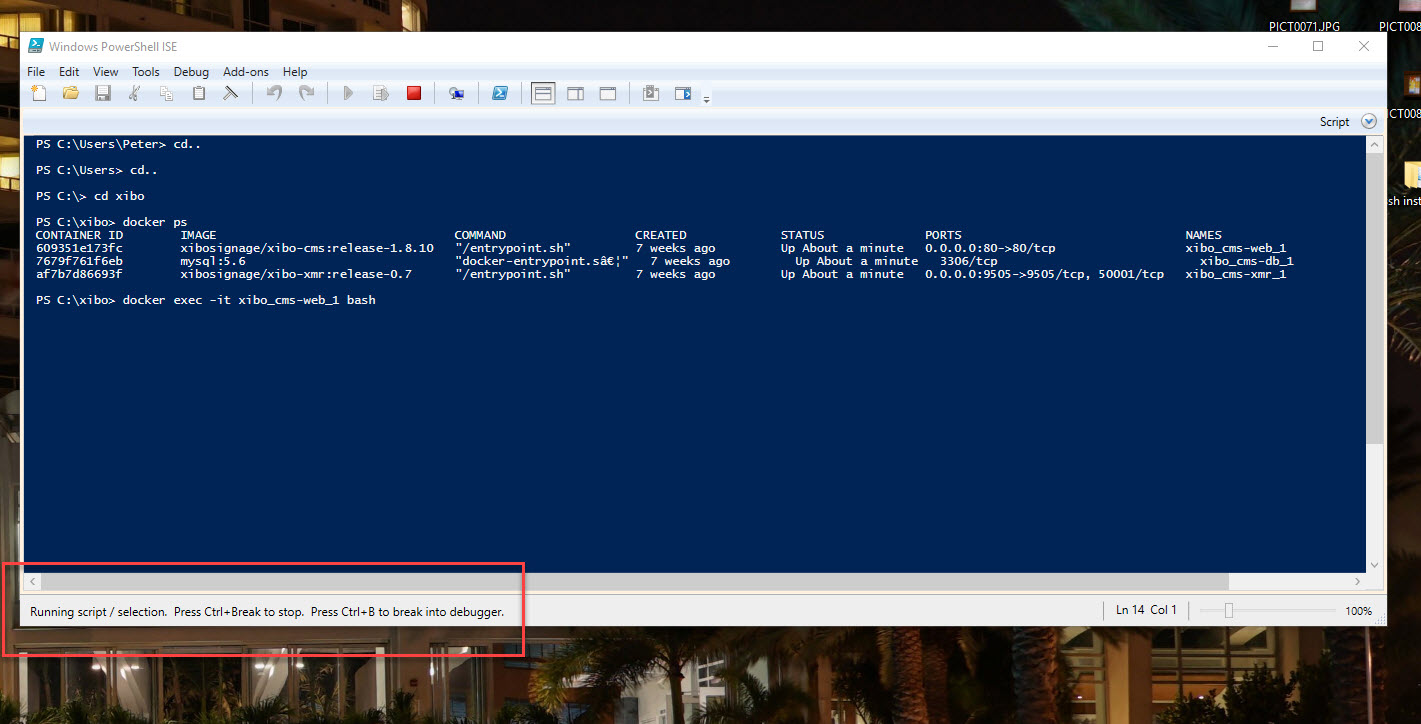
Attached you fond the screenshot.
When I tpye the commando for SQL, I can’t type anything in the powershell anymore.
At the bottom left, I see: `Running script / selection. Press CTRL+Break to stop...etc...`
What am I doing wrong now?
Nice to hear from you,
Regards, Peter
---
### Author:  [@alex](https://community.xibo.org.uk/u/alex)
#### Post date: [August 29, 2018, 8:05pm UTC](https://community.xibo.org.uk/t/forgot-password/15572/4 "2018-08-29T20:05:02Z")
It looks right to me, but there should be output after that.
I’d try the instructions I sent you yesterday rather than Peter’s ones.
---
### Author:  [@Peterspie](https://community.xibo.org.uk/u/Peterspie)
#### Post date: [August 30, 2018, 12:28pm UTC](https://community.xibo.org.uk/t/forgot-password/15572/5 "2018-08-30T12:28:59Z")
Hi Alex,
> [@alex](#):
>
> If it’s Docker for Windows (as opposed to Docker Toolbox) then you’re right to run it in PowerShell.
Yes, it is Docker for Windows on my on PC. I am doing some tests before we buy a subscribtion for hosting and the Android license.
I have tried to follow these instructions, several times, but I just don’t understand how to connect to the database. I am familiar with MySQL (I use it for Joomla), but now I am stuck.
> [@alex](#):
>
> If you’ve forgotten your xibo\_admin account password and don’t have any way to recover access to your Xibo system, you can reset the xibo\_admin account password as follows:
>
> - Connect to the Xibo database and run the following SQL. You could do that from the mysql command line application, or via a web interface such as PHPMyAdmin:
>
> > UPDATE `user` set `UserPassword` = MD5(‘password’), CSPRNG = 0 WHERE `UserID` = 1 LIMIT 1;
>
> - Your xibo\_admin password will then be “password”. Please ensure you then change it as soon as you can afterwards.
I hope you can show me the right way to do this.
Is it possible in the next release to create a `"forgot username"` and `"forgot password"` button?
It would be so much easier that way.
Regards, Peter
---
### Author:  [@alex](https://community.xibo.org.uk/u/alex)
#### Post date: [August 30, 2018, 12:37pm UTC](https://community.xibo.org.uk/t/forgot-password/15572/6 "2018-08-30T12:37:24Z")
Email based password reset is coming in 1.8.12, but likely wouldn’t help you because you’re unlikely to have email setup and working on a local test install.
If you look at the second article I linked, it explains how to connect to MySQL inside Docker.
If that doesn’t work (and it really should), then there’s something else wrong with the setup. If you’re just testing prior to looking at Cloud, why not setup a Cloud demo (it’s free) and test with that?
---
### Author:  [@Peterspie](https://community.xibo.org.uk/u/Peterspie)
#### Post date: [August 30, 2018, 4:46pm UTC](https://community.xibo.org.uk/t/forgot-password/15572/7 "2018-08-30T16:46:17Z")
Hi Alex, I finally managed to enter the CMS. I used the wrong Powershell 😉
Now I get the next challenge. If I want to change the password i use:
> UPDATE `user` set `UserPassword` = MD5(‘password’), CSPRNG = 0 WHERE `UserID` = 1 LIMIT 1;
and i get the next error:
> MySQL [cms]\> UPDATE `user` set `UserPassword` = MD5(‘password’), CSPRNG = 0 WHERE `UserID` = 1 LIMIT 1;
> ERROR 1054 (42S22): Unknown column ‘‘password’’ in ‘field list’
Can you tell me please what I am doing wrong here?
Regards, Peter
---
### Author:  [@alex](https://community.xibo.org.uk/u/alex)
#### Post date: [August 30, 2018, 5:55pm UTC](https://community.xibo.org.uk/t/forgot-password/15572/8 "2018-08-30T17:55:50Z")
`password` needs to be in quotes
---
### Author:  [@Peterspie](https://community.xibo.org.uk/u/Peterspie)
#### Post date: [August 30, 2018, 7:24pm UTC](https://community.xibo.org.uk/t/forgot-password/15572/9 "2018-08-30T19:24:58Z")
> [@Peterspie](#):
>
> UPDATE `user` set `UserPassword` = MD5(“password”), CSPRNG = 0 WHERE `UserID` = 1 LIMIT 1;
Thanks Alex! That did it…
Regards, Peter
---
### Author:  [@system](https://community.xibo.org.uk/u/system)
#### Post date: [March 4, 2020, 5:12pm UTC](https://community.xibo.org.uk/t/forgot-password/15572/10 "2020-03-04T17:12:00Z")