# Data Set -\> Remote data source
**URL:** https://community.xibo.org.uk/t/data-set-remote-data-source/13337
**Category:** Get Help
**Created:** [February 19, 2018, 10:37am UTC](https://community.xibo.org.uk/t/data-set-remote-data-source/13337 "2018-02-19T10:37:21Z")
**Posts on this page:** 12
**Page:** 1
### Author:  [@alaa\_abd\_el\_wahab](https://community.xibo.org.uk/u/alaa_abd_el_wahab)
#### Post date: [February 19, 2018, 10:37am UTC](https://community.xibo.org.uk/t/data-set-remote-data-source/13337/1 "2018-02-19T10:37:21Z")
Hello,
How to get data from an external source by Remote data source
can anyone give me an example with images
---
### Author:  [@Peter](https://community.xibo.org.uk/u/Peter)
#### Post date: [February 19, 2018, 11:35am UTC](https://community.xibo.org.uk/t/data-set-remote-data-source/13337/2 "2018-02-19T11:35:19Z")
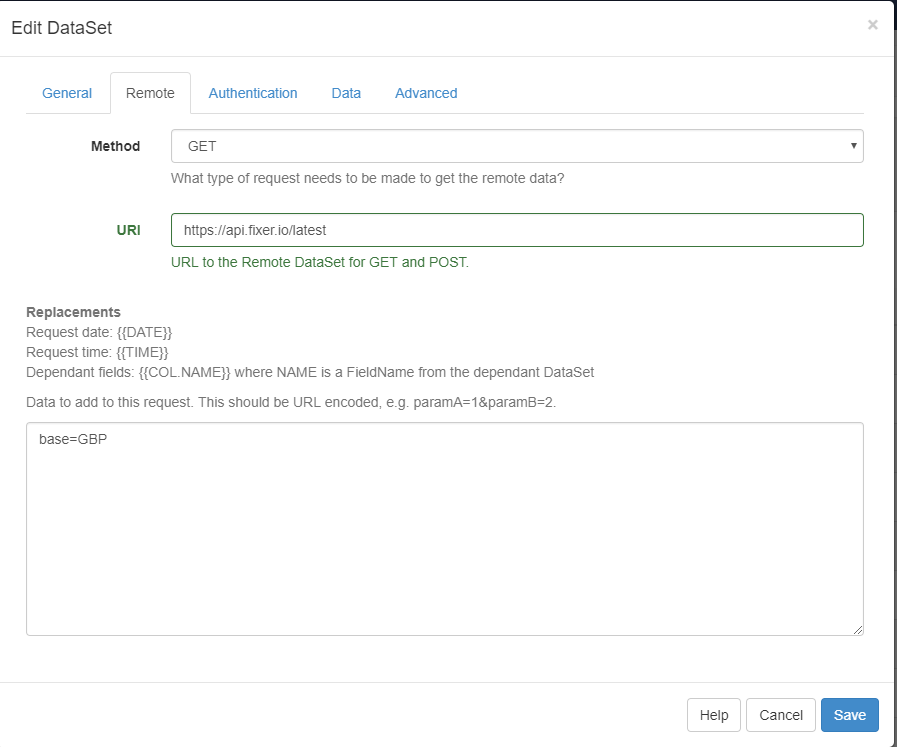
You need to have a source url that will send json formatted object with the data that should be imported to the dataSet, create the dataSet and columns marked as remote - [DataSets | Xibo Digital Signage](https://xibo.org.uk/manual/en/media_datasets.html#designing_your_dataset)
For example:
DataSet
Specify the method and URL and parameter (in this case just base)
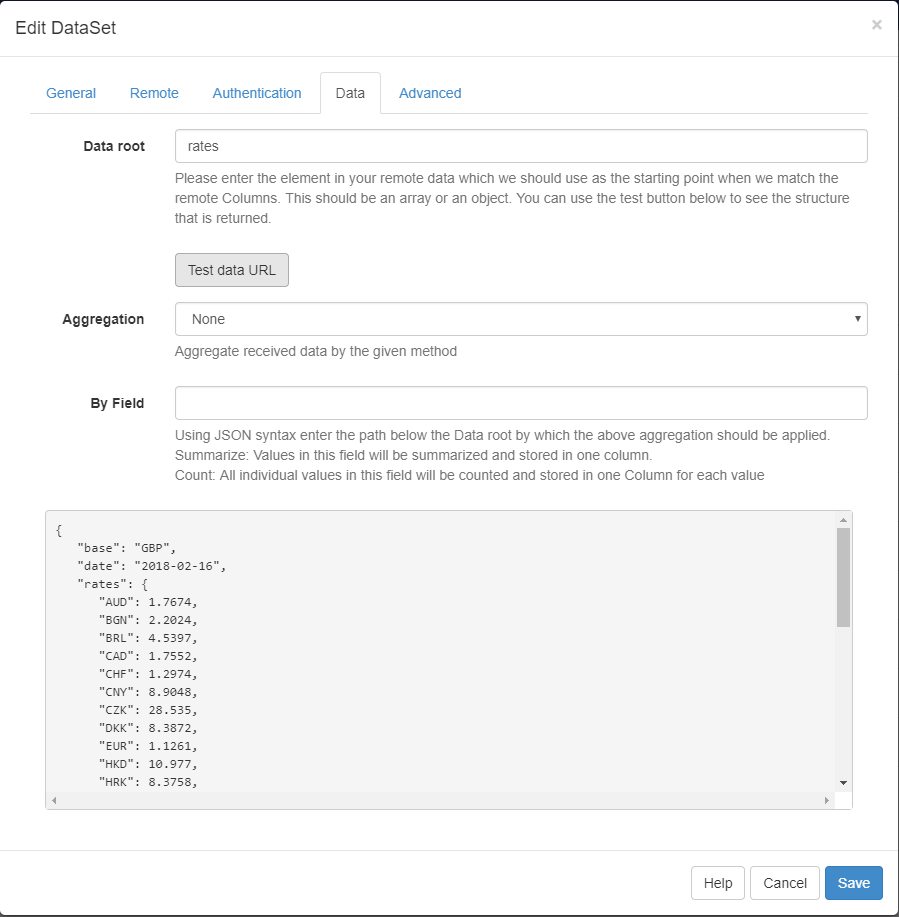
Specify the data root and test the data URL
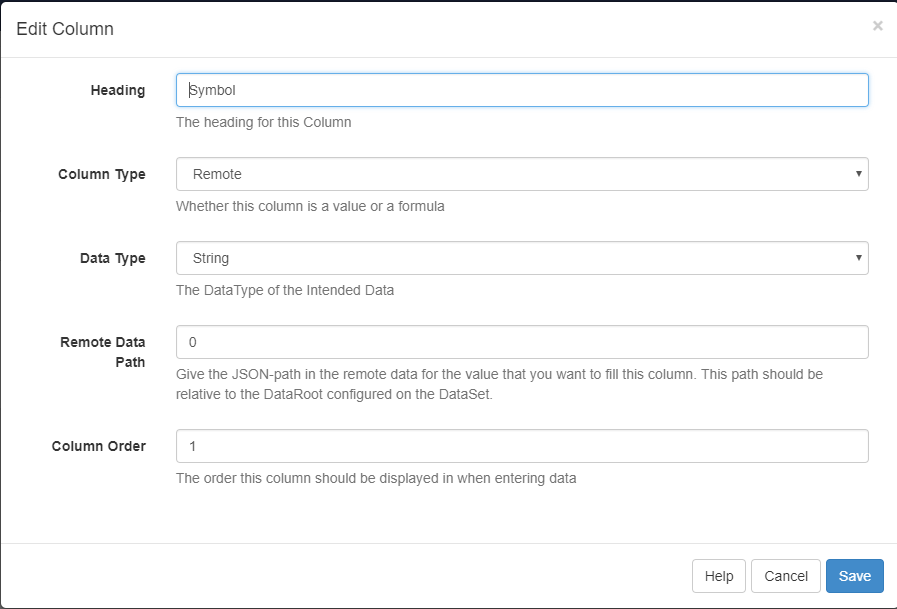
Columns
Mark columns as remote and specify remote data Path as per manual
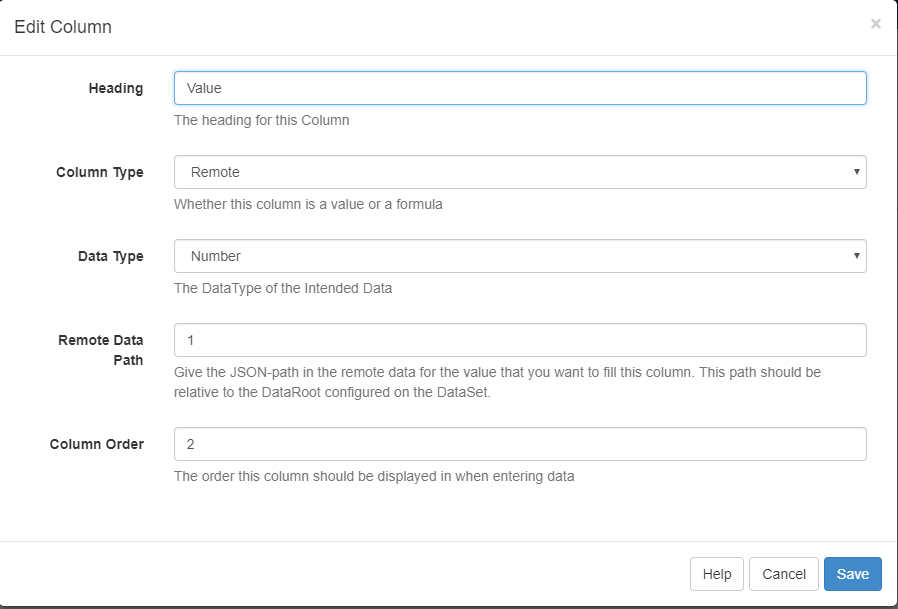
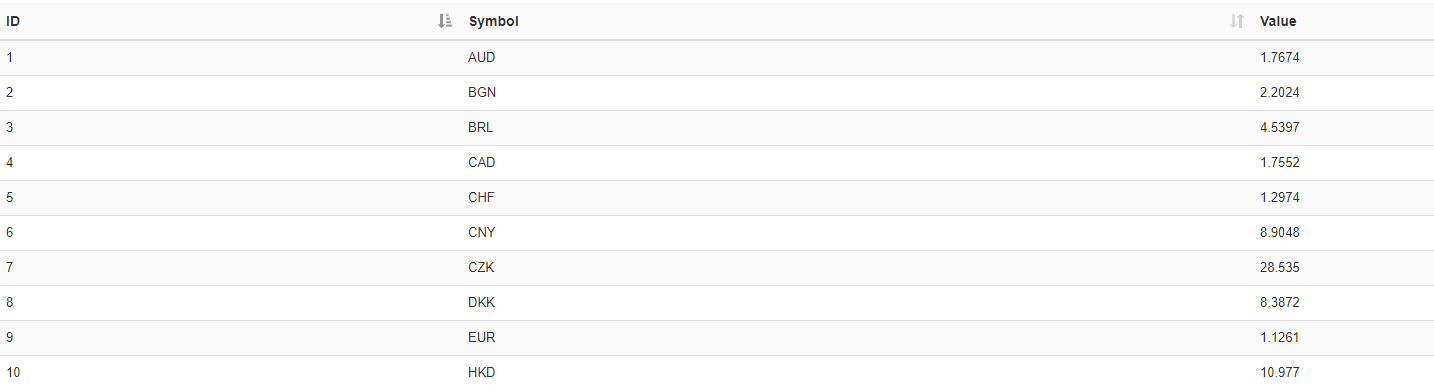
End data in dataSet after sync:
---
### Author:  [@alaa\_abd\_el\_wahab](https://community.xibo.org.uk/u/alaa_abd_el_wahab)
#### Post date: [February 20, 2018, 11:09am UTC](https://community.xibo.org.uk/t/data-set-remote-data-source/13337/3 "2018-02-20T11:09:44Z")
Thanks for your reply
I’m trying to do the same steps
But it gives me data in the test data URL and at the end, the data in Dataset doesn’t appear

---
### Author:  [@alaa\_abd\_el\_wahab](https://community.xibo.org.uk/u/alaa_abd_el_wahab)
#### Post date: [February 25, 2018, 11:07am UTC](https://community.xibo.org.uk/t/data-set-remote-data-source/13337/4 "2018-02-25T11:07:31Z")
Is there anyone can help me in this issue???
---
### Author:  [@dan](https://community.xibo.org.uk/u/dan)
#### Post date: [February 25, 2018, 1:33pm UTC](https://community.xibo.org.uk/t/data-set-remote-data-source/13337/5 "2018-02-25T13:33:40Z")
What specifically are you trying to do? If you tell us what you’ve got set up we will see if we can help.
---
### Author:  [@alaa\_abd\_el\_wahab](https://community.xibo.org.uk/u/alaa_abd_el_wahab)
#### Post date: [February 25, 2018, 2:08pm UTC](https://community.xibo.org.uk/t/data-set-remote-data-source/13337/6 "2018-02-25T14:08:12Z")
I’m trying to use the remote feature in the dataset, but the problem is in the last step, the data doesn’t appear in the dataset
Is there a miss step after setting up the colums?
---
### Author:  [@dan](https://community.xibo.org.uk/u/dan)
#### Post date: [February 26, 2018, 10:34am UTC](https://community.xibo.org.uk/t/data-set-remote-data-source/13337/7 "2018-02-26T10:34:32Z")
I mean what have you configured for your Remote DataSet and Column Remote Fields?
The final step is that the Task called “Fetch Remote DataSets” needs to run to populate the DataSet - if you have XTR setup or use Docker then this would happen automatically.
You can check the task status using the Tasks page.
---
### Author:  [@mk2001](https://community.xibo.org.uk/u/mk2001)
#### Post date: [April 13, 2018, 9:29am UTC](https://community.xibo.org.uk/t/data-set-remote-data-source/13337/8 "2018-04-13T09:29:28Z")
Hi @all,
i have got an API with some weather data, but the interresting informations are on the 2nd sub-level of the json object. And if I enter the data as shown in your post into my xibo i does not retun any arrays/objects anymore.
How to enter the dataroot in a right form?
Thanks in advance
Marcus
Object:
```
{
"location":"Stuttgart",
"weatherData": {
"current":{
"temperature":"25.0°C",
"humunity": "35%",
"rain": "0 Liter"
},
"forecast": {
"moreData":"..."
}
}
}
```
I want to store “current”. Thanks
---
### Author:  [@Peter](https://community.xibo.org.uk/u/Peter)
#### Post date: [April 13, 2018, 10:30am UTC](https://community.xibo.org.uk/t/data-set-remote-data-source/13337/9 "2018-04-13T10:30:50Z")
`current` should probably be the root, then each column would take the `temperature`, `humidity` etc (ie the remote data path 0, 1 and so on).
If it is available over the internet then I can try it if you are willing to share the link to it.
---
### Author:  [@chistiandi\_edwin](https://community.xibo.org.uk/u/chistiandi_edwin)
#### Post date: [April 25, 2018, 2:57am UTC](https://community.xibo.org.uk/t/data-set-remote-data-source/13337/10 "2018-04-25T02:57:50Z")
i have an error when show Dataset.
i got success when test data URL
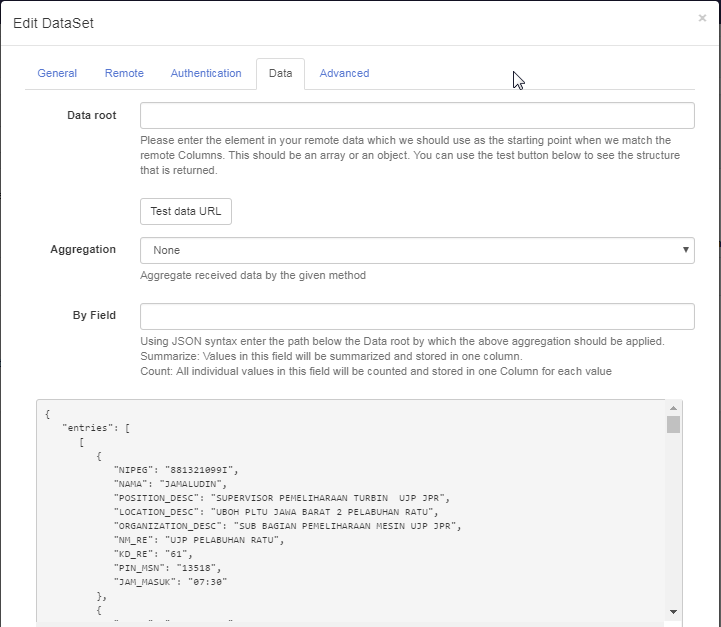
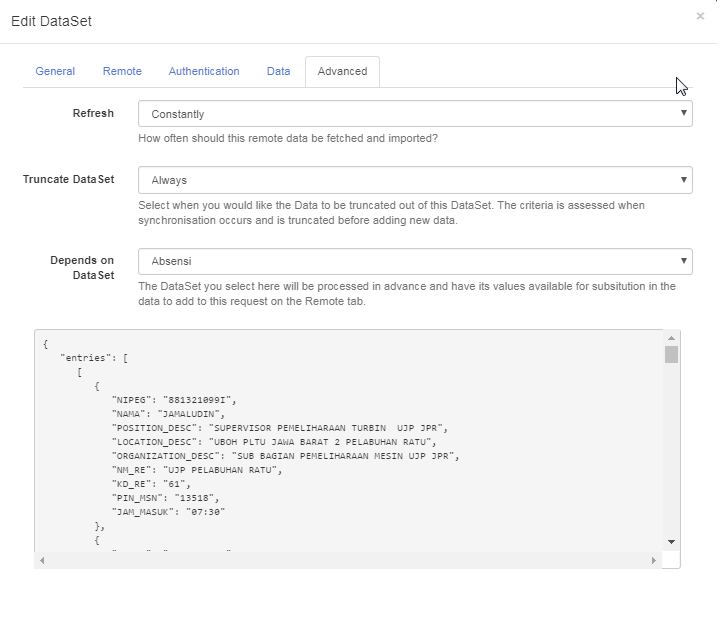
but, it’s failed to sync
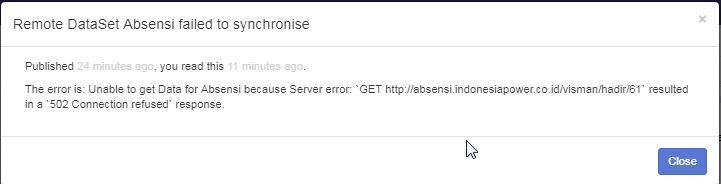
is there any eror on my setup?
this is my column setup

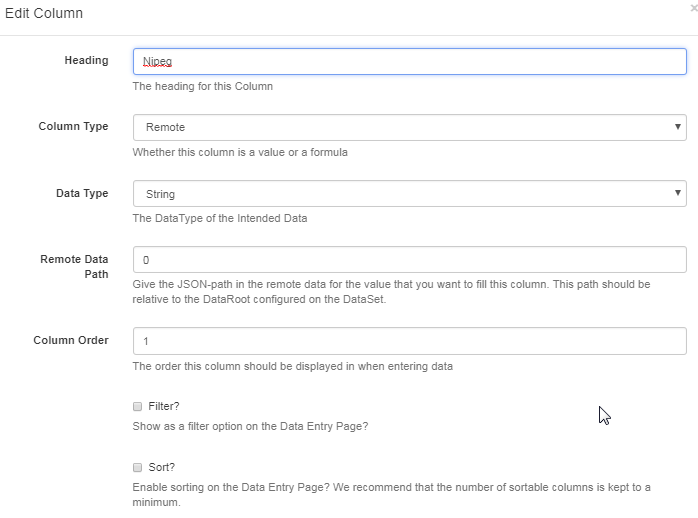
thx for your help.
---
### Author:  [@Peter](https://community.xibo.org.uk/u/Peter)
#### Post date: [April 25, 2018, 8:08am UTC](https://community.xibo.org.uk/t/data-set-remote-data-source/13337/11 "2018-04-25T08:08:27Z")
You don’t have data root specified, I’m not sure about other remote dataset settings as we cannot seem them there.
That being said 502 is rather odd in this case, it pretty much means that the fetch remote dataset task was running and tried to access that URL, but the connection was refused by the server.
Does this URL requires any authentication and if so is that configured in the remote dataSet?
---
### Author:  [@system](https://community.xibo.org.uk/u/system)
#### Post date: [March 4, 2020, 5:10pm UTC](https://community.xibo.org.uk/t/data-set-remote-data-source/13337/12 "2020-03-04T17:10:10Z")