# CMS shows same private IP for different displays
**URL:** https://community.xibo.org.uk/t/cms-shows-same-private-ip-for-different-displays/9890
**Category:** Get Help
**Created:** [May 3, 2017, 5:11pm UTC](https://community.xibo.org.uk/t/cms-shows-same-private-ip-for-different-displays/9890 "2017-05-03T17:11:38Z")
**Posts on this page:** 19
**Page:** 1
### Author:  [@jasonh77tw](https://community.xibo.org.uk/u/jasonh77tw)
#### Post date: [May 3, 2017, 5:11pm UTC](https://community.xibo.org.uk/t/cms-shows-same-private-ip-for-different-displays/9890/1 "2017-05-03T17:11:38Z")

I install CMS 1.81 in Windows 10 Pro x64 with Docker.
The IP of CMS machine is 192.168.16.15, and the players are 192.168.16.12 and 192.168.16.137.
When I tried to make VNC link, I found CMS shows both these players as 172.18.0.1
How can I fix it?
---
### Author:  [@Guru\_Evi](https://community.xibo.org.uk/u/Guru_Evi)
#### Post date: [May 4, 2017, 2:18am UTC](https://community.xibo.org.uk/t/cms-shows-same-private-ip-for-different-displays/9890/2 "2017-05-04T02:18:04Z")
Most likely that is the “IP address” that your web server sees (the Docker interface?). You’re probably using some form of proxy, in that case your proxy needs to pass the IP information.
From what I’ve seen, the CMS does not use the IP of the player behind a firewall/proxy but uses the IP the CMS ‘sees’ which is often a public IP or a proxy IP.
---
### Author:  [@alex](https://community.xibo.org.uk/u/alex)
#### Post date: [May 4, 2017, 7:12am UTC](https://community.xibo.org.uk/t/cms-shows-same-private-ip-for-different-displays/9890/3 "2017-05-04T07:12:17Z")
On Windows, Docker uses a userland proxy service to proxy TCP packets in to the CMS from Windows.
Unfortunately, that means that as you’ve seen, the source IP address is always the internal Docker bridge. As it stands, I don’t think there’s anything we can do to change that. There’s an issue open in the Docker bug tracker for it, so hopefully in time they will resolve this. It doesn’t affect Docker on Linux as far as I’m aware.
@Guru_Evi If they were running behind a reverse proxy, the source IP should still be shown since Xibo looks for the X-Forwarded-For headers which most reverse proxies add to the HTTP request. As the Docker userland proxy is a TCP proxy and not one that understands the protocol passing through it, it can’t add those headers.
---
### Author:  [@jasonh77tw](https://community.xibo.org.uk/u/jasonh77tw)
#### Post date: [May 6, 2017, 3:36am UTC](https://community.xibo.org.uk/t/cms-shows-same-private-ip-for-different-displays/9890/4 "2017-05-06T03:36:18Z")
Thank you, Alex, but it’s really hard to perfectly install xibo 1.8.x.
Firstly, I tried to use custom installtion with XAMPP, but no matter how, I can’t get lib\_zmq work.
Then I tried Windows Home + docker + toolbox, VirtualBox + Lubuntu + docker for days… still no luck.
Fianally I can install it on Windows 10 Pro + Docker, but the bad news about IP… Ahhhhh…
---
### Author:  [@alex](https://community.xibo.org.uk/u/alex)
#### Post date: [May 7, 2017, 7:16pm UTC](https://community.xibo.org.uk/t/cms-shows-same-private-ip-for-different-displays/9890/5 "2017-05-07T19:16:05Z")
A Linux-based install shouldn’t have this issue. There’s a step by step guide in the Guides section. It’s about 10 minutes work start to finish, once you have the OS installed.
---
### Author:  [@jasonh77tw](https://community.xibo.org.uk/u/jasonh77tw)
#### Post date: [May 8, 2017, 5:31am UTC](https://community.xibo.org.uk/t/cms-shows-same-private-ip-for-different-displays/9890/6 "2017-05-08T05:31:33Z")
I’ve some trouble when I tried to do “docker-compose up -d” on Ubuntu.
docker-compose responded that I need to change the docker version to “2” or “2.0” in “.yml” file.
After I done this, there were new error messages. I tried this and that and finally it works, but I don’t know what made it work. I only know one thing I did is to re-install docker-compose.
But on CentOS, everything goes smoothly.
---
### Author:  [@alex](https://community.xibo.org.uk/u/alex)
#### Post date: [May 8, 2017, 7:11am UTC](https://community.xibo.org.uk/t/cms-shows-same-private-ip-for-different-displays/9890/7 "2017-05-08T07:11:39Z")
If docker-compose complains about the version number, you’re likely using a packaged version of Docker and Docker Compose rather than installing the latest versions as shown in the guide.
---
### Author:  [@Marashni](https://community.xibo.org.uk/u/Marashni)
#### Post date: [November 28, 2017, 3:36am UTC](https://community.xibo.org.uk/t/cms-shows-same-private-ip-for-different-displays/9890/8 "2017-11-28T03:36:11Z")
@alex After migrating from Docker on Windows to Docker on Ubuntu as a Hyper-V VM, we are still getting IP addresses resolving to an internal IP address that looked like it was attached to a container. I’ll provide more information tomorrow, but it appears this issue may be more widespread.
---
### Author:  [@alex](https://community.xibo.org.uk/u/alex)
#### Post date: [November 28, 2017, 9:35am UTC](https://community.xibo.org.uk/t/cms-shows-same-private-ip-for-different-displays/9890/9 "2017-11-28T09:35:39Z")
Is the HyperV VM connected to the network in bridged mode, or in NAT mode? If it’s in NAT mode, then the VM (and therefore the containers) will see all connections coming from a fixed IP rather than from the actual origin.
---
### Author:  [@Marashni](https://community.xibo.org.uk/u/Marashni)
#### Post date: [November 28, 2017, 4:30pm UTC](https://community.xibo.org.uk/t/cms-shows-same-private-ip-for-different-displays/9890/10 "2017-11-28T16:30:00Z")
@alex The Hyper-V VM is connected to the network via a virtual switch. The Connection type for the virtual switch is External Network attached to an Intel® Ethernet Connection (2) I219-LM, which allows the management operating system to share the network adapter.
Here is some output from ifconfig from the Ubuntu VM:
- eth0 has ipv4 address 10.250.103.237, which is the external network.
- br-175b5db1f2e6 has ipv4 address 172.18.0.1
- docker0 has ipv4 address 172.17.0.1
Here is some output from ifconfig from the xibodocker\_cms-web\_1 container:
- eth0 has ipv4 address 172.18.0.4
So, please correct me if I’m wrong, but it appears that br-175b5db1f2e6 is a bridge used by docker that is acting as a NAT for the docker containers, which is interesting due to the Ubuntu VM receiving an address on its eth0 from the external network indicating a bridged connection.
---
### Author:  [@alex](https://community.xibo.org.uk/u/alex)
#### Post date: [November 28, 2017, 4:52pm UTC](https://community.xibo.org.uk/t/cms-shows-same-private-ip-for-different-displays/9890/11 "2017-11-28T16:52:59Z")
Docker creates virtual networks inside the machine to isolate different services from one another.
In that way, one service you run with Docker absolutely cannot interact with any other unless you expose those specific services to the other containers.
The CMS should still be seeing the connections to it from the source LAN IP address however.
The reason it doesn’t work on Windows, is there’s a physical proxy application sitting between the VM and the containers, which is the cause of the changed IP address.

Here’s a screenshot from my local CMS, and you can see the Player on the LAN correctly shows its LAN IP address, not the docker network address.
My cms-web container has the IP address 172.9.0.3 which is the private Docker network, so what you’re seeing is what I would expect to see too. The only difference being I’m seeing the correct LAN IP address, and I presume you aren’t?
---
### Author:  [@Marashni](https://community.xibo.org.uk/u/Marashni)
#### Post date: [November 28, 2017, 5:26pm UTC](https://community.xibo.org.uk/t/cms-shows-same-private-ip-for-different-displays/9890/12 "2017-11-28T17:26:26Z")
@alex I’ve provided some screenshots below and for the record am using release\_1.8.2\_5.6:
As you can see, the ip address of my display is displayed as the address attached to br-175b5db1f2e6

Output from Ubuntu VM Host ifconfig:
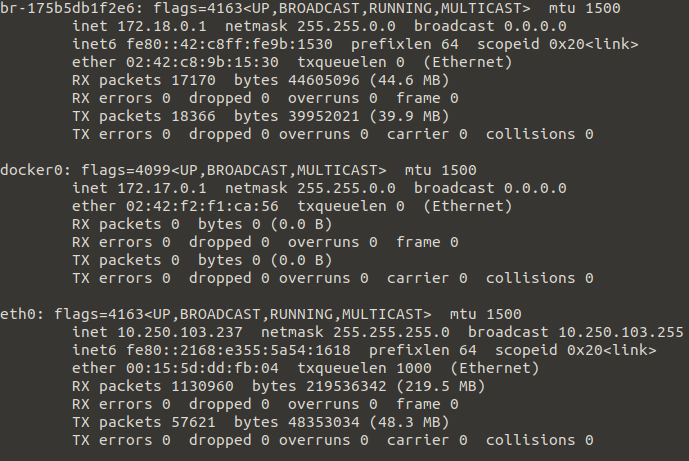
I presume the existence of br-175b5db1f2e6 is problematic, and from my understanding I would expect the docker containers to be receiving addressing from docker0 not br-175b5db1f2e6, yes?
---
### Author:  [@alex](https://community.xibo.org.uk/u/alex)
#### Post date: [November 28, 2017, 5:42pm UTC](https://community.xibo.org.uk/t/cms-shows-same-private-ip-for-different-displays/9890/13 "2017-11-28T17:42:39Z")
> [@Marashni](#):
>
> I presume the existence of br-175b5db1f2e6 is problematic, and from my understanding I would expect the docker containers to be receiving addressing from docker0 not br-175b5db1f2e6, yes?
Absolutely not. You would 100% expect that to be there. It’s the isolated network that docker makes for the CMS to use for its internal communications, with the MySQL and XMR containers.
What version of Docker are you using?
Where is that display installed? On another VM on the HyperV host? Or somewhere else on a completely separate machine? Are you running a reverse proxy infront of the CMS on the Ubuntu host machine by any chance?
---
### Author:  [@Marashni](https://community.xibo.org.uk/u/Marashni)
#### Post date: [November 28, 2017, 6:06pm UTC](https://community.xibo.org.uk/t/cms-shows-same-private-ip-for-different-displays/9890/14 "2017-11-28T18:06:49Z")
@alex Okay that’s valuable information, thanks for that Alex.
Docker Client: 17.09.0-ce
Docker Server: 17.09.0-ce
The display is installed on a separate system attached to a television. It is able to receive campaigns pushed by the server and is doing so currently. I’m also able to receive screenshots, so I know XMR is functioning, although I have a separate issue open regarding the amount of the screen being captured.
There is currently no reverse proxy in front of the CMS, although I was intending to implement an Apache reverse proxy based on your guide here: [Xibo 1.8.0 with Docker on Ubuntu 16.04](https://community.xibo.org.uk/t/xibo-1-8-0-with-docker-on-ubuntu-16-04/9392)
---
### Author:  [@alex](https://community.xibo.org.uk/u/alex)
#### Post date: [November 28, 2017, 6:23pm UTC](https://community.xibo.org.uk/t/cms-shows-same-private-ip-for-different-displays/9890/15 "2017-11-28T18:23:38Z")
If you’re going to put a reverse proxy infront then the IP address reported is a moot point, as the proxy will pass the correct IP through to the containers for you. That sounds like your quickest route to what you want.
---
### Author:  [@Marashni](https://community.xibo.org.uk/u/Marashni)
#### Post date: [November 28, 2017, 6:30pm UTC](https://community.xibo.org.uk/t/cms-shows-same-private-ip-for-different-displays/9890/16 "2017-11-28T18:30:18Z")
Good point, I’ll report back with findings/resolution once I have configured the reverse proxy. Thanks Alex.
---
### Author:  [@Marashni](https://community.xibo.org.uk/u/Marashni)
#### Post date: [December 1, 2017, 9:37pm UTC](https://community.xibo.org.uk/t/cms-shows-same-private-ip-for-different-displays/9890/17 "2017-12-01T21:37:44Z")
Reporting back as I said I would, configuring reverse proxy with an Apache server went along without a hitch, currently getting the correct IP Address of my Xibo Player.
Unsure as to why Docker on Linux inside a Hyper-V VM reported incorrectly.
Thanks again Alex.
---
### Author:  [@ljtcsm](https://community.xibo.org.uk/u/ljtcsm)
#### Post date: [July 26, 2019, 1:06pm UTC](https://community.xibo.org.uk/t/cms-shows-same-private-ip-for-different-displays/9890/18 "2019-07-26T13:06:12Z")
I know this thread hasn’t had any update in quite some time. Just curious if there has been any update to a fix for this on Windows? Having the same issue with all of my displays showing with the same IP: 172.18.0.1.
Xibo 2.0.1
docker for windows 2.0.0.3 (31259)
on Windows 10 Pro 64bit v1809 (17763.615)
---
### Author:  [@system](https://community.xibo.org.uk/u/system)
#### Post date: [March 4, 2020, 5:07pm UTC](https://community.xibo.org.uk/t/cms-shows-same-private-ip-for-different-displays/9890/19 "2020-03-04T17:07:22Z")