# Client Not Updating
**URL:** https://community.xibo.org.uk/t/client-not-updating/213
**Category:** Xibo Player for Android
**Created:** [March 19, 2015, 6:38pm UTC](https://community.xibo.org.uk/t/client-not-updating/213 "2015-03-19T18:38:50Z")
**Posts on this page:** 20
**Page:** 1
### Author:  [@John](https://community.xibo.org.uk/u/John)
#### Post date: [March 19, 2015, 6:38pm UTC](https://community.xibo.org.uk/t/client-not-updating/213/1 "2015-03-19T18:38:50Z")
All of a sudden my client stopped updating.
Only playing what is cached.
I’ve updated to v1.7 v53
Tried removing the Video region thinking that might have been the issue but no go.
Only two regions are Clock and RSS.
I’ve checked [New clients not updating](https://community.xibo.org.uk/t/new-clients-not-updating/114/2) date/time are correct. I’ve rebooted the device still only playing what’s cached.
I’ve removed the display and re-added it, still nothing.
Any ideas?
Thanks
John
---
### Author:  [@alex](https://community.xibo.org.uk/u/alex)
#### Post date: [March 19, 2015, 7:55pm UTC](https://community.xibo.org.uk/t/client-not-updating/213/2 "2015-03-19T19:55:42Z")
What is shown on the client status screen? Please post a screenshot. If you’d rather not in a public forum, please open a case with Spring Signage directly.
---
### Author:  [@John](https://community.xibo.org.uk/u/John)
#### Post date: [March 19, 2015, 8:33pm UTC](https://community.xibo.org.uk/t/client-not-updating/213/3 "2015-03-19T20:33:09Z")
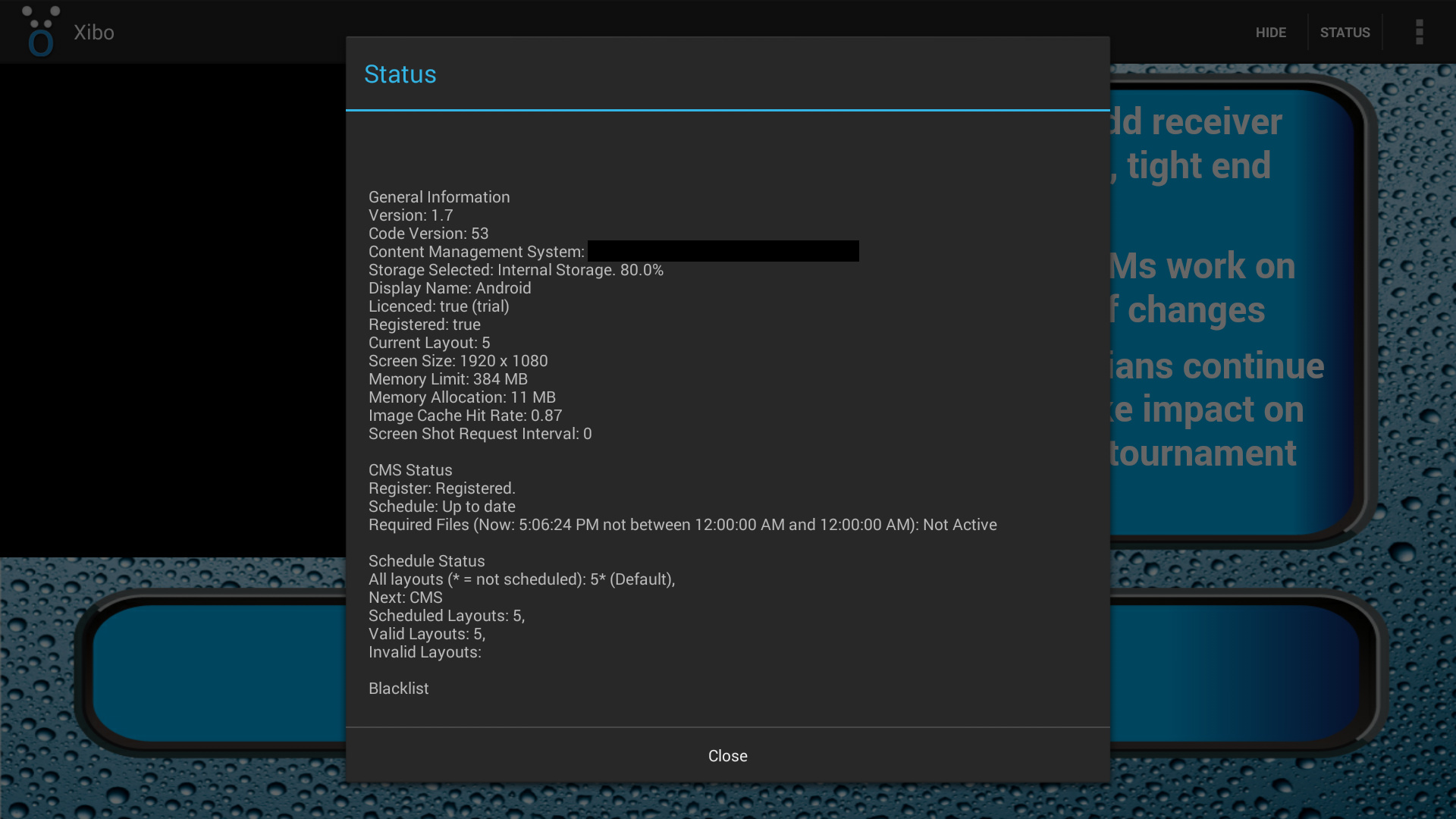
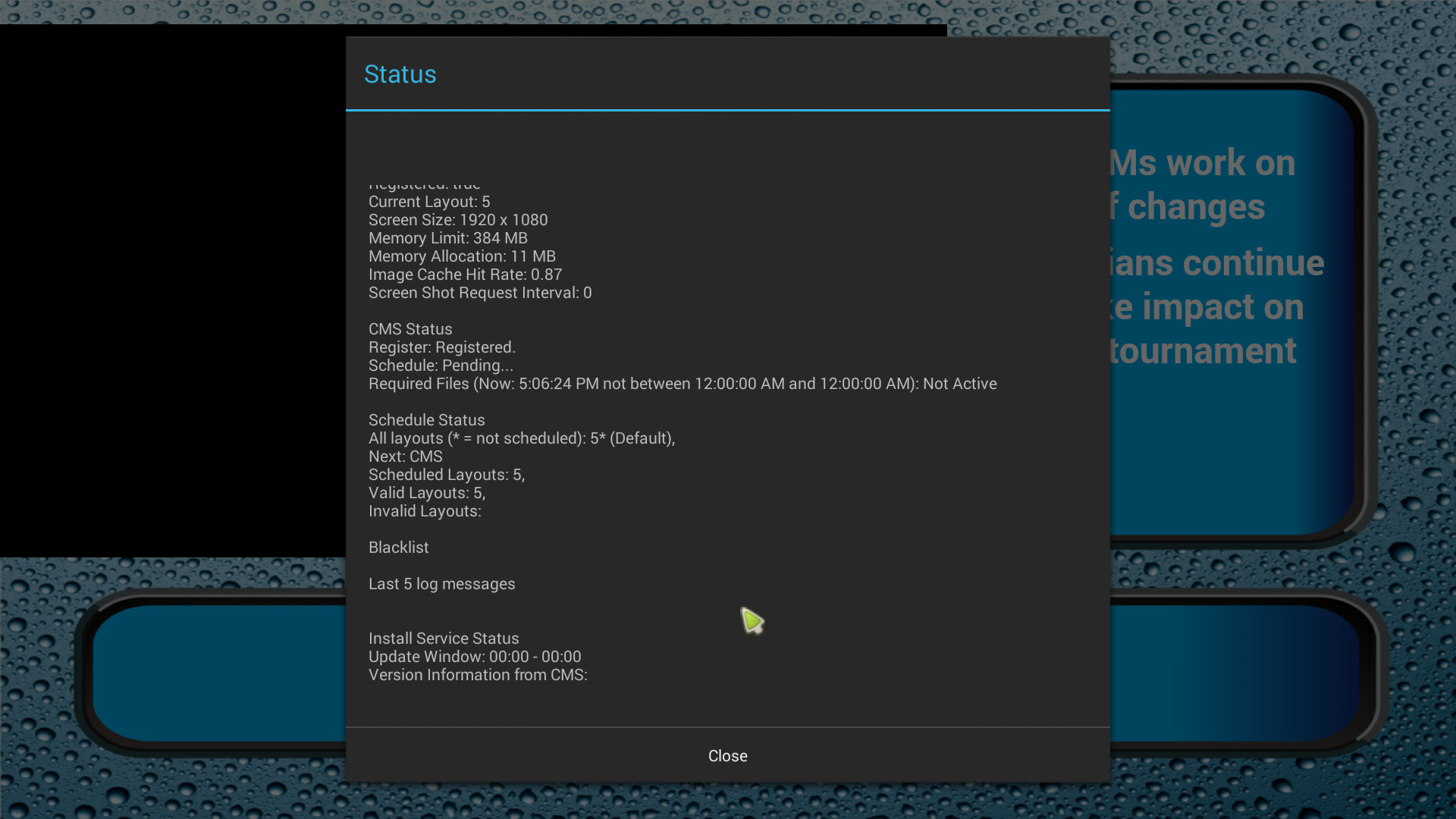
I just blocked out the URL as it’s a private site at the moment.
Thanks
---
### Author:  [@alex](https://community.xibo.org.uk/u/alex)
#### Post date: [March 19, 2015, 9:22pm UTC](https://community.xibo.org.uk/t/client-not-updating/213/4 "2015-03-19T21:22:31Z")
See the Required Files section. The client isn’t updating because the CMS Display Profile for that client is set so that the client only updates between certain times. You need to adjust that so that it can connect all the time and then restart the client.
There is a bug in 1.7.2 if you set the start and finish times to identical values. See:
> [@Unable to display scheduled campaign or layout to Xibo Windows Player](https://community.xibo.org.uk/t/unable-to-display-scheduled-campaign-or-layout-to-xibo-windows-player/175/21):
>
> I’m pretty sure the bug will only effect people that have created a default - but it would be interesting to know for sure!
---
### Author:  [@John](https://community.xibo.org.uk/u/John)
#### Post date: [March 19, 2015, 9:42pm UTC](https://community.xibo.org.uk/t/client-not-updating/213/5 "2015-03-19T21:42:39Z")
Perfect, ya now that you say that it happened when I created a default layout after upgrading to v1.7.2.
Works perfectly now after setting the Start Time to 00:00 and End Time to 23:50
Thanks
---
### Author:  [@alex](https://community.xibo.org.uk/u/alex)
#### Post date: [March 19, 2015, 10:47pm UTC](https://community.xibo.org.uk/t/client-not-updating/213/6 "2015-03-19T22:47:44Z")
Great. Glad you got it working.
Alex
---
### Author:  [@Lelouch](https://community.xibo.org.uk/u/Lelouch)
#### Post date: [March 27, 2015, 12:34pm UTC](https://community.xibo.org.uk/t/client-not-updating/213/7 "2015-03-27T12:34:51Z")
I have various Xibo clients all on 1.7.2 running Windows 8.1. After updating the software from 1.7.1 to 1.7.2 I noticed that my RSS feeds stopped updating. After trying steps to get them to update I ended up assigning the players the default layout from Xibo rebooting the players and then reassigning them my current layout with successful results.
How can I ensure my current layouts will update?
---
### Author:  [@alex](https://community.xibo.org.uk/u/alex)
#### Post date: [March 27, 2015, 1:22pm UTC](https://community.xibo.org.uk/t/client-not-updating/213/8 "2015-03-27T13:22:22Z")
Check the info screen. I expect you’ve created a Display Profile in the CMS which is preventing the Player from connecting to the CMS except for a very small window over midnight. If you fill either apply the patch mentioned above or set a wider window you will be OK
---
### Author:  [@Lelouch](https://community.xibo.org.uk/u/Lelouch)
#### Post date: [March 27, 2015, 1:26pm UTC](https://community.xibo.org.uk/t/client-not-updating/213/9 "2015-03-27T13:26:12Z")
I have no Display Profile set. The only thing that is set with a schedule are my Campaigns which I have starting in 2015 00:00 and ending in 2020 00:00.
---
### Author:  [@alex](https://community.xibo.org.uk/u/alex)
#### Post date: [March 27, 2015, 1:26pm UTC](https://community.xibo.org.uk/t/client-not-updating/213/10 "2015-03-27T13:26:50Z")
Please post a screenshot of the client status screen. It’s also vital that the date/time/timezone are correct on your device.
---
### Author:  [@Lelouch](https://community.xibo.org.uk/u/Lelouch)
#### Post date: [March 27, 2015, 1:49pm UTC](https://community.xibo.org.uk/t/client-not-updating/213/11 "2015-03-27T13:49:23Z")
Can I send it via e-mail?
---
### Author:  [@alex](https://community.xibo.org.uk/u/alex)
#### Post date: [March 27, 2015, 1:50pm UTC](https://community.xibo.org.uk/t/client-not-updating/213/12 "2015-03-27T13:50:57Z")
If you’d prefer not to post it in public then you can open a service desk case with Spring Signage directly - assuming this is an Android client.
---
### Author:  [@Lelouch](https://community.xibo.org.uk/u/Lelouch)
#### Post date: [March 27, 2015, 2:08pm UTC](https://community.xibo.org.uk/t/client-not-updating/213/13 "2015-03-27T14:08:41Z")
My apologies, as I mentioned above these are Win 8.1 machines.
---
### Author:  [@alex](https://community.xibo.org.uk/u/alex)
#### Post date: [March 27, 2015, 2:09pm UTC](https://community.xibo.org.uk/t/client-not-updating/213/14 "2015-03-27T14:09:33Z")
Oh right. It’s just the thread is about Android devices (and is in the Android room)!
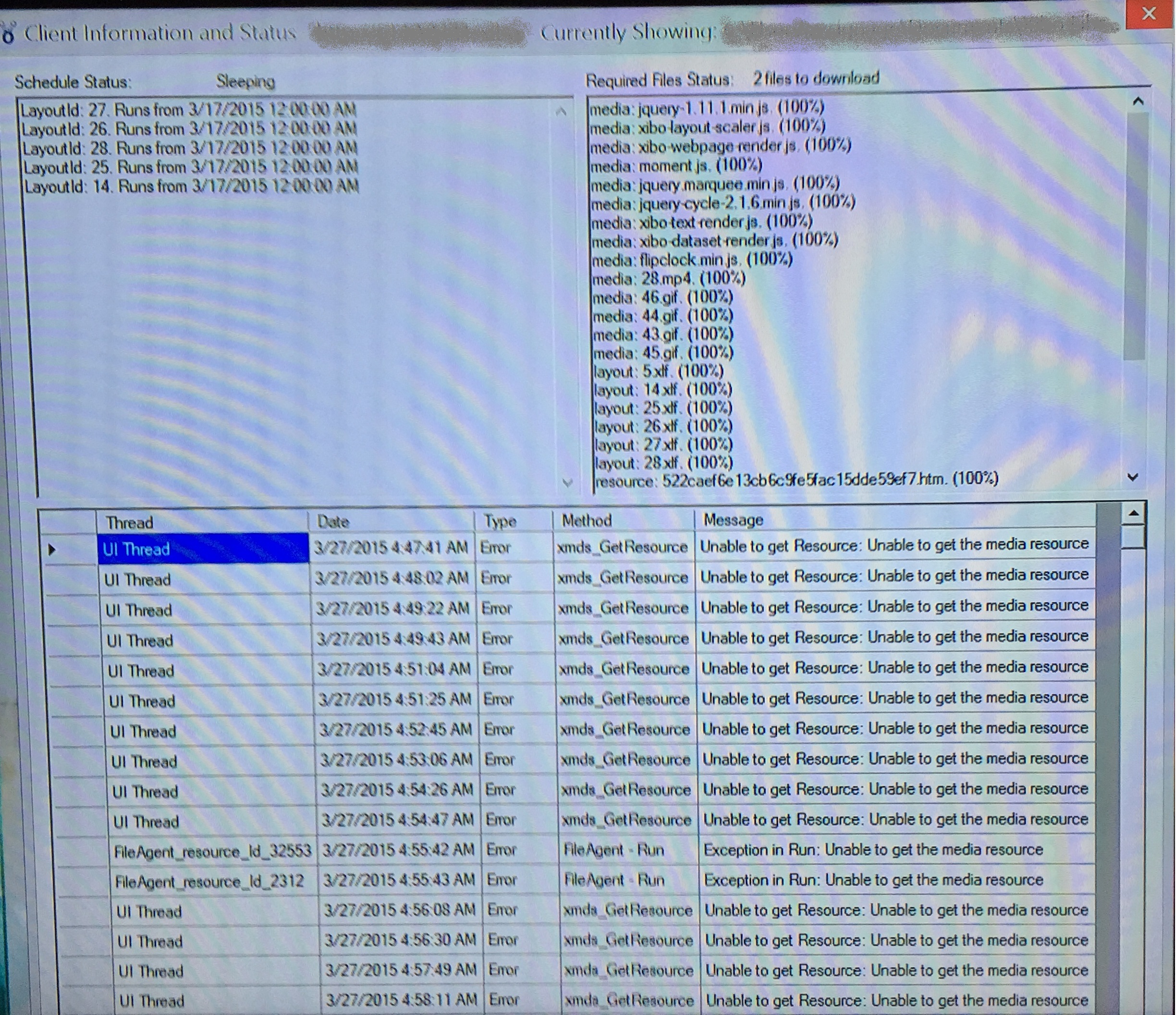
Can you post a screenshot then showing the top right of the client information screen? It shouldn’t have anything sensitive on it but shows the Required Files status
---
### Author:  [@Lelouch](https://community.xibo.org.uk/u/Lelouch)
#### Post date: [March 27, 2015, 2:16pm UTC](https://community.xibo.org.uk/t/client-not-updating/213/15 "2015-03-27T14:16:03Z")
I am a new user and as such not allowed to post images yet…
When I press “I” on the keyboard to bring up the current status I am getting few different error messages.
Here is an example of what I get:

---
### Author:  [@alex](https://community.xibo.org.uk/u/alex)
#### Post date: [March 27, 2015, 2:27pm UTC](https://community.xibo.org.uk/t/client-not-updating/213/16 "2015-03-27T14:27:09Z")
It’s above that box what I need to see. It looks like you can upload images just fine!
It’s at the top right of the information screen. Labelled “Required Files Status:”
Please provide a screenshot of that, or exactly what it says
---
### Author:  [@Lelouch](https://community.xibo.org.uk/u/Lelouch)
#### Post date: [March 27, 2015, 2:59pm UTC](https://community.xibo.org.uk/t/client-not-updating/213/17 "2015-03-27T14:59:10Z")
---
### Author:  [@alex](https://community.xibo.org.uk/u/alex)
#### Post date: [March 27, 2015, 3:00pm UTC](https://community.xibo.org.uk/t/client-not-updating/213/18 "2015-03-27T15:00:16Z")
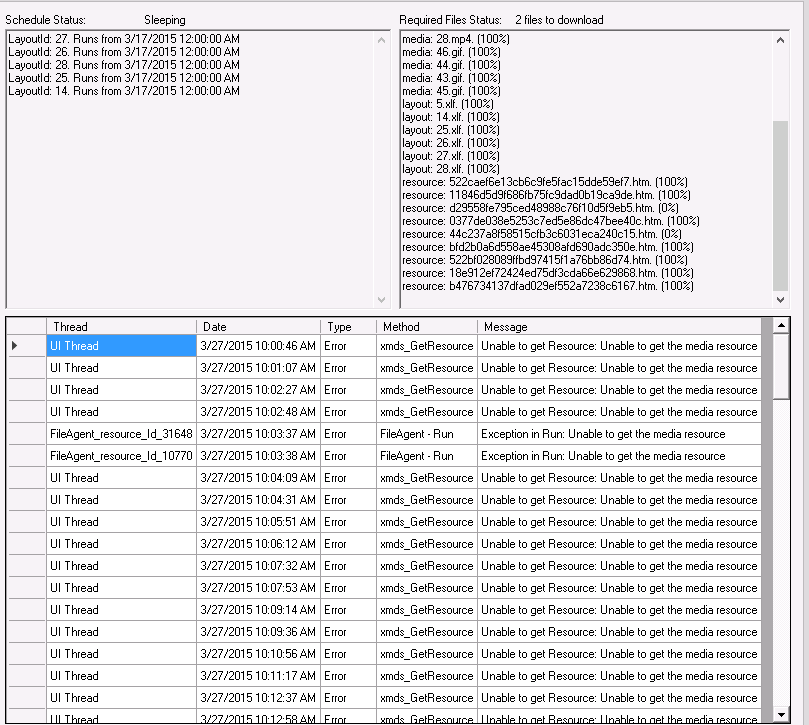
So it’s having problems downloading 2 files. Can you scroll down the Required Files list and see which ones aren’t at 100%?
---
### Author:  [@Lelouch](https://community.xibo.org.uk/u/Lelouch)
#### Post date: [March 27, 2015, 3:15pm UTC](https://community.xibo.org.uk/t/client-not-updating/213/19 "2015-03-27T15:15:56Z")
---
### Author:  [@alex](https://community.xibo.org.uk/u/alex)
#### Post date: [March 27, 2015, 3:17pm UTC](https://community.xibo.org.uk/t/client-not-updating/213/20 "2015-03-27T15:17:51Z")
It’s hard to say without having access to the CMS, but those are very likely 2 RSS feeds.
Check on the CMS that all your RSS feed URLs are valid, and that if any of them are accessed over SSL (ie start https://) that you’ve configured PHP to support that properly following the FAQ here:
> [@Using Tickers, Forecast, Twitter and other external resources that make use of HTTPS connections](https://community.xibo.org.uk/t/using-tickers-forecast-twitter-and-other-external-resources-that-make-use-of-https-connections/46):
>
> Using Tickers, Forecast, Twitter and other external resources that make use of HTTPS connections It is easy to reference and use external sources in Xibo widgets such as Tickers, however special consideration may need to be taken when referencing resources provided over SSL (anything with HTTPS at the front of the Address). Symptoms You have added a Ticker/Twitter/Forecast media item which references a feed or uses resources served over HTTPS and nothing is shown. You have checked the logs and …
[Next page](https://community.xibo.org.uk/t/client-not-updating/213.md?page=2)