# Cannot upload large video file
**URL:** https://community.xibo.org.uk/t/cannot-upload-large-video-file/12941
**Category:** Get Help
**Created:** [January 18, 2018, 4:33am UTC](https://community.xibo.org.uk/t/cannot-upload-large-video-file/12941 "2018-01-18T04:33:28Z")
**Posts on this page:** 20
**Page:** 1
### Author:  [@flx123](https://community.xibo.org.uk/u/flx123)
#### Post date: [January 18, 2018, 4:33am UTC](https://community.xibo.org.uk/t/cannot-upload-large-video-file/12941/1 "2018-01-18T04:33:29Z")
When trying to upload a large video to the media library (1.5G mp4), receive the following error: General error: 2006 MySQL server has gone away. The upload status bar climbs to 100%, but then after about an additional minute shows the error. Don’t seem to be having an issue with smaller video files. Are there any settings I can change to solve the problem? 1.8.4 docker install on windows 10 machine.
Thanks.
---
### Author:  [@alex](https://community.xibo.org.uk/u/alex)
#### Post date: [January 18, 2018, 11:31am UTC](https://community.xibo.org.uk/t/cannot-upload-large-video-file/12941/2 "2018-01-18T11:31:54Z")
Sounds like the upload is taking longer than MySQL is prepared to wait for an update from the webapp.
You’d need to increase MySQL’s timeouts to resolve it.
To do so, you’ll need to adjust your docker-compose file slightly in the cms-db section:
```
services:
cms-db:
image: mysql:5.6
command: --wait-timeout=300
volumes:
- "./shared/db:/var/lib/mysql"
restart: always
environment:
- MYSQL_DATABASE=cms
- MYSQL_USER=cms
- MYSQL_RANDOM_ROOT_PASSWORD=yes
mem_limit: 1g
env_file: config.env
```
Where wait-timeout is the number of seconds mysql should hold a connection open and inactive.
---
### Author:  [@flx123](https://community.xibo.org.uk/u/flx123)
#### Post date: [January 19, 2018, 3:00am UTC](https://community.xibo.org.uk/t/cannot-upload-large-video-file/12941/3 "2018-01-19T03:00:39Z")
Made the changes, and can now upload the file - but running into an additional problem.
Player downloads file (after scheduling) - but won’t play. Error = C:\Users\FLX\Documents\Xibo Library\48.mp4. Ex = Windows Media Player cannot find the file. If you are trying to play, burn, or sync an item that is in your library, the item might point to a file that has been moved, renamed, or deleted. 48.mp4 shows in the Xibo Library folder, as expected:

When try to run file directly get an error:
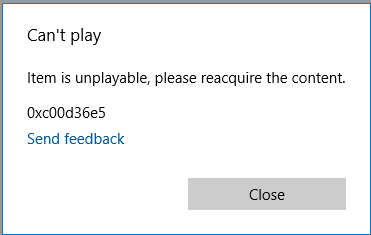
Running 48.mp4 from the cms Library folder

results in the same error. Running the original file from the same machine works fine.

Any ideas?
---
### Author:  [@flx123](https://community.xibo.org.uk/u/flx123)
#### Post date: [January 19, 2018, 4:14am UTC](https://community.xibo.org.uk/t/cannot-upload-large-video-file/12941/4 "2018-01-19T04:14:38Z")
Update … just to try something different, I created a fresh install of 1.8.4 and was able to get a working file after 2 tries. There is no obvious indication that Test file 1 had an issue - it shows as media #20 with the correct duration - but as compared to Test file 2 (media #21, which does work) I can now see that the file size is not correct. Also, looking at the file size in windows explorer, it is now apparent that media #21 is exactly the same size (1,592,990 KB) as the original file (output.mp4). Every other attempt created a file that was slightly smaller.
Still cannot get the file to work on the production install. What is most concerning is that there is no error produced (now that MySQL is no longer timing out) until the player tries to play the file. Even then, the player just shows a blank screen - I would not have known to check the log if I did not happen to catch that the video was not playing.
Thanks again for any input you may have!


---
### Author:  [@alex](https://community.xibo.org.uk/u/alex)
#### Post date: [January 19, 2018, 8:00am UTC](https://community.xibo.org.uk/t/cannot-upload-large-video-file/12941/5 "2018-01-19T08:00:41Z")
So what changed between you getting a bad upload and a good one?
Do you consistently get a good upload now or not?
---
### Author:  [@flx123](https://community.xibo.org.uk/u/flx123)
#### Post date: [January 19, 2018, 1:11pm UTC](https://community.xibo.org.uk/t/cannot-upload-large-video-file/12941/6 "2018-01-19T13:11:24Z")
Nothing changed between getting a bad upload and a good one - same computer, same database, same file. New database is more reliable - the upload succeeded 7 out of 12 times. 3 of the 5 failures were a result of trying to upload 4 at a time - and at least an error was produced upfront on those (see below - the 4th file, Test file9, uploaded ok).
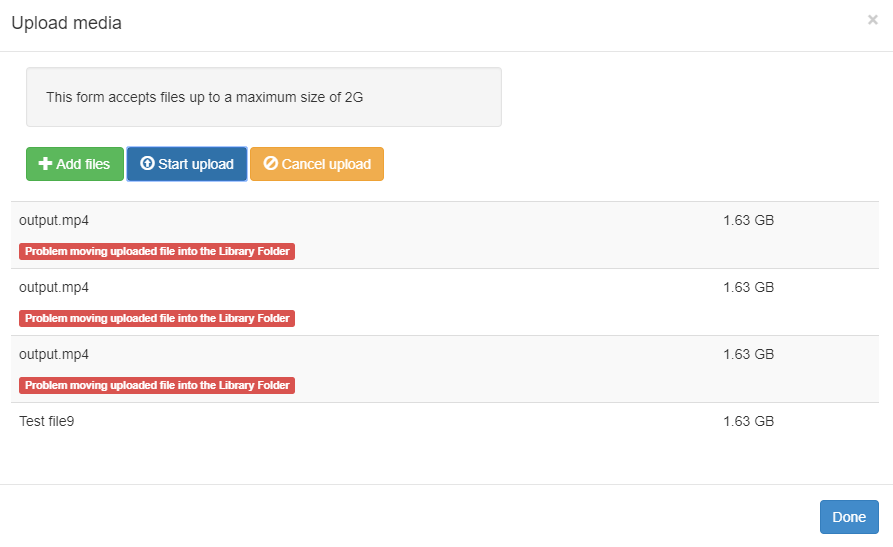
To clarify:
Machine 1 - cannot get file to upload with at least a dozen attempts.
Machine 2 - now has 2 databases. “A”, very similar to the one on machine 1, cannot upload. “B” is a newly created database - and, as mentioned above, is more reliable, but still not 100%.
Both machines have windows 10 professional installed.
Both machines have same version of docker and cms 1.8.4
Using same “output.mpg” upload.
---
### Author:  [@alex](https://community.xibo.org.uk/u/alex)
#### Post date: [January 19, 2018, 1:32pm UTC](https://community.xibo.org.uk/t/cannot-upload-large-video-file/12941/7 "2018-01-19T13:32:06Z")
I thought you said it gave you no indication that the file hadn’t uploaded correctly, yet your screenshot shows an error on upload.
That upload error is normally caused either by filesystem permissions, or by a temporary file left from a previous failed upload attempt. I’d try clearing the `shared/cms/library/temp` directory and see if that changes anything.
---
### Author:  [@flx123](https://community.xibo.org.uk/u/flx123)
#### Post date: [January 19, 2018, 1:48pm UTC](https://community.xibo.org.uk/t/cannot-upload-large-video-file/12941/8 "2018-01-19T13:48:50Z")
I don’t have an issue with those 3 failures - as mentioned above, at least an error was generated informing of the problem. No error produced for any other of the other dozen+ failures. I checked shared/cms/library/temp - and the folder is empty.
---
### Author:  [@alex](https://community.xibo.org.uk/u/alex)
#### Post date: [January 19, 2018, 2:06pm UTC](https://community.xibo.org.uk/t/cannot-upload-large-video-file/12941/9 "2018-01-19T14:06:05Z")
OK. Please can you step through the Report Fault wizard and capture one of these failures, so we can see what the CMS is seeing?
---
### Author:  [@alex](https://community.xibo.org.uk/u/alex)
#### Post date: [January 19, 2018, 2:17pm UTC](https://community.xibo.org.uk/t/cannot-upload-large-video-file/12941/10 "2018-01-19T14:17:06Z")
As a test, I’m uploading a 3GB file here on 1.8.4.
It uploads without errors as expected, and the file size and contents match in the library (I’m running md5sum on them both to verify).
What settings exactly have you got in your config.env for:
CMS\_PHP\_POST\_MAX\_SIZE
CMS\_PHP\_UPLOAD\_MAX\_FILESIZE
CMS\_PHP\_MAX\_EXECUTION\_TIME
---
### Author:  [@flx123](https://community.xibo.org.uk/u/flx123)
#### Post date: [January 19, 2018, 3:07pm UTC](https://community.xibo.org.uk/t/cannot-upload-large-video-file/12941/11 "2018-01-19T15:07:28Z")
There are no settings for the 3 items you list. Should there be? If so, how do I add them?
Report fault created a troubleshoot file - how do I send that to you?
---
### Author:  [@alex](https://community.xibo.org.uk/u/alex)
#### Post date: [January 19, 2018, 3:15pm UTC](https://community.xibo.org.uk/t/cannot-upload-large-video-file/12941/12 "2018-01-19T15:15:45Z")
So if you’re not setting them explicitly, then they’ll default as follows:
```
CMS_PHP_POST_MAX_SIZE=2G
CMS_PHP_UPLOAD_MAX_FILESIZE=2G
CMS_PHP_MAX_EXECUTION_TIME=300
```
You might want to increase your MAX\_EXECUTION\_TIME so that it’s slightly longer than whatever value you’ve set the mysql timeout to.
To do so, you can just add a line to config.env, and then down/up the containers.
---
### Author:  [@flx123](https://community.xibo.org.uk/u/flx123)
#### Post date: [January 19, 2018, 5:02pm UTC](https://community.xibo.org.uk/t/cannot-upload-large-video-file/12941/13 "2018-01-19T17:02:37Z")
Increasing the max\_execution time might have solved the problem. I’ll do some further testing and let you know.
Thanks!!!
---
### Author:  [@react](https://community.xibo.org.uk/u/react)
#### Post date: [January 24, 2018, 7:32pm UTC](https://community.xibo.org.uk/t/cannot-upload-large-video-file/12941/14 "2018-01-24T19:32:35Z")
can i play 5gb files without any problems with this changes ?
---
### Author:  [@alex](https://community.xibo.org.uk/u/alex)
#### Post date: [January 25, 2018, 8:09am UTC](https://community.xibo.org.uk/t/cannot-upload-large-video-file/12941/15 "2018-01-25T08:09:42Z")
I’ve tested up to 3GB here, but I don’t see why you couldn’t go up to 5GB.
---
### Author:  [@react](https://community.xibo.org.uk/u/react)
#### Post date: [January 25, 2018, 8:24am UTC](https://community.xibo.org.uk/t/cannot-upload-large-video-file/12941/16 "2018-01-25T08:24:18Z")
why dont include this changes in default docker file ? it gives only pluses
---
### Author:  [@alex](https://community.xibo.org.uk/u/alex)
#### Post date: [January 25, 2018, 9:30am UTC](https://community.xibo.org.uk/t/cannot-upload-large-video-file/12941/17 "2018-01-25T09:30:21Z")
Not everyone will want their users uploading multi-gigabyte files.
The entries in config.env have been possible since the introduction of PHP 5.6 in release 1.8.3.
If you want large file uploads, then that is all that should be required.
The change to the docker-compose file for MySQL seems to only apply to the OP here. I’ve tested with larger files than they are using and haven’t hit MySQL timeouts at all in the same scenario.
---
### Author:  [@react](https://community.xibo.org.uk/u/react)
#### Post date: [January 25, 2018, 9:34am UTC](https://community.xibo.org.uk/t/cannot-upload-large-video-file/12941/18 "2018-01-25T09:34:53Z")
Thanks for answer . For next releases i think to have an option of setting maximum load file size in web interface will look good. i mean in config.env set max size could be , and than in a web limitation switch.
---
### Author:  [@alex](https://community.xibo.org.uk/u/alex)
#### Post date: [January 25, 2018, 9:37am UTC](https://community.xibo.org.uk/t/cannot-upload-large-video-file/12941/19 "2018-01-25T09:37:09Z")
It’s not possible to set it in the web interface as it’s a function of PHP not Xibo.
---
### Author:  [@alex](https://community.xibo.org.uk/u/alex)
#### Post date: [December 4, 2018, 5:28pm UTC](https://community.xibo.org.uk/t/cannot-upload-large-video-file/12941/20 "2018-12-04T17:28:26Z")
A post was split to a new topic: [Cannot upload large file - Unknown Error](https://community.xibo.org.uk/t/cannot-upload-large-file-unknown-error/16796)
[Next page](https://community.xibo.org.uk/t/cannot-upload-large-video-file/12941.md?page=2)