# Api Error: "Invalid key supplied"
**URL:** https://community.xibo.org.uk/t/api-error-invalid-key-supplied/31518
**Category:** CMS Features and Functionality
**Created:** [April 10, 2024, 1:17pm UTC](https://community.xibo.org.uk/t/api-error-invalid-key-supplied/31518 "2024-04-10T13:17:44Z")
**Posts on this page:** 20
**Page:** 1
### Author:  [@sasch90](https://community.xibo.org.uk/u/sasch90)
#### Post date: [April 10, 2024, 1:17pm UTC](https://community.xibo.org.uk/t/api-error-invalid-key-supplied/31518/1 "2024-04-10T13:17:44Z")
To be completed by the original poster:
# CMS Version
4.0.9
# Issue
Does anyone knows what “key” the CMS mean? I tried the (little bit outdated) manual of [Getting Started with Postman | Xibo Digital Signage](https://xibosignage.com/docs/developer/cms-api/getting-started-with-postman)
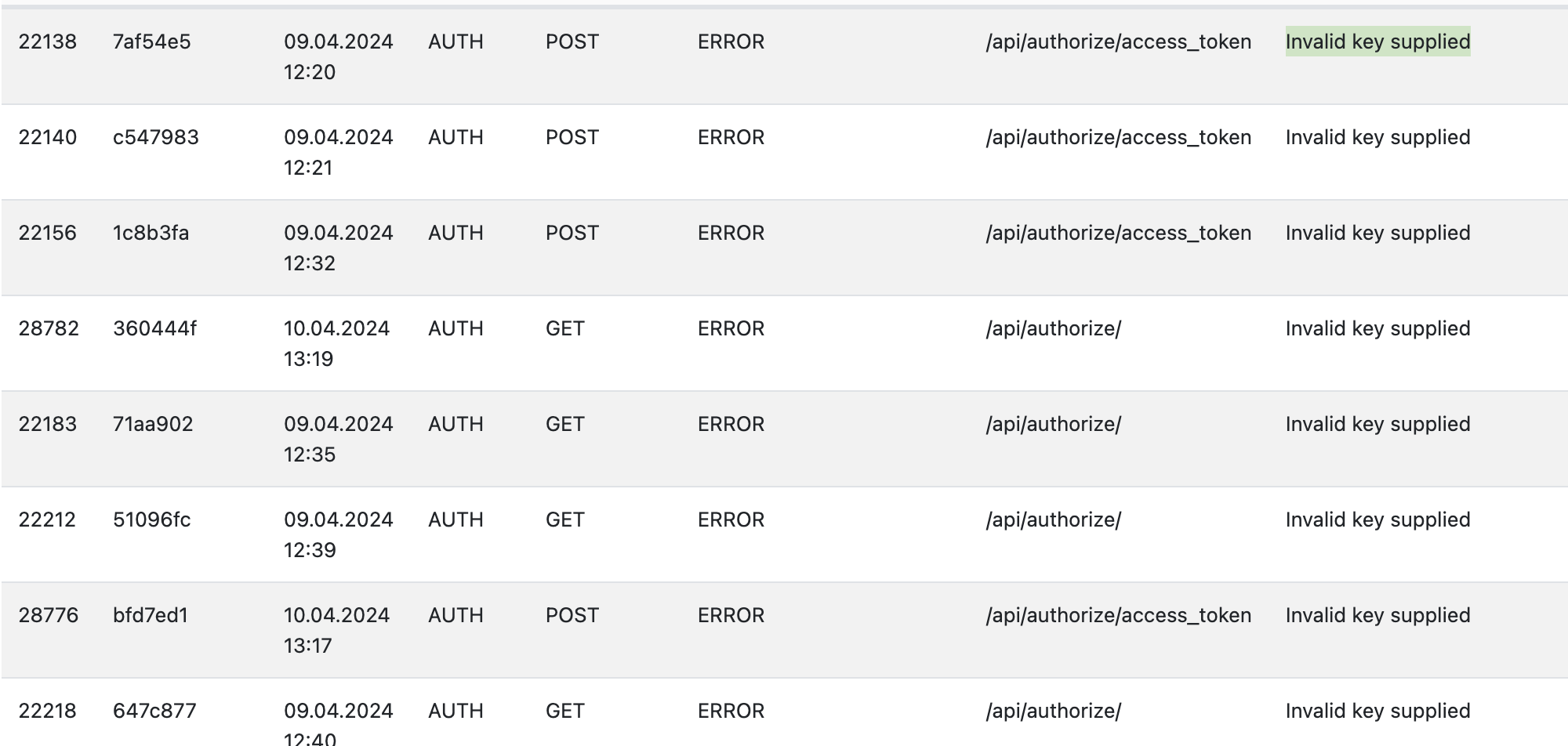
and the CMS shows this Error on the Logs:
---
### Author:  [@ProServ](https://community.xibo.org.uk/u/ProServ)
#### Post date: [April 10, 2024, 8:52pm UTC](https://community.xibo.org.uk/t/api-error-invalid-key-supplied/31518/2 "2024-04-10T20:52:38Z")
This documentation, though in need of updating, is still up to date.
Having used it, I haven’t had any major problems.
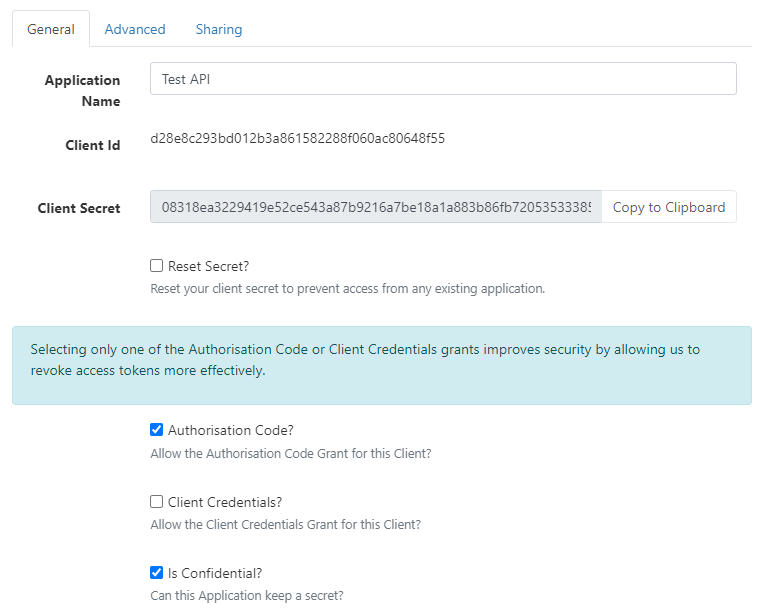
Have you created a new application, like this?
Can you give us the API request you want?
What are you using to test the API?
Did you ask for an authorisation key before sending your GET/POST?
---
### Author:  [@sasch90](https://community.xibo.org.uk/u/sasch90)
#### Post date: [April 16, 2024, 1:24pm UTC](https://community.xibo.org.uk/t/api-error-invalid-key-supplied/31518/3 "2024-04-16T13:24:55Z")
Hey, thank you for the reply. I created the app, checked “Authorisation Code” and “Is Credential”
Then i added like in the screenshot to Postman (also tried it with [make.com](http://make.com))
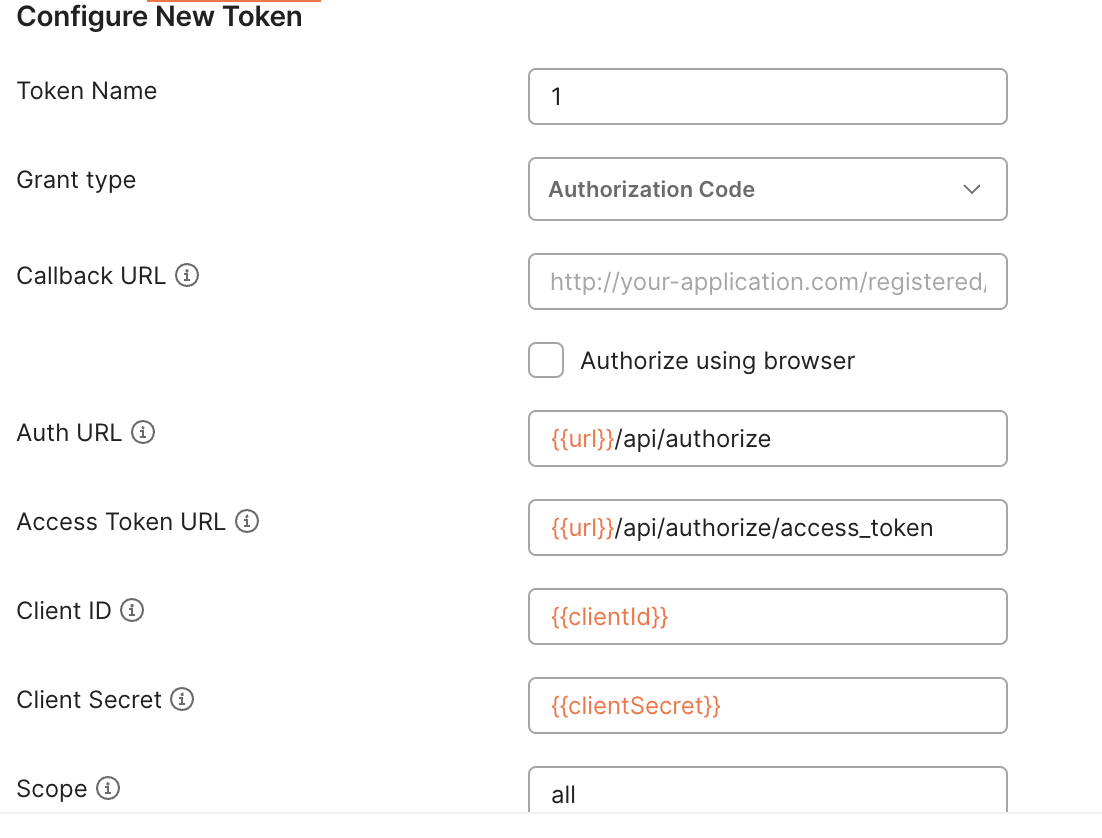
and if i click on: “Get New Access Token” it opens a browser window:
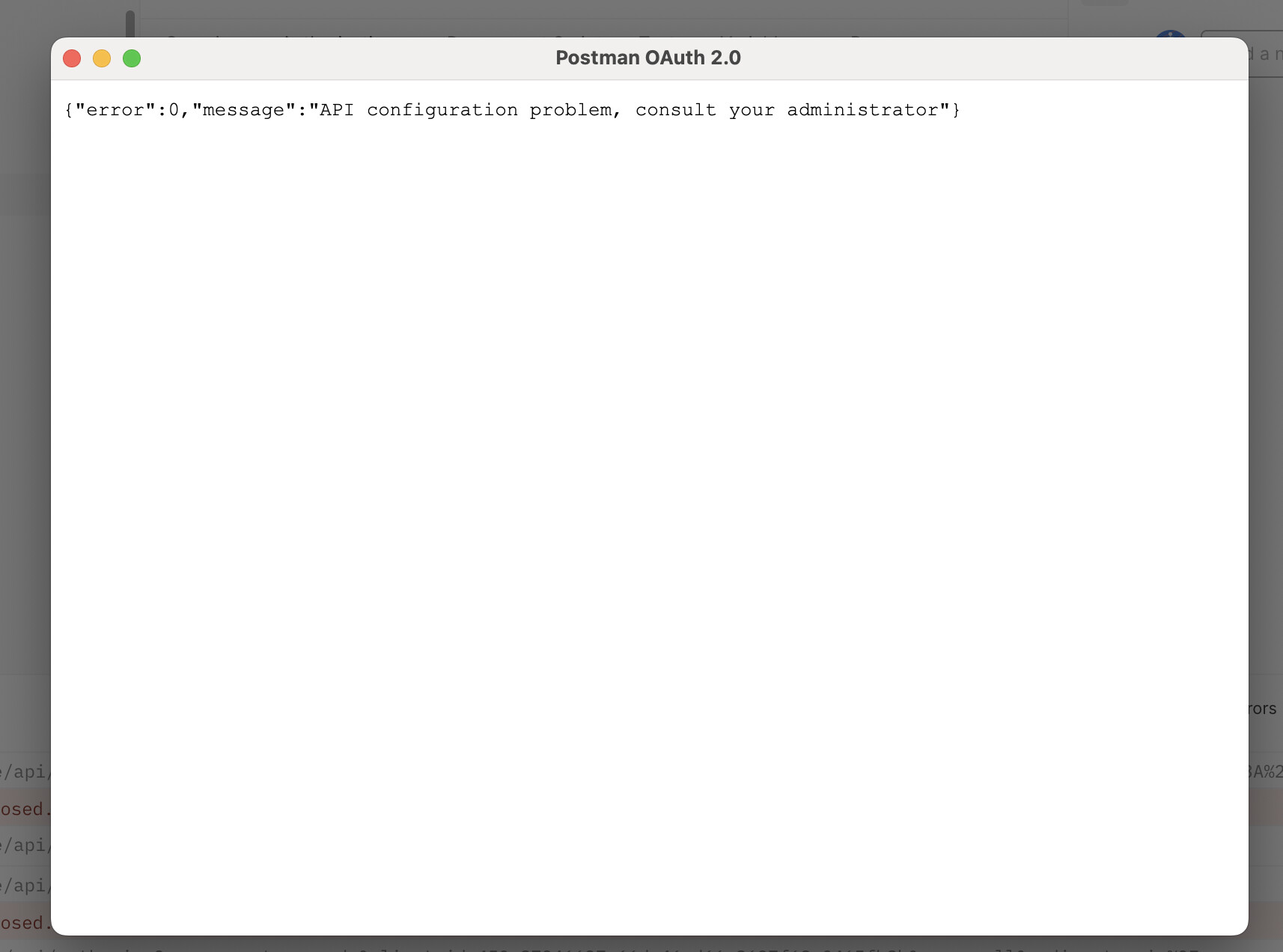
and throws the errors shown in the first post.
Maybe is this an error with the .key files in my (self hosted) cms?
---
### Author:  [@ProServ](https://community.xibo.org.uk/u/ProServ)
#### Post date: [April 16, 2024, 4:45pm UTC](https://community.xibo.org.uk/t/api-error-invalid-key-supplied/31518/4 "2024-04-16T16:45:33Z")
Try with this exemple:
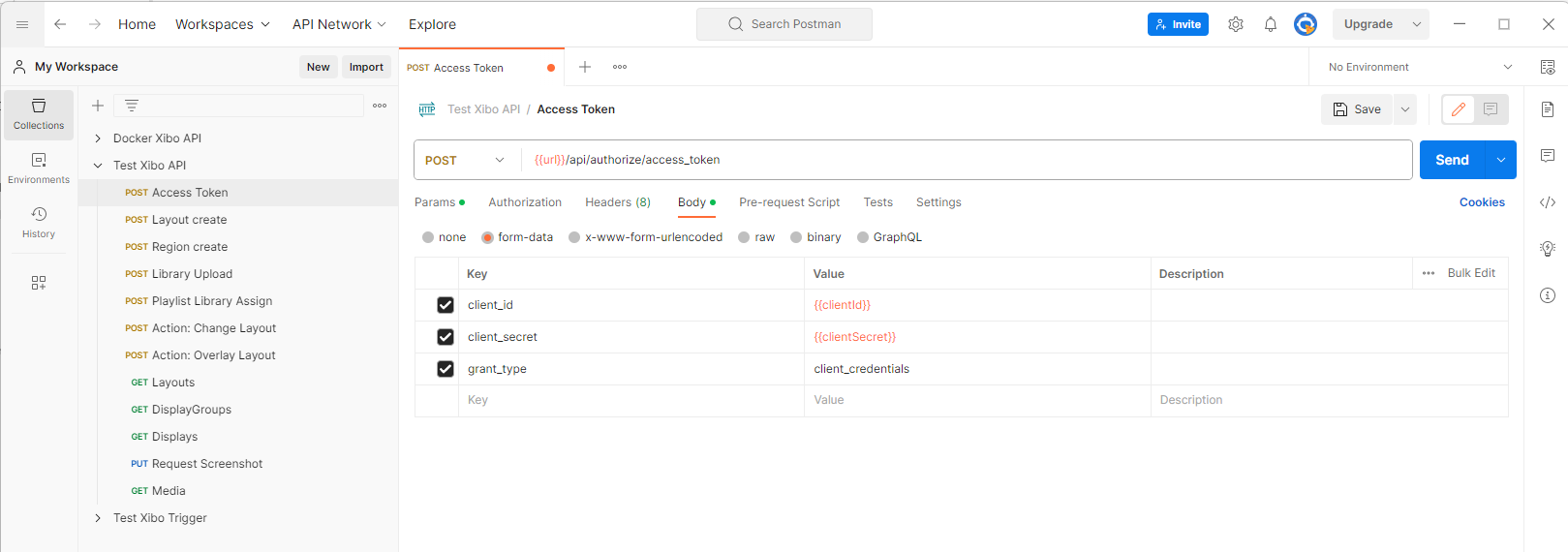
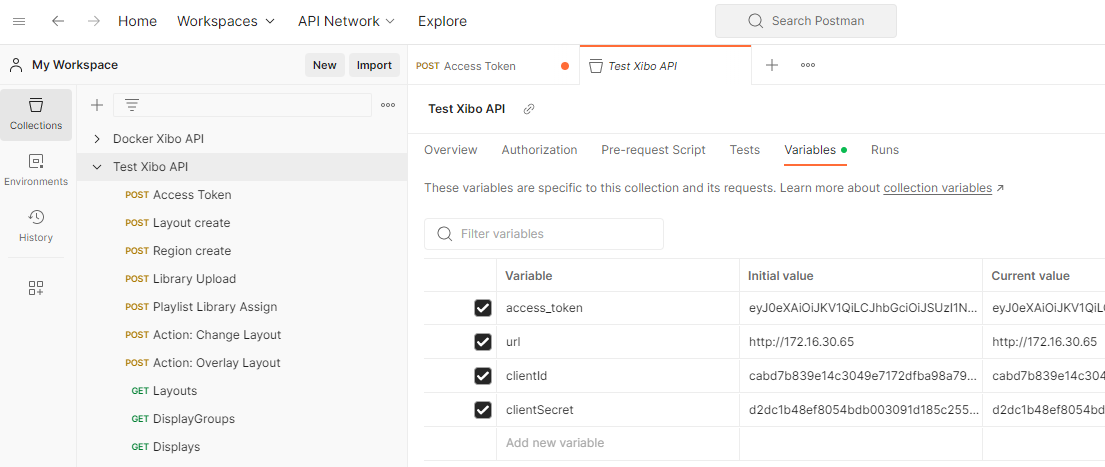
Don’t forget to set your variables: [Store and reuse values using variables | Postman Learning Center](https://learning.postman.com/docs/sending-requests/variables/variables/)
Like this:
---
### Author:  [@ProServ](https://community.xibo.org.uk/u/ProServ)
#### Post date: [April 16, 2024, 4:58pm UTC](https://community.xibo.org.uk/t/api-error-invalid-key-supplied/31518/5 "2024-04-16T16:58:23Z")
> [@sasch90](#):
>
> i click on: “Get New Access Token”
You try to get an OAuth 2.0 token.
Xibo’s API don’t work with this token.
You need to get a Token by Send a Request “POST”.
After that, you can set this “bearer token” to your collection:
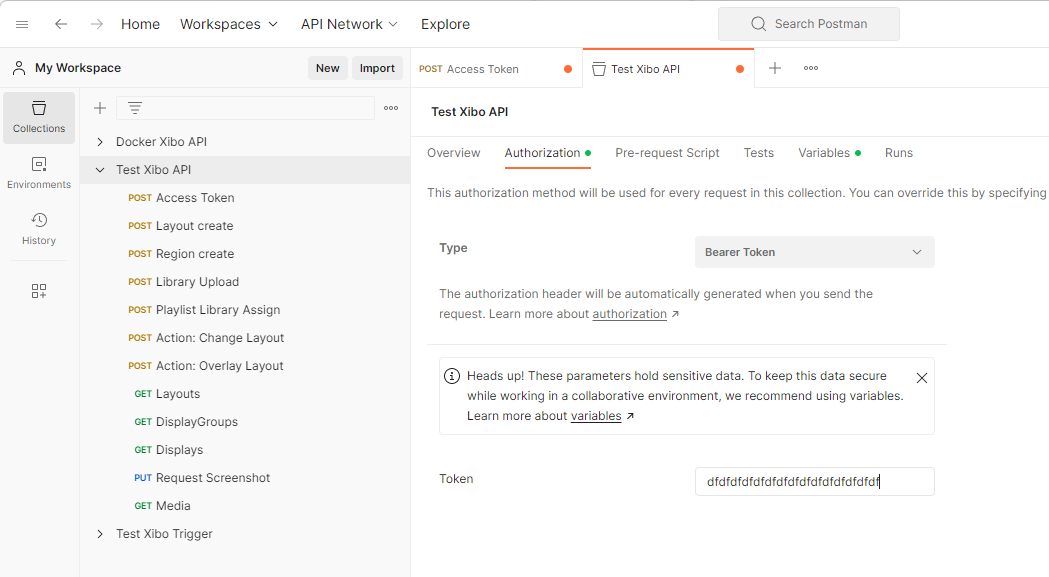
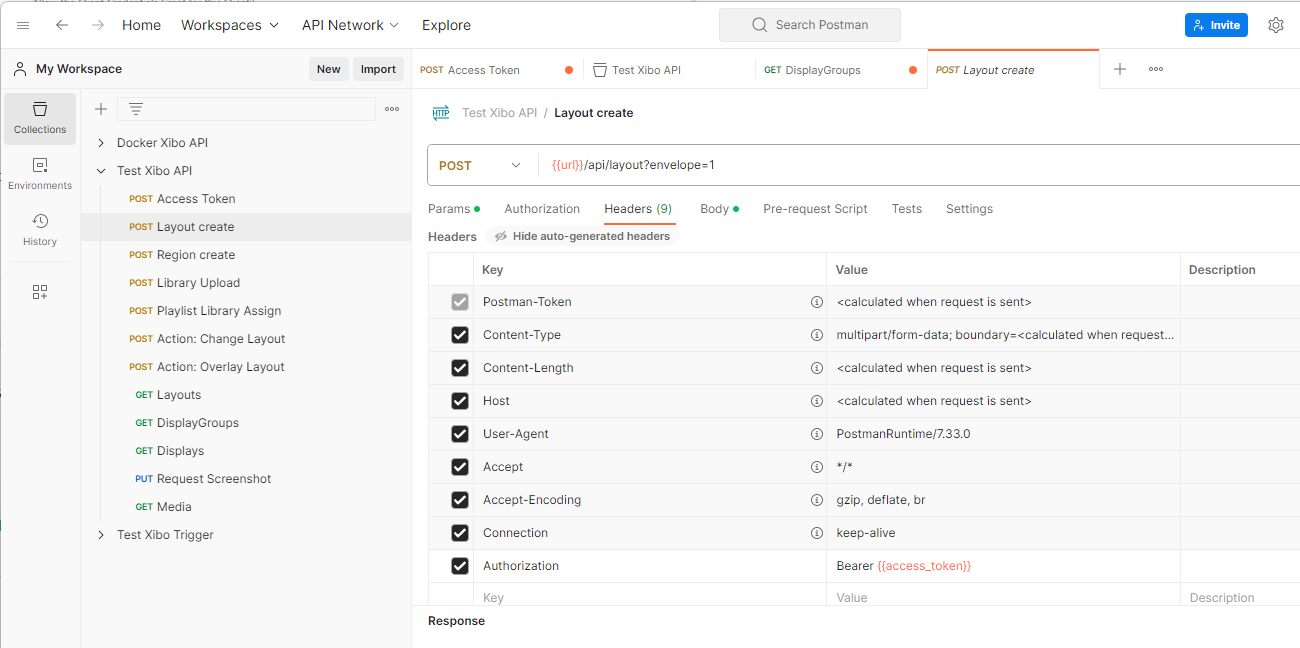
Or to your header requests:
---
### Author:  [@sasch90](https://community.xibo.org.uk/u/sasch90)
#### Post date: [April 16, 2024, 6:28pm UTC](https://community.xibo.org.uk/t/api-error-invalid-key-supplied/31518/6 "2024-04-16T18:28:13Z")
I tried it all. The answer is always a Error with 500 Code:
> {“error”:0,“message”:“API configuration problem, consult your administrator”}
and xibo doesn’t say why.
I think there is a faulty configuration in my CMS
* * *
another question. At the screenshot in the manual is “Oauth 2.0 on the top”
[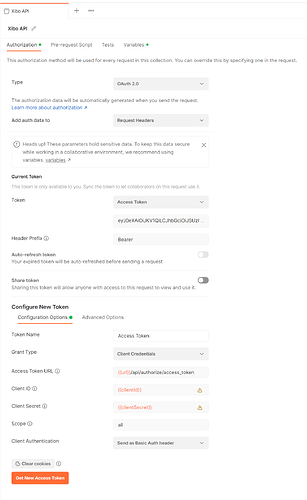 ](https://xibosignage.com/img/developer/0cb838b8dc040e9dc972ca55136fe284f9e91f3c_2_307x500.png)
---
### Author:  [@ProServ](https://community.xibo.org.uk/u/ProServ)
#### Post date: [April 16, 2024, 6:31pm UTC](https://community.xibo.org.uk/t/api-error-invalid-key-supplied/31518/7 "2024-04-16T18:31:45Z")
> [@sasch90](#):
>
> At the screenshot in the manual is “Oauth 2.0 on the top”
I think it’s a bad information.
But I could be wrong.
@dan, can you confirm that you can’t request API authorisation with an OAuth 2.0 token?
---
### Author:  [@sasch90](https://community.xibo.org.uk/u/sasch90)
#### Post date: [April 16, 2024, 6:51pm UTC](https://community.xibo.org.uk/t/api-error-invalid-key-supplied/31518/8 "2024-04-16T18:51:46Z")
I am a Step forward. The documentation [here](https://xibosignage.com/docs/setup/xibo-on-a-web-server#content-after-installation) says:
> The CMS requires a pub/private RSA keypair and an encryption key to be saved in the library folder.
But my Library is at another place. So i created the files and put it in the [cms]/library folder. But this was the error. Now i understand. The documentation menans not **the** Library folder. It means **my** library Folder. Just like in the settings. Now i try again 🙂 because the error is now another one:
{
“error”: “invalid\_client”,
“error\_description”: “Client authentication failed”,
“message”: “Client authentication failed”
}
complicated world 🤯 😅
---
### Author:  [@ProServ](https://community.xibo.org.uk/u/ProServ)
#### Post date: [April 16, 2024, 7:05pm UTC](https://community.xibo.org.uk/t/api-error-invalid-key-supplied/31518/9 "2024-04-16T19:05:02Z")
I thought you were using Xibo for Docker with a reverse proxy.
It’s so easy to use Docker.
Take a screenshot to your Postman code snippet like that:
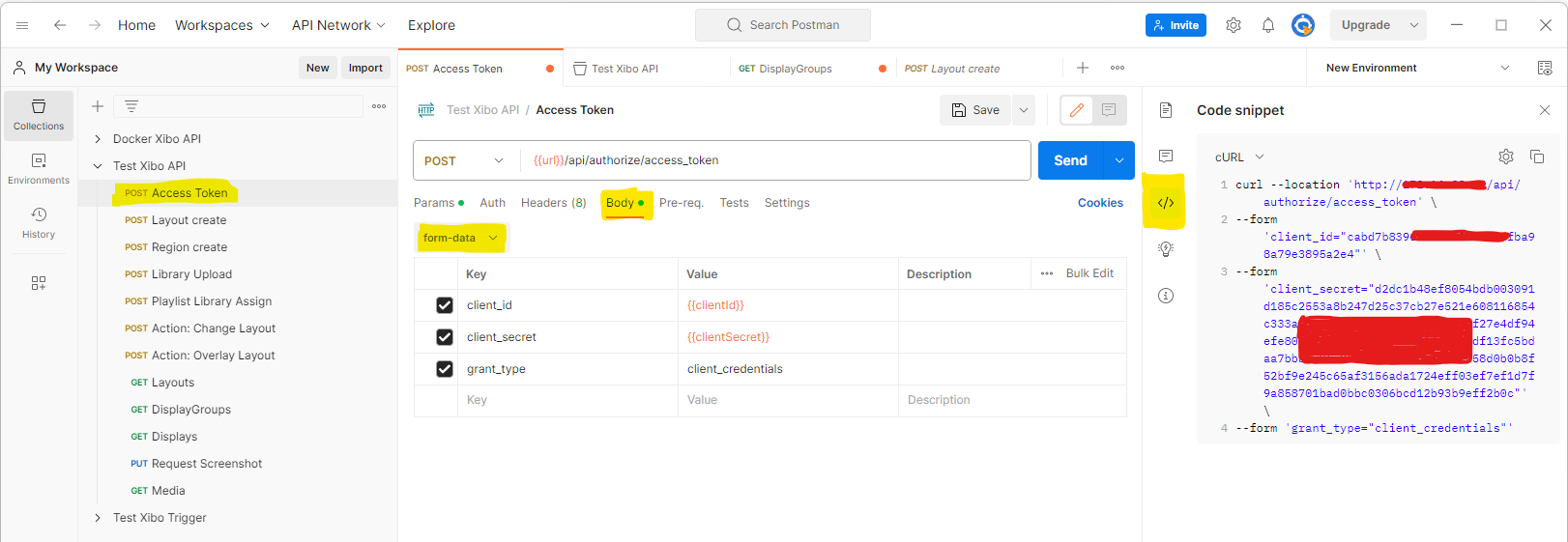
---
### Author:  [@sasch90](https://community.xibo.org.uk/u/sasch90)
#### Post date: [April 16, 2024, 7:23pm UTC](https://community.xibo.org.uk/t/api-error-invalid-key-supplied/31518/10 "2024-04-16T19:23:20Z")
its a self hosted CMS with PHP
---
### Author:  [@ProServ](https://community.xibo.org.uk/u/ProServ)
#### Post date: [April 16, 2024, 7:27pm UTC](https://community.xibo.org.uk/t/api-error-invalid-key-supplied/31518/11 "2024-04-16T19:27:39Z")
Please uncheck “Authorization” and “Cookie” under “Headers” tab.
---
### Author:  [@sasch90](https://community.xibo.org.uk/u/sasch90)
#### Post date: [April 16, 2024, 7:30pm UTC](https://community.xibo.org.uk/t/api-error-invalid-key-supplied/31518/12 "2024-04-16T19:30:11Z")
done 🙂 same response
---
### Author:  [@sasch90](https://community.xibo.org.uk/u/sasch90)
#### Post date: [April 16, 2024, 7:31pm UTC](https://community.xibo.org.uk/t/api-error-invalid-key-supplied/31518/13 "2024-04-16T19:31:55Z")
would be so great to get the access token from the CMS in the UI. So much hours for that ☹
---
### Author:  [@ProServ](https://community.xibo.org.uk/u/ProServ)
#### Post date: [April 16, 2024, 7:33pm UTC](https://community.xibo.org.uk/t/api-error-invalid-key-supplied/31518/14 "2024-04-16T19:33:21Z")
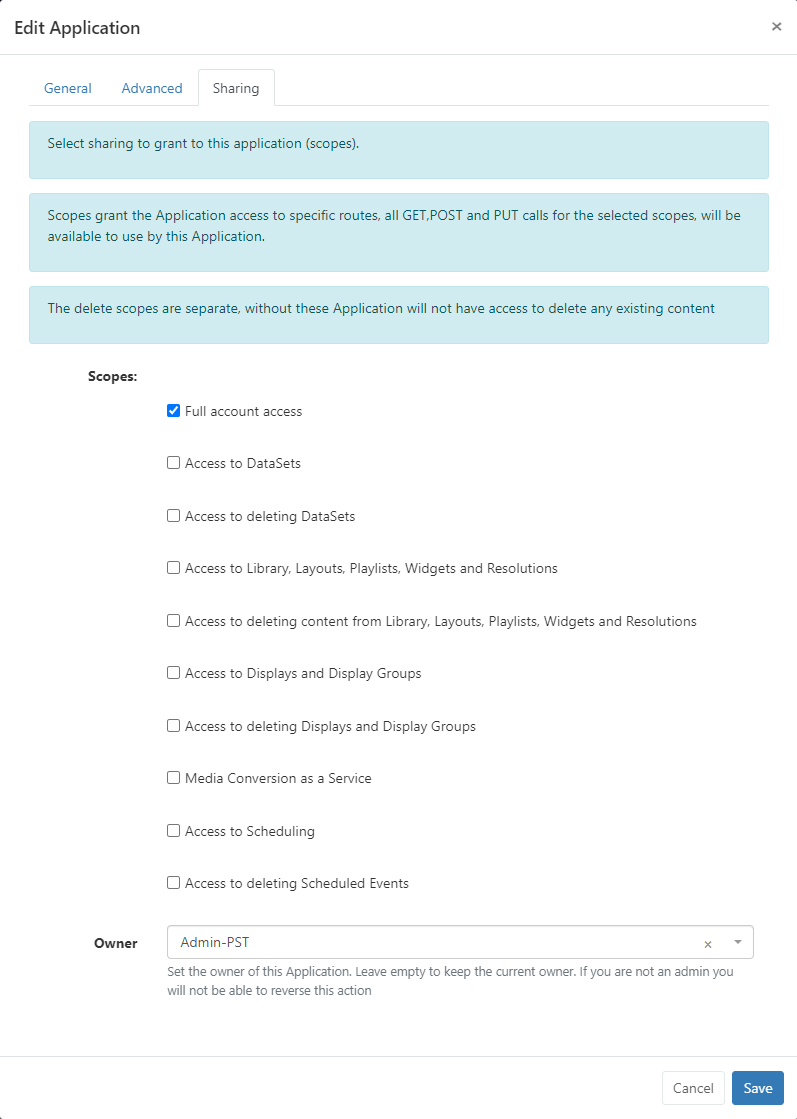
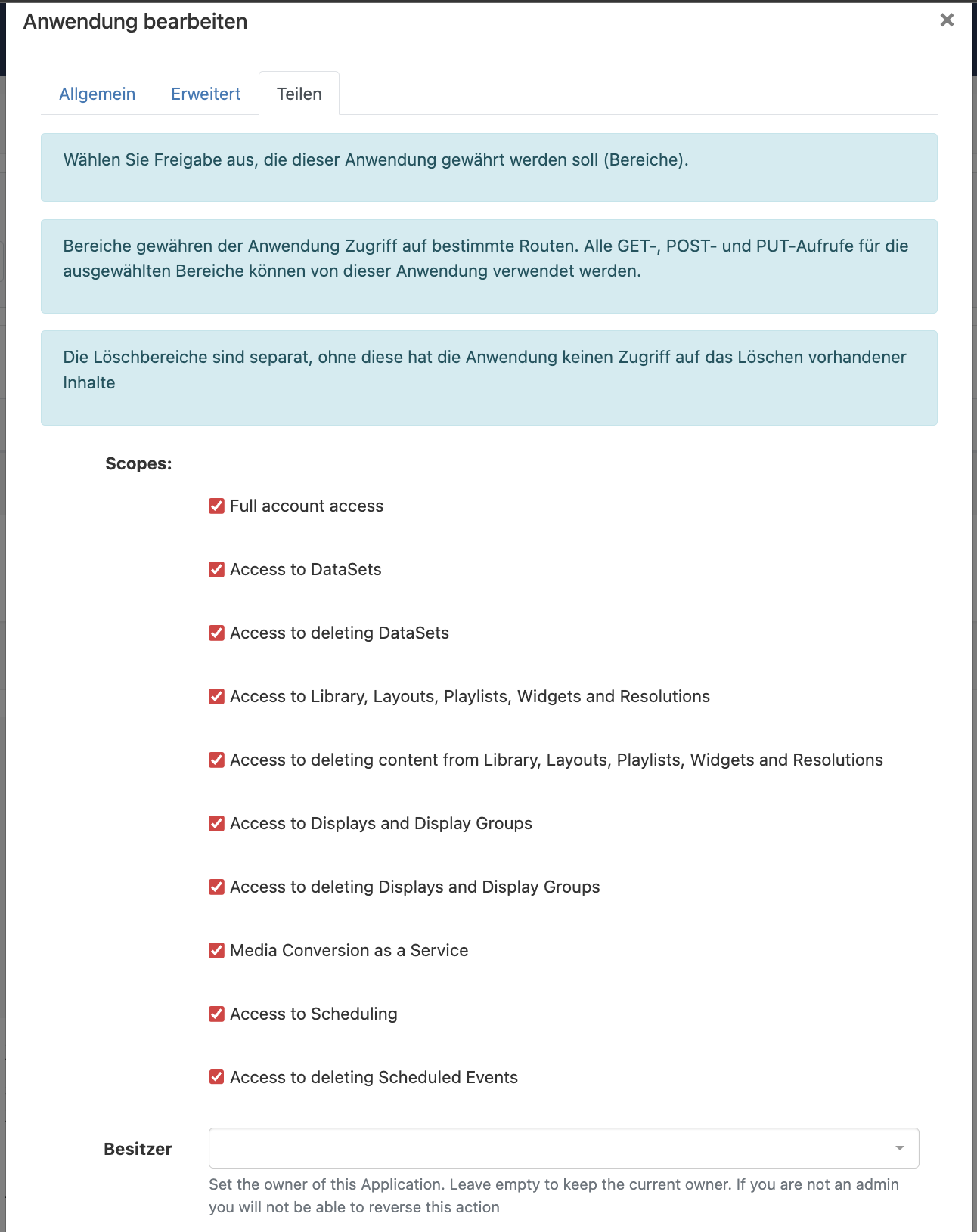
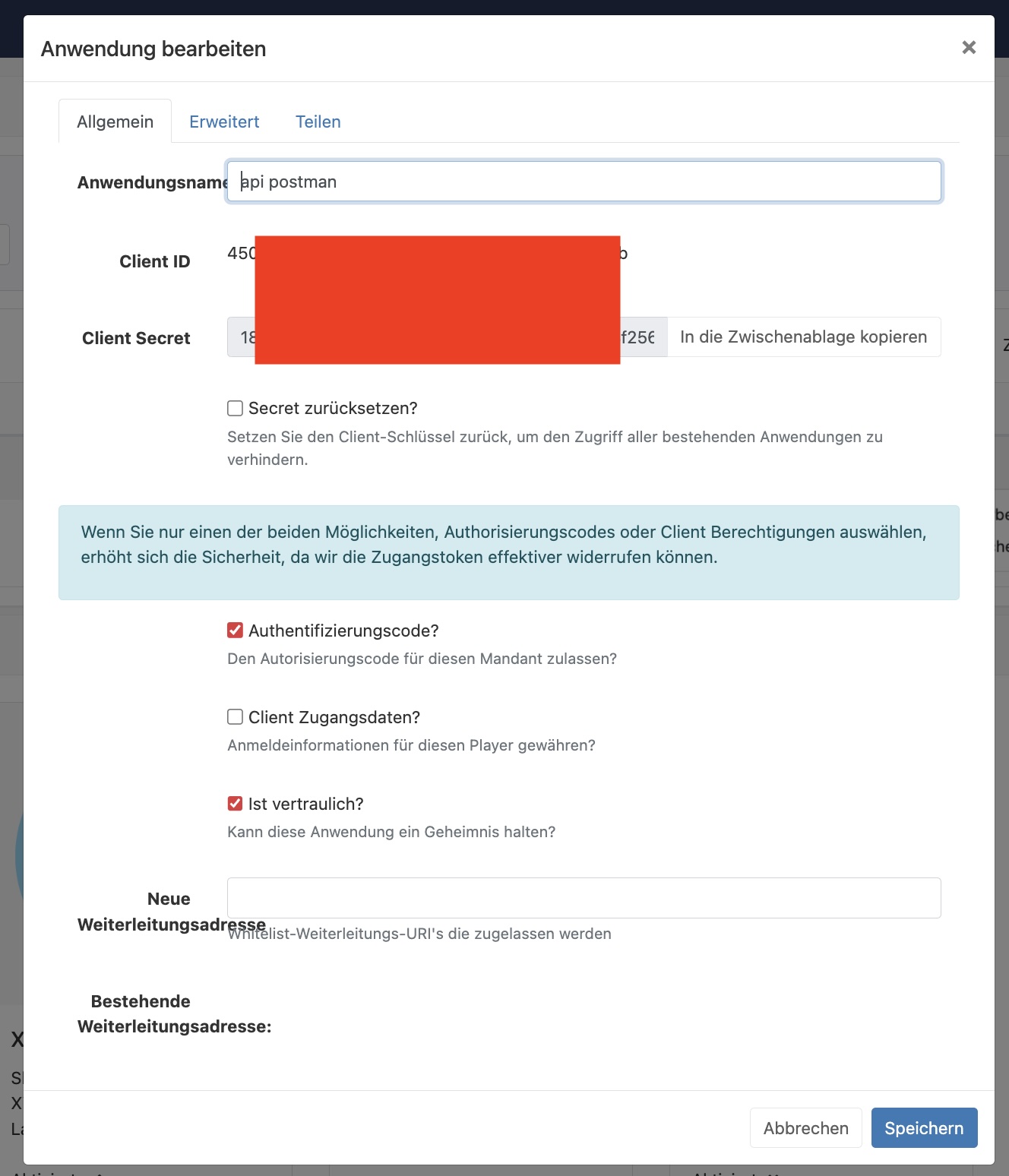
Take a screenshot to your Application Profil, like this:
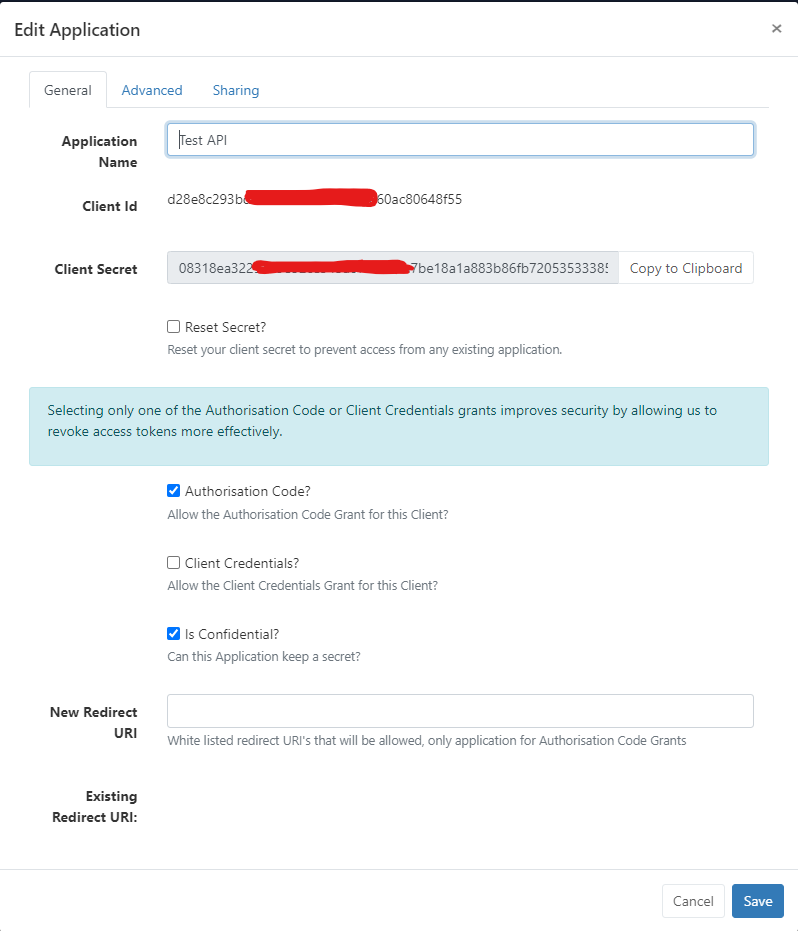
And under Sharing tab
---
### Author:  [@sasch90](https://community.xibo.org.uk/u/sasch90)
#### Post date: [April 16, 2024, 7:39pm UTC](https://community.xibo.org.uk/t/api-error-invalid-key-supplied/31518/15 "2024-04-16T19:39:08Z")
---
### Author:  [@ProServ](https://community.xibo.org.uk/u/ProServ)
#### Post date: [April 16, 2024, 7:52pm UTC](https://community.xibo.org.uk/t/api-error-invalid-key-supplied/31518/16 "2024-04-16T19:52:06Z")
I think I’ve give the wrong information
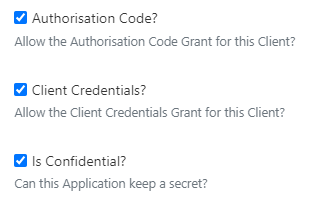
Try with all 3 boxes checked, or at a minimum the first 2.
---
### Author:  [@sasch90](https://community.xibo.org.uk/u/sasch90)
#### Post date: [April 16, 2024, 7:56pm UTC](https://community.xibo.org.uk/t/api-error-invalid-key-supplied/31518/17 "2024-04-16T19:56:44Z")
if i check all the 3 checkboxes, there is a new error (500) and its translated into german:
{
“success”: false,
“error”: 500,
“message”: “Unerwarteter Fehler, bitte den Support kontaktieren.”
}
something like: “unexpected error”
---
### Author:  [@ProServ](https://community.xibo.org.uk/u/ProServ)
#### Post date: [April 16, 2024, 8:01pm UTC](https://community.xibo.org.uk/t/api-error-invalid-key-supplied/31518/18 "2024-04-16T20:01:32Z")
And with the last box unchecked “Is Confidential”?
---
### Author:  [@sasch90](https://community.xibo.org.uk/u/sasch90)
#### Post date: [April 16, 2024, 8:32pm UTC](https://community.xibo.org.uk/t/api-error-invalid-key-supplied/31518/19 "2024-04-16T20:32:26Z")
{
“error”: “invalid\_client”,
“error\_description”: “Client authentication failed”,
“message”: “Client authentication failed”
}
---
### Author:  [@ProServ](https://community.xibo.org.uk/u/ProServ)
#### Post date: [April 16, 2024, 10:02pm UTC](https://community.xibo.org.uk/t/api-error-invalid-key-supplied/31518/20 "2024-04-16T22:02:51Z")
Strange,
Please let me add a New instance for testing that.
[Next page](https://community.xibo.org.uk/t/api-error-invalid-key-supplied/31518.md?page=2)