# Adding a Traffic Map
**URL:** https://community.xibo.org.uk/t/adding-a-traffic-map/6886
**Category:** Get Help
**Created:** [August 17, 2016, 4:48am UTC](https://community.xibo.org.uk/t/adding-a-traffic-map/6886 "2016-08-17T04:48:47Z")
**Posts on this page:** 11
**Page:** 1
### Author:  [@gulsanece](https://community.xibo.org.uk/u/gulsanece)
#### Post date: [August 17, 2016, 4:48am UTC](https://community.xibo.org.uk/t/adding-a-traffic-map/6886/1 "2016-08-17T04:48:48Z")
Hi all
I want to add a traffic map to one of my layouts.
I believe I should use Embedded section but I don’t know how.
I checked the documentations but I would appreciate if someone can instruct me specifically for traffic map example.
Thanks and regards
Eced
---
### Author:  [@PaulW](https://community.xibo.org.uk/u/PaulW)
#### Post date: [August 17, 2016, 10:35pm UTC](https://community.xibo.org.uk/t/adding-a-traffic-map/6886/2 "2016-08-17T22:35:02Z")
If I remember, you can get examples from google themselves how to show traffic on the map. I then created a web page to show this, then embedded it into xibo to get the result.
Hope it helps.
---
### Author:  [@Peter](https://community.xibo.org.uk/u/Peter)
#### Post date: [August 25, 2016, 2:50pm UTC](https://community.xibo.org.uk/t/adding-a-traffic-map/6886/3 "2016-08-25T14:50:13Z")
You will need Google Maps js api key - documentation - [Traffic Layer | Maps JavaScript API | Google Developers](https://developers.google.com/maps/documentation/javascript/examples/layer-traffic)
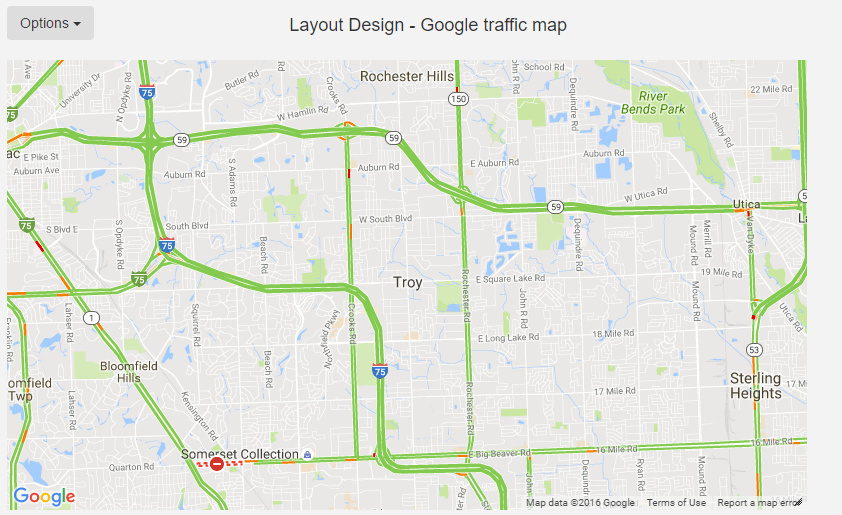
Then on your layout you add new embedded html item like this:
HTML to Embed
``
Custom Style Sheets
```
```
HEAD content to Embed (including script tags)
```
```
Obviously you replace the YOUR\_API\_KEY ,with, well with your google api key.
zoom and center line should be self-explanatory
`disableDefaultUI: true`
gets rid off ‘pin man’ and zoom UI - you can leave it at false or delete that line if you’d rather see this UI.
effect:
---
### Author:  [@gulsanece](https://community.xibo.org.uk/u/gulsanece)
#### Post date: [August 26, 2016, 1:10pm UTC](https://community.xibo.org.uk/t/adding-a-traffic-map/6886/4 "2016-08-26T13:10:58Z")
Great, it works. But I want to add Istanbul’s traffic map instead of this screen. How is it possible?
---
### Author:  [@Peter](https://community.xibo.org.uk/u/Peter)
#### Post date: [August 26, 2016, 1:12pm UTC](https://community.xibo.org.uk/t/adding-a-traffic-map/6886/5 "2016-08-26T13:12:56Z")
The above is just an example.
> [@Peter](#):
>
> center: {lat: 42.6055556, lng: -83.15},
You will want to change this line to latitude and longitude of what you want to show.
---
### Author:  [@gulsanece](https://community.xibo.org.uk/u/gulsanece)
#### Post date: [August 26, 2016, 1:14pm UTC](https://community.xibo.org.uk/t/adding-a-traffic-map/6886/6 "2016-08-26T13:14:22Z")
Hahaha just realized it. Such a silly question. How can I determine my city’s coordinates on google maps
---
### Author:  [@Peter](https://community.xibo.org.uk/u/Peter)
#### Post date: [August 26, 2016, 1:36pm UTC](https://community.xibo.org.uk/t/adding-a-traffic-map/6886/7 "2016-08-26T13:36:08Z")
[http://www.gps-coordinates.net/](http://www.gps-coordinates.net/)
You can put the whole address there or just Istanbul then on the map find the exact region you want to show in Xibo, click the get GPS coordinates button - then put that latitude and longitude in your embedded html.
---
### Author:  [@erkete](https://community.xibo.org.uk/u/erkete)
#### Post date: [February 7, 2017, 8:03pm UTC](https://community.xibo.org.uk/t/adding-a-traffic-map/6886/8 "2017-02-07T20:03:24Z")
Hi,
I want to do same project but a little different.
I use google map. I have a address dataset table.
I want to set “lat” and “Ing” values from the address dataset tables.
How can I do this. Please help me.
center: {lat: 42.6055556, lng: -83.15},
---
### Author:  [@alex](https://community.xibo.org.uk/u/alex)
#### Post date: [February 8, 2017, 8:52am UTC](https://community.xibo.org.uk/t/adding-a-traffic-map/6886/9 "2017-02-08T08:52:06Z")
For info, 1.8 now comes with a Google Traffic map as standard.
---
### Author:  [@alex](https://community.xibo.org.uk/u/alex)
#### Post date: [February 8, 2017, 8:53am UTC](https://community.xibo.org.uk/t/adding-a-traffic-map/6886/10 "2017-02-08T08:53:24Z")
You can’t take the data from a dataset.
With the 1.8 module that does this, you can use the Display location as defined in the display record instead, so traffic for the displays location is shown.
---
### Author:  [@system](https://community.xibo.org.uk/u/system)
#### Post date: [March 4, 2020, 5:05pm UTC](https://community.xibo.org.uk/t/adding-a-traffic-map/6886/11 "2020-03-04T17:05:47Z")