# 4.5.2 - Navigation bar bug when clicking "Dashboard"
**URL:** https://community.xibo.org.uk/t/4-5-2-navigation-bar-bug-when-clicking-dashboard/38440
**Category:** CMS Features and Functionality
**Created:** [September 22, 2026, 2:17pm UTC](https://community.xibo.org.uk/t/4-5-2-navigation-bar-bug-when-clicking-dashboard/38440 "2026-09-22T14:17:04Z")
**Posts on this page:** 3
**Page:** 1
### Author:  [@pitoco02](https://community.xibo.org.uk/u/pitoco02)
#### Post date: [September 22, 2026, 2:17pm UTC](https://community.xibo.org.uk/t/4-5-2-navigation-bar-bug-when-clicking-dashboard/38440/1 "2026-09-22T14:17:05Z")
Hi everyone,
@israt.farzana Hi!
There is a bug in the navigation bar:
When the navigation menu is collapsed and you click on “Dashboard,” it returns a “Page not found” error.
Reason:
In this collapsed state, the route is not being constructed correctly; it takes the current menu path and simply appends “/dashboard” to it.
Example:
[https://beta.xibo.dev/design/dashboard](https://beta.xibo.dev/design/dashboard)
or
[https://beta.xibo.dev/schedule/dashboard](https://beta.xibo.dev/schedule/dashboard)
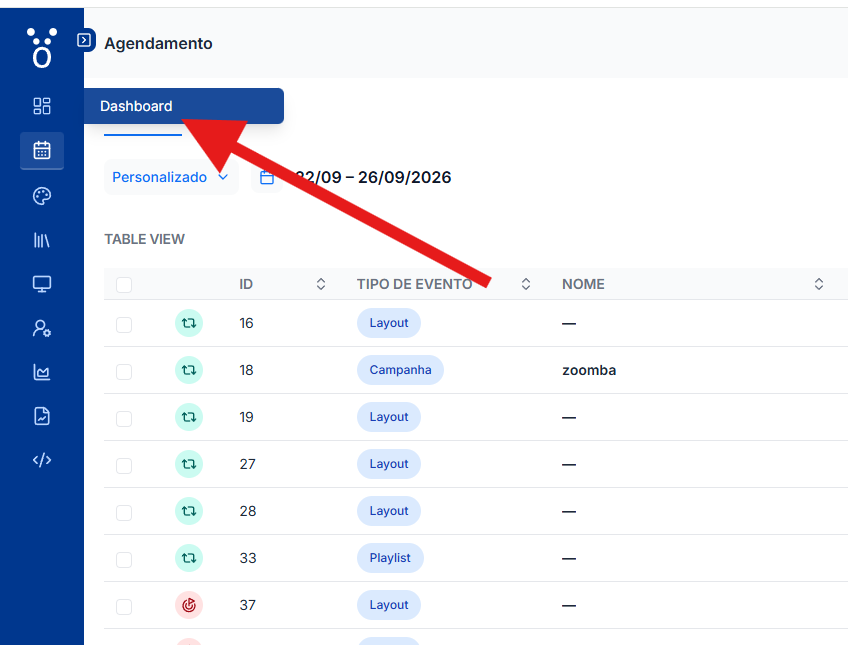
---
### Author:  [@israt.farzana](https://community.xibo.org.uk/u/israt.farzana)
#### Post date: [September 22, 2026, 3:40pm UTC](https://community.xibo.org.uk/t/4-5-2-navigation-bar-bug-when-clicking-dashboard/38440/2 "2026-09-22T15:40:57Z")
Hey Paulo, Thanks for reporting the issue. We’ve logged it and notified the development team.
>
>
> When the sidebar is collapsed, clicking the \*\*Dashboard\*\* text in the hover popu…p opens a \*\*Page Not Found\*\* screen instead of taking the user to the Dashboard.
>
> \### Steps to reproduce
>
> 1. Log into the CMS and make sure the left sidebar is collapsed.
> 2. Navigate to a page other than Dashboard under a section, for example \*\*Design → Layouts\*\*.
> 3. Hover over the \*\*Dashboard\*\* icon in the collapsed sidebar and wait for the popup to appear.
> 4. Click the \*\*Dashboard\*\* text inside the popup.
> 5. A \*\*Page Not Found\*\* screen is displayed.
>
> \### Expected
>
> Clicking \*\*Dashboard\*\* in the popup should take the user to the Dashboard.
>
> \### Actual
>
> The user is taken to a \*\*Page Not Found\*\* screen.
>
> For example, from \`/design/layout\`, the URL becomes \`/design/dashboard\` instead of \`/dashboard\`.
>
> \### Notes
>
> \* The issue only occurs when clicking the \*\*Dashboard\*\* text in the popup that appears when hovering over the icon.
---
### Author:  [@Ieuan\_Leigh](https://community.xibo.org.uk/u/Ieuan_Leigh)
#### Post date: [September 30, 2026, 2:29pm UTC](https://community.xibo.org.uk/t/4-5-2-navigation-bar-bug-when-clicking-dashboard/38440/3 "2026-09-30T14:29:51Z")
Hi Paulo,
We have just released v4.5.3 with a fix to this issue. Release notes [here](https://docs.xibosignage.com/changelog#cms-v4.5.3).
Thank you for reporting the issue 😀