# 3.1.0 & 3.1.1 - Canva Connection Error
**URL:** https://community.xibo.org.uk/t/3-1-0-3-1-1-canva-connection-error/27055
**Category:** Get Help
**Created:** [April 4, 2022, 4:55pm UTC](https://community.xibo.org.uk/t/3-1-0-3-1-1-canva-connection-error/27055 "2022-04-04T16:55:57Z")
**Posts on this page:** 20
**Page:** 1
### Author:  [@pitoco02](https://community.xibo.org.uk/u/pitoco02)
#### Post date: [April 4, 2022, 4:55pm UTC](https://community.xibo.org.uk/t/3-1-0-3-1-1-canva-connection-error/27055/1 "2022-04-04T16:55:57Z")
Hi Guys,
I’m trying to connect Canva to my CMS 3.1.0 Version, and it throws an error:
```auto
{
success: false,
error: 404,
message: "404 Not Found",
help: "The requested resource could not be found. Please verify the URI and try again."
}
```
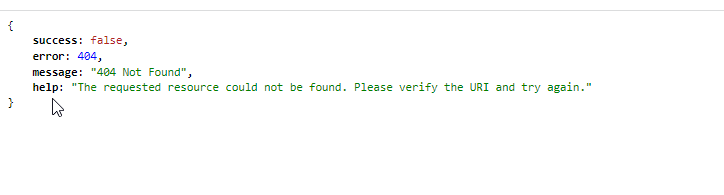
**CMS: 3.1.0 - Manual Installation - IIS Server**
It’s everthing like the tutorial.. and i already tryed to reset the registration right there:
> **[Register | Xibo Canva Connector](https://canva.xibosignage.com/register)**
> [@Canva connection error](https://community.xibo.org.uk/t/canva-connection-error/25825/6):
>
> What version CMS are you using? You may be receiving this error as you have replaced your CMS installation on the same URL and will now have incorrect client information. If you DM us the URL we can reset this for you. For those with the error message containing “API configuration problem, consult your administrator” this error will have a companion message in your CMS logs which will give more detail. It will possibly be something to do with how the CMS has been configured with encryption…
Theres any configuration that i have to do in the CMS instalation or missing?
Many Thanks!!
---
### Author:  [@natasha](https://community.xibo.org.uk/u/natasha)
#### Post date: [April 8, 2022, 10:22am UTC](https://community.xibo.org.uk/t/3-1-0-3-1-1-canva-connection-error/27055/2 "2022-04-08T10:22:11Z")
Hi, it could be a number of things as unsure of your setup, but you could start by making sure that `web` is not in the URL of your CMS.
You will also need to do this, adapting for Windows and the path to your CMS Library:
> [@Canva on xibo 3.0.3](https://community.xibo.org.uk/t/canva-on-xibo-3-0-3/26342/2):
>
> Have you setup your encryption keys for the CMS API? Ensure that you substitue the path to your CMS Library directory.
---
### Author:  [@pitoco02](https://community.xibo.org.uk/u/pitoco02)
#### Post date: [April 8, 2022, 11:33am UTC](https://community.xibo.org.uk/t/3-1-0-3-1-1-canva-connection-error/27055/3 "2022-04-08T11:33:05Z")
Hi Natasha!
I did tested my API connection generating a access token using Postman after follow the tutorial steps that you send to me:
> [@Canva on xibo 3.0.3](https://community.xibo.org.uk/t/canva-on-xibo-3-0-3/26342):
>
> To be completed by the original poster: CMS Version 3.0.3 Installation Method custom apache Operating System centos 8 Issue hello i have a xibo 3 install but connecting to canva fails during registration when trying to register the cms with canva, after entering the host name i get this error: {“error”:0,“message”:“API configuration problem, consult your administrator”} the following 500 error in apache logs Dec 8 09:37:38 projects httpd: [08/Dec/2021:09:37:38 -0800] x.x.x.x [xibo.do…](http://xibo.domain.com)
And it work’s.. but the Canva connection still throwing the same error…
> but you could start by making sure that `web` is not in the URL of your CMS.
So sorry, I think I didn’t understand what you meant
Thanks again! 🙂
---
### Author:  [@natasha](https://community.xibo.org.uk/u/natasha)
#### Post date: [April 14, 2022, 1:05pm UTC](https://community.xibo.org.uk/t/3-1-0-3-1-1-canva-connection-error/27055/4 "2022-04-14T13:05:57Z")
> [@Xibo In Web Server](https://community.xibo.org.uk/t/xibo-in-web-server/15235/2):
>
> You should not have /web in the CMS URL, that would be the first thing to fix, please see [https://xibo.org.uk/manual/en/manual\_install.html](https://xibo.org.uk/manual/en/manual_install.html) and the Environment page linked on the left there. You will also want to ensure that especially XTR is configured correctly, but that can be done once you have the CMS up and running. You might be also hitting this bug - [https://github.com/xibosignage/xibo/issues/1578](https://github.com/xibosignage/xibo/issues/1578) You can either install 1.8.9 or apply the patch manually on your 1.8.10 installation. I…
As the above link suggests, take a look at the Prepare your Environment page from the manual installation doc.
I hope that is some help? 🙂
---
### Author:  [@pitoco02](https://community.xibo.org.uk/u/pitoco02)
#### Post date: [April 24, 2022, 7:54pm UTC](https://community.xibo.org.uk/t/3-1-0-3-1-1-canva-connection-error/27055/5 "2022-04-24T19:54:43Z")
Hi Natasha! thanks for answering
**Updating** : Now i’m using the CMS 3.1.1
So… I set up the CMS as described in the tutorials you sent me.
I even generated an “Access Token” via Postman without errors.
But the connection to Canva doesn’t work as it should.
- In my URL there is nothing related to the “Web” folder
- The “certs” folder (in my libraly folder) is correctly configured with the 3 files “encryption.key”, “private.key”, “public.key” generated according to the topic: [Canva on xibo 3.0.3 - #2 by natasha](https://community.xibo.org.uk/t/canva-on-xibo-3-0-3/26342/2)
- I tested the connection with canva with 02 different CMS’s on two different servers, both did not work.
- This is the URL generated by canva (I’m hiding the sensitive information(CMS address and ClientID), but I can send it to you in private.)
`https://MYCMSADDRESS/api/authorize?state=bb23832d6719066ead2489af39b56f95&scope=&response_type=code&approval_prompt=auto&redirect_uri=https%3A%2F%2Fcanva.xibosignage.com%2Fcomplete&client_id=MYCLIENTID`
- this is the error displayed:
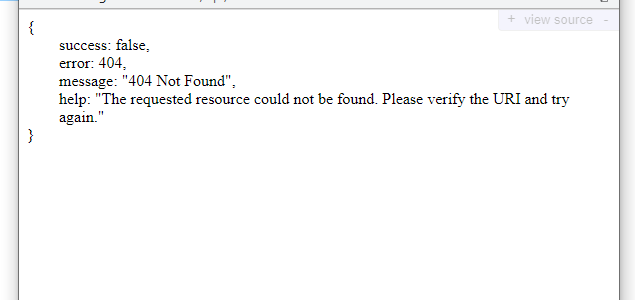
Anything else I might have forgotten to check, or something missing from that URL that should (or shouldn’t) be there?
Thank you! 😉
---
### Author:  [@pitoco02](https://community.xibo.org.uk/u/pitoco02)
#### Post date: [April 24, 2022, 8:08pm UTC](https://community.xibo.org.uk/t/3-1-0-3-1-1-canva-connection-error/27055/6 "2022-04-24T20:08:47Z")
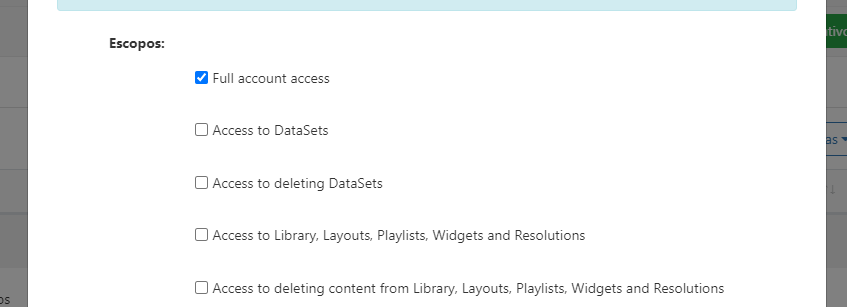
I noticed that the “scope” variable in the URL is empty… that is correct?
(in my application scopes is checked with “Full account access”)
---
### Author:  [@natasha](https://community.xibo.org.uk/u/natasha)
#### Post date: [April 27, 2022, 12:43pm UTC](https://community.xibo.org.uk/t/3-1-0-3-1-1-canva-connection-error/27055/7 "2022-04-27T12:43:08Z")
Hi, I have discussed this with the team who have said the following:
Requests for /api/authorize should be routed to api/authorize/index.php whereas everything else under /api gets routed to api/index.php
>
At a guess you may have converted the .htaccess file into whatever IIS uses and that rule is either missing or not being correctly applied to the request. Take a look at this section [IIS](https://xibo.org.uk/docs/setup/prepare-your-environment#:~:text=index.php%3F%24args%3B%0A%7D-,IIS,-IIS%20includes%20a) to convert, however we don’t support IIS directly and we don’t have access to test I am afraid.
If this is not the case then please do come back to us!
---
### Author:  [@pitoco02](https://community.xibo.org.uk/u/pitoco02)
#### Post date: [May 31, 2022, 3:31pm UTC](https://community.xibo.org.uk/t/3-1-0-3-1-1-canva-connection-error/27055/8 "2022-05-31T15:31:10Z")
Hello Natasha! you helped a lot, thank you
I finally found out what was going on there.
I’m using IIS, and actually the .htacces conversion was being done correctly.
But the problem was in the URL generated by the CMS.
take a look, this is the URL generated by the CMS:
`https://MYCMSADDRESS/api/authorize?state=.........`
But both HTACCES and web.config expected the slash “/” after the “authorize” word in the regex pattern like this:
`https://MYCMSADDRESS/api/authorize/?state=.........`
So I changed the pattern rule to redirect to “api/authorize/index.php” file without the need for slash after “authorize”
Like this:

``
This is how the connection with canva worked to me. 🙂
---
### Author:  [@Raimundo\_Junior](https://community.xibo.org.uk/u/Raimundo_Junior)
#### Post date: [August 21, 2022, 5:27am UTC](https://community.xibo.org.uk/t/3-1-0-3-1-1-canva-connection-error/27055/9 "2022-08-21T05:27:15Z")
I have the same error in version 3.1.4 that I displayed this message:
{“error”:0,“message”:“API configuration problem, consult your administrator”}
And in the registry [Register | Xibo Canva Connector](https://canva.xibosignage.com/register) it shows that everything is ok: Registered, please connect again through Canva.
I also created the certs folder and the three files “encryption.key”, “private.key”, “public.key”
This is the URL generated by canva:
[https://MYSITE/cms/web/api/authorize/?state=7414faea4b77507c5596c64b7945c171&scope=&response\_type=code&approval\_prompt=auto&redirect\_uri=https%3A%2F%2Fcanva.xibosignage.com%2Fcomplete&client\_id=MYID](https://MYSITE/cms/web/api/authorize/?state=7414faea4b77507c5596c64b7945c171&scope=&response_type=code&approval_prompt=auto&redirect_uri=https%3A%2F%2Fcanva.xibosignage.com%2Fcomplete&client_id=MYID)
---
### Author:  [@Raimundo\_Junior](https://community.xibo.org.uk/u/Raimundo_Junior)
#### Post date: [August 31, 2022, 4:34am UTC](https://community.xibo.org.uk/t/3-1-0-3-1-1-canva-connection-error/27055/10 "2022-08-31T04:34:36Z")
I found it in debug, can you help me?
1202,bf333f2,“2022-08-31 01:21:46”,AUTH,/api/authorize/,GET,“Key path "file://library/certs/private.key" does not exist or is not readable”,ERROR
1203,bf333f2,“2022-08-31 01:21:46”,AUTH,/api/authorize/,GET,“API configuration problem, consult your administrator”,ERROR
1204,bf333f2,“2022-08-31 01:21:46”,AUTH,/api/authorize/,GET,"#0 [internal function]: Xibo\Middleware\ApiAuthentication-\>Xibo\Middleware{closure}(Object(DI\Container))
---
### Author:  [@natasha](https://community.xibo.org.uk/u/natasha)
#### Post date: [August 31, 2022, 11:16am UTC](https://community.xibo.org.uk/t/3-1-0-3-1-1-canva-connection-error/27055/11 "2022-08-31T11:16:31Z")
Try doing the full reset first as you have now added encryption keys etc. Failing that you could look at your CMS installation as you have `web` in the URL so correcting that may solve your issue: [Prepare your Environment](https://xibosignage.com/docs/setup/xibo-on-a-web-server#content-prepare-your-environment)
---
### Author:  [@pitoco02](https://community.xibo.org.uk/u/pitoco02)
#### Post date: [August 31, 2022, 6:05pm UTC](https://community.xibo.org.uk/t/3-1-0-3-1-1-canva-connection-error/27055/12 "2022-08-31T18:05:09Z")
Oi Raimundo, você é brasileiro certo?
Vou escrever em português pq vai ficar mais fácil de entender…
O seu problema cara está na URL gerada pela integração do Canva pelo que me parece… a solução foi descrita na minha resolução, leia com atenção:
> [@3.1.0 & 3.1.1 - Canva Connection Error](https://community.xibo.org.uk/t/3-1-0-3-1-1-canva-connection-error/27055/8):
>
> Hello Natasha! you helped a lot, thank you I finally found out what was going on there. I’m using IIS, and actually the .htacces conversion was being done correctly. But the problem was in the URL generated by the CMS. take a look, this is the URL generated by the CMS: https://MYCMSADDRESS/api/authorize?state=......... But both HTACCES and web.config expected the slash “/” after the “authorize” word in the regex pattern like this: https://MYCMSADDRESS/api/authorize/?state=......... So I …
Aí está dizendo que um padrão possui uma barra “/” e no outro não possui essa barra depois da palavra “autorize”.
Isso faz com que o regex de redirecionamento **não funcione**.
Você usa oq pra controlar as regras de redirecionamento de URLs? Web.config do IIS ou o HTACCESS?
Se usar o IIS/ Web.config, copie as regras que está no print da solução do tópico.
Se esse for o problema, irá resolver.
Me avise aqui se não der certo!
===================
English (free translation):
Hi Raimundo
It looks like that your problem is in the URL generated by the Canva integration as it seems to me… the solution was described in my resolution, read carefully:
> [@3.1.0 & 3.1.1 - Canva Connection Error](https://community.xibo.org.uk/t/3-1-0-3-1-1-canva-connection-error/27055/8):
>
> Hello Natasha! you helped a lot, thank you I finally found out what was going on there. I’m using IIS, and actually the .htacces conversion was being done correctly. But the problem was in the URL generated by the CMS. take a look, this is the URL generated by the CMS: https://MYCMSADDRESS/api/authorize?state=......... But both HTACCES and web.config expected the slash “/” after the “authorize” word in the regex pattern like this: https://MYCMSADDRESS/api/authorize/?state=......... So I …
There it is saying that one pattern has a slash “/” and the other does not have this slash after the word “authorize”.
This causes the redirect regex to **not work**.
What do you use to control URL redirection rules? IIS web.config or HTACCESS?
If using IIS/Web.config, copy the rules that are in the print of the topic’s solution.
If that’s the problem, it will fix it.
Let me know if it doesn’t work out!
---
### Author:  [@pitoco02](https://community.xibo.org.uk/u/pitoco02)
#### Post date: [August 31, 2022, 6:10pm UTC](https://community.xibo.org.uk/t/3-1-0-3-1-1-canva-connection-error/27055/13 "2022-08-31T18:10:19Z")
Além de tudo, siga todos os passos que a Natasha te enviou em relação as encryption keys.
esses 03 arquivos tem que estar na sua biblioteca:
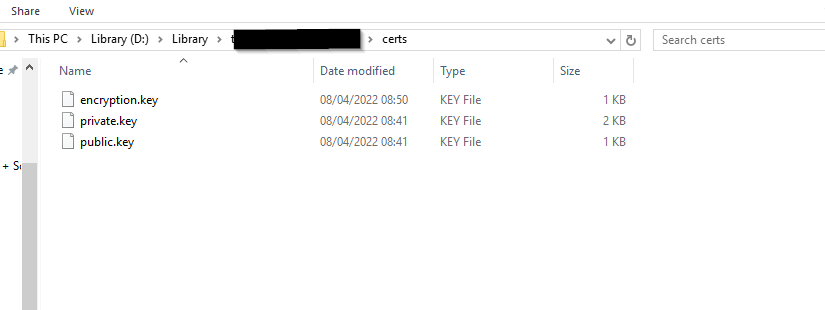
Segue o tutorial de como gera-los facilmente:
> [@API Problem after installation CMS 3.0.3](https://community.xibo.org.uk/t/api-problem-after-installation-cms-3-0-3/25809/4):
>
> Guys, i was finally able to obtain a access\_token! What you have to do: Open the path of your library. There should be a folder called “certs” Inside this folder, create three new files: encryption.key private.key public.key Go to [Online RSA Key Generator](https://travistidwell.com/jsencrypt/demo/) and generate a keypair. Copy the contents to the corresponding file (Private Key = private.key, Public Key = public.key) Go to [Generate free random base64 string +\> GeneratePlus](https://generate.plus/en/base64) and generate a 32 bytes long base64-string. Copy your strin…
======================
English (free translation):
In addition, follow all the steps that Natasha sent you regarding encryption keys.
these 03 files must be in your library:

Here’s the tutorial on how to easily generate them:
> [@API Problem after installation CMS 3.0.3](https://community.xibo.org.uk/t/api-problem-after-installation-cms-3-0-3/25809/4):
>
> Guys, i was finally able to obtain a access\_token! What you have to do: Open the path of your library. There should be a folder called “certs” Inside this folder, create three new files: encryption.key private.key public.key Go to [Online RSA Key Generator](https://travistidwell.com/jsencrypt/demo/) and generate a keypair. Copy the contents to the corresponding file (Private Key = private.key, Public Key = public.key) Go to [Generate free random base64 string +\> GeneratePlus](https://generate.plus/en/base64) and generate a 32 bytes long base64-string. Copy your strin…
---
### Author:  [@Raimundo\_Junior](https://community.xibo.org.uk/u/Raimundo_Junior)
#### Post date: [August 31, 2022, 11:19pm UTC](https://community.xibo.org.uk/t/3-1-0-3-1-1-canva-connection-error/27055/14 "2022-08-31T23:19:11Z")
One doubt the private key has to be 1024 or 2048?

---
### Author:  [@Raimundo\_Junior](https://community.xibo.org.uk/u/Raimundo_Junior)
#### Post date: [August 31, 2022, 11:23pm UTC](https://community.xibo.org.uk/t/3-1-0-3-1-1-canva-connection-error/27055/15 "2022-08-31T23:23:02Z")
A summary of what I did:
1 - I created the Application with the name Canva and marked what I asked for.
2 - I created the folder pointing to the /web folder and put the SSL certificate.
3 - I created the 3 .key files following what our colleague said:
RSA (Private and Public): [Online RSA Key Generator](https://travistidwell.com/jsencrypt/demo/)
Encryption: [https://generate.plus/en/base64](https://generate.plus/en/base64)
4 - I placed the files inside the xibo/Library/certs folder
5 - In my .htaccess I left it like this:
RewriteCond %{REQUEST\_FILENAME} !-f
RewriteCond %{REQUEST\_URI} ^/api/authorize/.\*$
RewriteRule ^ api/authorize/index.php [QSA,L]
RewriteCond %{REQUEST\_FILENAME} !-f
RewriteCond %{REQUEST\_URI} ^/api/.\*$
RewriteRule ^ api/index.php [QSA,L]
6 - And in ConfigService it was like this:
$this-\>apiKeyPaths = [
‘publicKeyPath’ =\> $libraryLocation . ‘certs/public.key’,
‘privateKeyPath’ =\> $libraryLocation . ‘certs/private.key’,
‘encryptionKey’ =\> file\_get\_contents($libraryLocation . ‘certs/encryption.key’)
];
7 - When I tried to validate in CANVA with my link: [https://app.faciltv.com.br](https://app.faciltv.com.br)
8 - Show me the message:
{“error”:0,“message”:“API configuration problem, consult your administrator”}
9 - And the link that shows this:
[https://app.faciltv.com.br/api/authorize/?state=298ceeXXXXXXXXb3feXXXXXXXXXXb87c4&scope=&response\_type=code&approval\_prompt=auto&redirect\_uri=https%3A%2F%2Fcanva.xibosignage.com%2Fcomplete&client\_id=XXXXXX287dXXXXXXF403c28aeXXXXXXXXXX8a](https://app.faciltv.com.br/api/authorize/?state=298ceeXXXXXXXXb3feXXXXXXXXXXb87c4&scope=&response_type=code&approval_prompt=auto&redirect_uri=https%3A%2F%2Fcanva.xibosignage.com%2Fcomplete&client_id=XXXXXX287dXXXXXXF403c28aeXXXXXXXXXX8a)
---
### Author:  [@pitoco02](https://community.xibo.org.uk/u/pitoco02)
#### Post date: [September 1, 2022, 5:21pm UTC](https://community.xibo.org.uk/t/3-1-0-3-1-1-canva-connection-error/27055/16 "2022-09-01T17:21:45Z")
private key has to be 2048
and Encryption key has to be 32 bytes
Are you using docker or a custom install in you CMS?
---
### Author:  [@Raimundo\_Junior](https://community.xibo.org.uk/u/Raimundo_Junior)
#### Post date: [September 1, 2022, 7:50pm UTC](https://community.xibo.org.uk/t/3-1-0-3-1-1-canva-connection-error/27055/17 "2022-09-01T19:50:49Z")
CMS in PHP, would docker be the best option?
---
### Author:  [@Raimundo\_Junior](https://community.xibo.org.uk/u/Raimundo_Junior)
#### Post date: [September 2, 2022, 12:12am UTC](https://community.xibo.org.uk/t/3-1-0-3-1-1-canva-connection-error/27055/18 "2022-09-02T00:12:13Z")
From where he gets the private.key because the path file://library/certs/private.key I don’t know where it is.
1337,4e61830,“2022-08-31 20:28:13”,AUTH,/api/authorize/,GET,“Key path " **file://library/certs/private.key**" does not exist or is not readable”,ERROR
1338,4e61830,“2022-08-31 20:28:13”,AUTH,/api/authorize/,GET,“API configuration problem, consult your administrator”,ERROR
---
### Author:  [@pitoco02](https://community.xibo.org.uk/u/pitoco02)
#### Post date: [September 2, 2022, 1:39pm UTC](https://community.xibo.org.uk/t/3-1-0-3-1-1-canva-connection-error/27055/19 "2022-09-02T13:39:44Z")
> [@Raimundo\_Junior](#):
>
> rom where he gets the private.key because the path file://library/certs/private.key I don’t know where it is.
Check your database to see if you library path is correct:
SELECT \* FROM setting where `setting` = ‘LIBRARY\_LOCATION’;

---
### Author:  [@system](https://community.xibo.org.uk/u/system)
#### Post date: [December 2, 2022, 7:40pm UTC](https://community.xibo.org.uk/t/3-1-0-3-1-1-canva-connection-error/27055/20 "2022-12-02T19:40:02Z")
This topic was automatically closed 91 days after the last reply. New replies are no longer allowed.