Can 1.8 be made to factor in the correct length of a video when playback time is set to 0? Currently the playback duration time is calculated with a 0 second value with videos that are set to 0 in the CMS.
We use getID3 for various purposes like this. It works well for us.
On the layout editor of 1.8, I have 4 images and two videos. Each image is set to play for 10 seconds and the videos and set at 0 duration, but actually have a run time of 10 seconds. The layout designer says: Layout Duration 00:00:40
Am I missing something?
I think that I was not clear where I was seeing the incorrect duration.
Update: The layouts page also shows 40 seconds instead of 1 minute.
Update 2: I can see how my request may confuse people if they upload a video of say 1 minute but have scheduled it to only show 15 seconds of the video. So, maybe if the duration is set to 0 in the media library, it can then default to reading the media’s actual length and include that into the total layout run time?
That is what it should already do - so I think you’ve got an issue if that isn’t working.
Can you check the duration of the videos in the library (rather than on the layout) to see if the durations have been correctly set when they were uploaded?
If not - then that is probably the issues - if so, then the issue will be in the layout duration calculations.
It is also possible that the layout just needs building - you can test this theory by making a small (or any change) to the layout and seeing if the duration updates as you’d expect.
Videos in the Media Library are set to 0:00:00, so that they will play all the way through. Are we doing this wrong?
We have two layouts with 2 - 10 second images and 2 - Videos that are set to 0 duration, that have a run time of 10 seconds.This is what we see on the layouts screens before making any changes to the layouts.
We made a small change to one layout. Afterwards when we go back to the layouts screen, the one we changed does show a different time, but it should be 40 seconds and not 30 seconds. It also fixes the Status on the layouts page.
When you first upload media or when you first upgrade all the video durations will be set to their actual video duration. This duration is then used to calculate layout duration. If you’ve edited this to 0 then it will be considered as 0 in the layout duration.
Adding video to layouts now has a checkbox, default ticked for end detect, that is all you need to do in order to play until the end.
The gears is a valid status - it means that the layout hasn’t been built yet. Layouts are built:
every minute you are in the designer
when they are requested by XMDS or Preview
by maintenance
these 3 triggers should mean that most layouts are built in a timely fashion.
Working out a layout duration is quite complicated - if your videos are in the library as 0 durations and you only have 2 10 second images shown, then I don’t see why your layout duration wouldn’t be 20 seconds (as it was before). Now that it is 30 seconds, perhaps one of those videos has been edited and had a duration applied?
Good to know. Thank you. Although I don’t see it??? I see an option to set the duration on both the media itself, and when adding the media to the layout. But nothing that says play till the end.
How does this work if layouts are being populated via the API? Currently, I believe, we set the duration of media to 0 on upload via the API. Sounds like we should change this practice and set the flag somehow to play the media for it’s entire length when adding it to a layout.
If that is how we should do it, then I think the other problems in the CMS become non-issues. How do we set the videos to play for the entire duration via the API when we assigned them to the layout?
It happens automatically - it will get assigned the duration of that item in the library. That is your real problem here, the question is “how are the items in the library getting a duration of 0”.
If I upload a video it gets a media library duration of NN seconds, which have been read from the file by getId3. I can force edit that back to 0 if I want, but then I will get issues with the layout duration.
I think it would be best for us to change what we are telling the system. It makes more since to let the system know/get the duration of video files on upload. As long as we can tell the system to play the videos until the end, we should be fine. So… how can we do that via the API? Will there be a default system setting for videos uploaded to play till the end, under say the Video Module? Currently we set the default to “0” there( Looks to be how that was designed )
We are currently setting the duration after the media is added to the library. So it sounds like we do not need to do that anymore.
However, if we pass a null value on the duration of media to the AP via an update I it seems to still show up as 0:00:00 duration. Is there anyway the system can be made to accept null as an unset value and not set the duration on the media?(Meaning the system will figure it out automatically and then apply that duration to the media in the library) This way null is, reset to the real length of the video, “0” is play till the end (but will mess with some calculations?), and NN is the time you want to set.
Update: We also found that on upload via the api the videos in the CMS library show 0:00:00. If we update them with a null value they show 0:00:00. (After playing with the CMS, it appears it just defaults back to the previous value when null.) If we manually set a duration through an API update it shows the duration set.( I don’t think we can set the duration at upload via the API.) If we upload them via the CMS we get the correct duration.
Also in the video module we have the duration set to “0” so that it will play to the end of the media. It says to do it that way. Not sure if that factors in.
Update: Ok, one last note. If you change the media duration in the library on a video, there is no way to default to auto detect again.
I think the conversation is over-complicating it a little as well as already having some API code that does certain things (i’m guessing here).
We’ve tried to make the process as simple as possible…
Upload a file - the duration is determined using getID3 for video and using the default duration set on the module itself for other media types
Edit an existing library file - all items must be provided as with other calls. If you provide an empty or 0 duration here then the duration will be set to 0.
Assign as a Widget - takes the library file and assigns it to the Playlist. Defaults to “use duration = 0”, which is end detect. The layout duration will be calculated from the duration in the library.
I might be wrong, but I think all you need to do it not set the duration on the media item after you upload it (you didn’t have to do that before either).
This does not seem to work for us. Duration on video is set to 0:00:00
Update: It is working, we failed to disable a second part of our code updating the media but not passing the duration.
So if you want to add a tag to the media but do not provide the duration then it gets set to 0:00:00??? Ok… will code accordingly.
Thank you Dan for you help.
This explains the layout duration calculations we saw.
The way around this is to provide a tag method rather than providing magic default values - or at least that is my opinion. Magic default values are all well and good and they do make the API easier to use, except when you want to actually provide a null/empty to something… and then you are stuffed
Tagging is a good use case for another method in any case.




 Although I don’t see it??? I see an option to set the duration on both the media itself, and when adding the media to the layout. But nothing that says play till the end.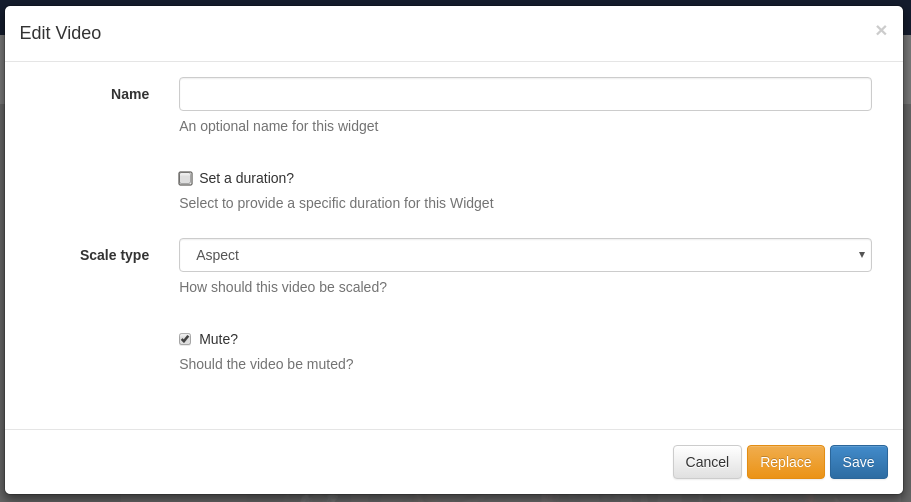
 )
) as well as already having some API code that does certain things (i’m guessing here).